

Xero to NetSuite Migration: How to Choose the Right Approach
How much history to bring, whether to switch over all at once, and the areas of a Xero to NetSuite migration that reliably cause problems.

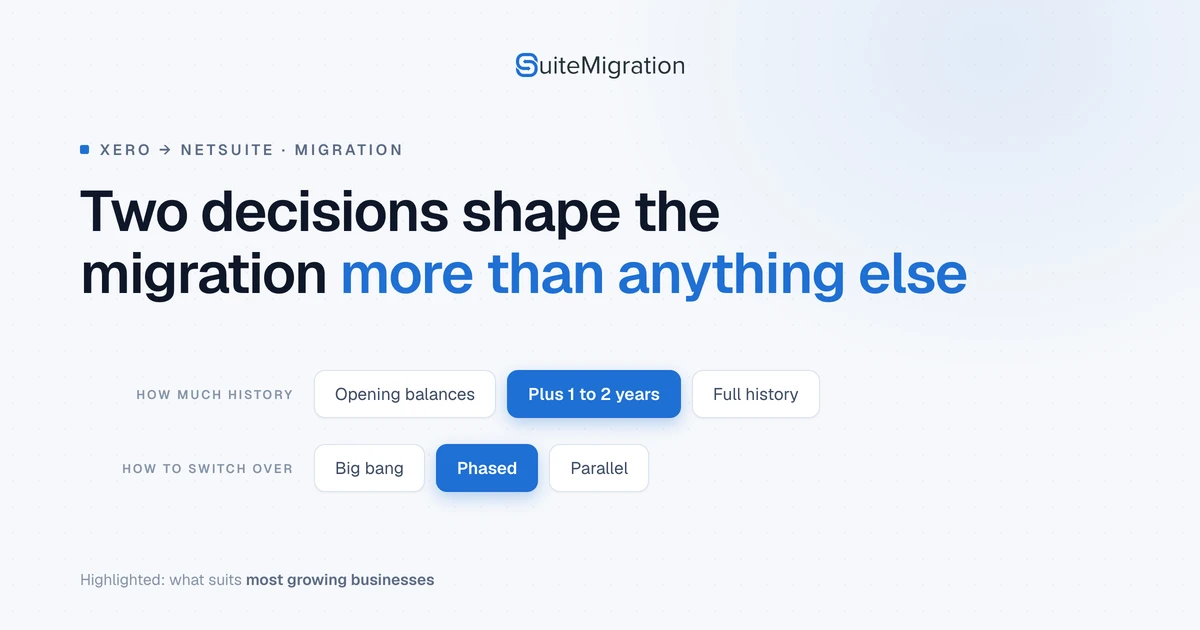
Two decisions shape a Xero to NetSuite migration more than anything that happens during the load: how much history you bring, and whether you switch everything on at once.
For most growing businesses the answer is opening balances plus one to two years of recent history, moved in phases rather than in a single cut-over. The rest of this post is how to tell whether you are one of those businesses, and which parts of the data will fight you if you are not.
Worth saying early: this is a move from accounting software to an ERP, so the migration is also when you decide what your reporting looks like afterwards. Copying Xero’s structure into NetSuite is the most common way to waste that opportunity. If you are still weighing up the move itself, we cover the triggers in outgrowing Xero.
NetSuite and Xero documentation checked on 11 September 2026.
How much history to bring
There are three realistic options.
Opening balances only. Current balances and open transactions as of a cut-over date, with closed history left in Xero or an archive. This suits clean, single-entity businesses that do not need old detail inside NetSuite.
Opening balances plus recent history. Usually one to two years. This is what most growing businesses choose, and it is usually right.
Full history. Every transaction. Worth it when you have genuine multi-year audit or reporting obligations, and expensive when you do not, because effort and risk both scale with the volume. A business with 217,359 transactions behind it is making a much larger commitment than the record count suggests, since every one of those transactions has relationships that have to survive the move.
Take the lightest option that meets your reporting and compliance obligations. We go through that decision in more detail in migrating historical transactions.
How to switch over
Big bang puts everything live on one date. It is faster and riskier, and it suits simpler environments.
Phased loads master data first, then open transactions, then history if you need it. Lower risk, and the usual recommendation once you have multiple entities.
Parallel running keeps both systems going for a period, often through one month end. It gives the highest confidence for the most short-term effort.
What needs special care
A lot of data moves without drama. Single-role customers and vendors, open invoices and bills with clear matching records, clean bank accounts, and straightforward tax codes in one jurisdiction usually flow through fine.
These are the areas that do not.
Contacts that are both customer and supplier
In Xero, Acme Ltd can be a single contact, because you sell to them and buy from them. NetSuite normally needs two records, a customer and a vendor.
Xero’s own guidance is to match on ContactID rather than name. Its docs say plainly that contact name “may no longer be a unique field” and recommend developers not rely on it. Xero still enforces unique names today, so this is a change it has flagged rather than a problem already sitting in your data. Matching on the ID costs nothing and survives the change either way.
The IsCustomer and IsSupplier flags help, but read them carefully. Xero defines them as true when the contact has any AR or AP invoices entered against them, so they describe transaction history rather than an intended role. A supplier you have set up but not yet been invoiced by will not be flagged as one. See Xero’s Contacts reference for both fields.
Duplicates are worth resolving before the move rather than after, and we cover the mechanics in vendor and item deduplication.
The chart of accounts
Xero’s chart is flat. NetSuite’s is dimensional, with subsidiaries, departments, classes, locations, and custom segments doing work that extra accounts often do in Xero. Copying the old chart across almost always produces a weak structure, because accounts that existed to stand in for a dimension become redundant once the dimension exists.
Redesign around how you intend to report, and settle retained earnings and opening balance treatment early rather than at cut-over.
Item types
Xero items are basic. NetSuite splits them into inventory, non-inventory, service, assembly, and several others, each with different costing and inventory behaviour, as set out in Oracle’s item types documentation. The type you pick affects inventory valuation and revenue reporting, and changing it later is awkward, so this is worth getting right during mapping rather than after go-live.
Tracking categories
Xero tracking categories become classes, departments, locations, or custom segments. The mapping is rarely one to one, so decide your reporting dimensions first and then map to them, rather than recreating a category because it exists.
Two details catch people out. Archived categories and options are excluded from the API unless you ask for them with includeArchived=true, per Xero’s Tracking Categories reference, so history that used a retired option arrives blank. And NetSuite has settings that control whether classifications can be set per line at all, described in Oracle’s per-line classifications documentation. Xero tracks per line, so if those settings are wrong a single invoice covering two regions collapses to one.
Import order and dependencies
NetSuite rejects a record that references something not yet loaded, so sequence matters: subsidiaries, then chart of accounts, then customers and vendors, then items, then open transactions. Within transactions, invoices come before payments.
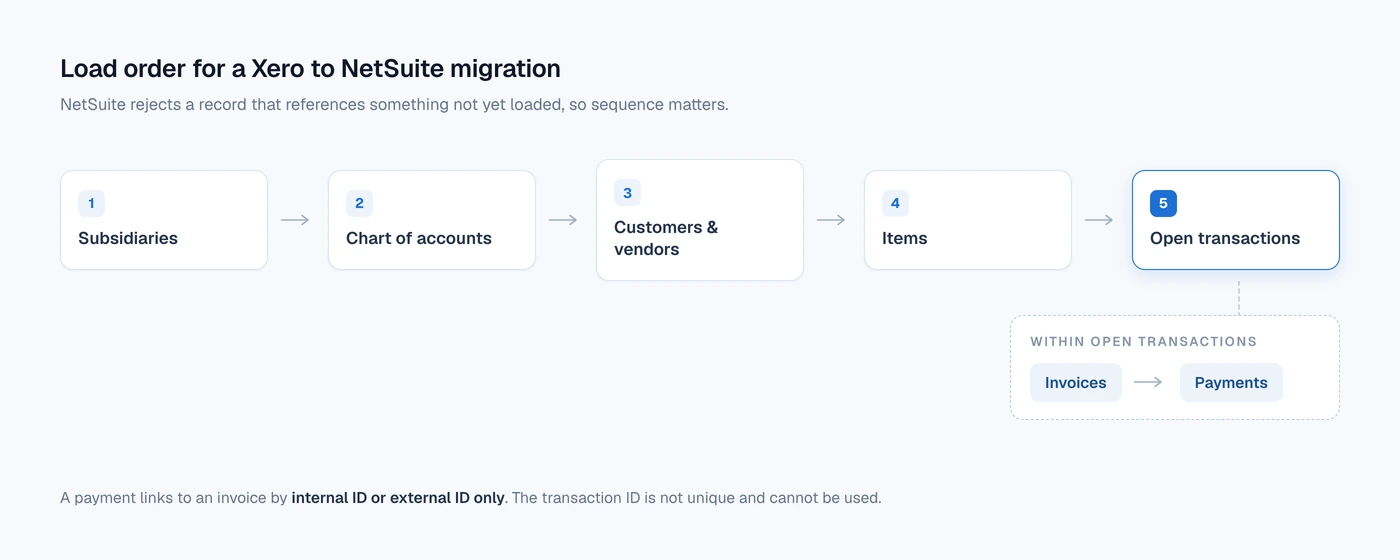
Oracle is explicit about the payment case. Its Customer Payment Import documentation states that if you are importing both payments and invoices and want the payments applied, you have to import the invoices first, and that a payment can only be linked to an invoice by internal ID or external ID. The transaction ID is not unique and cannot be used for this, which is the detail that catches teams who mapped on invoice number.
Test the sequence in a sandbox. Discovering a dependency problem at cut-over is the expensive version.
Opening balances and reconciliation
Errors in the opening position flow into every report you run afterwards, so reconcile the final Xero trial balance thoroughly before you migrate, and validate AR and AP ageing, bank balances, and inventory after the load.
Treat cut-over reconciliation as a formal checkpoint with named owners. A matching trial balance is necessary but not sufficient, because totals cannot show whether each individual record arrived. Record-level reconciliation covers the difference.
Multiple entities
Separate Xero organisations become subsidiaries in NetSuite, particularly under OneWorld. Map each organisation to its subsidiary early, and design intercompany handling and consolidation before any data moves.
Data cleanliness
Duplicate contacts, inconsistent naming, unreconciled accounts, and dormant records all get harder to fix once they are in NetSuite. Clean and deduplicate in Xero first, and archive what is inactive rather than bringing it across. On a book with 4,127 customers, the few hundred that are dormant or duplicated are cheaper to deal with while they are still in the system you know.
Choosing your approach
| Factor | Opening balances, big bang | Hybrid, phased | Full history, phased or parallel |
|---|---|---|---|
| Entities | Single | Multiple | Complex multi-entity |
| Data quality | Clean | Some cleanup needed | Significant cleanup required |
| History needed | Low | Recent, one to two years | Multi-year or audit driven |
| Risk tolerance | Higher | Prefer lower risk | Very low |
| Timeline | Need to move quickly | Can allow four to six months | Willing to invest more time |
A clean single-entity business can usually get away with opening balances and a big bang. A growing multi-entity business is safest with a hybrid load, phased. Heavy compliance or long history needs mean more history and stronger validation. For turning that into a plan and a number, see how to scope a migration project.
How SuiteMigration handles it
Every decision above depends on knowing what is actually in your Xero data, which is usually the part nobody has. Our Migration Readiness Audit reads the whole Xero organisation before anything moves and reports what NetSuite will need: contacts carrying both AR and AP activity, tracking options no longer in use, duplicates, and records that will not map cleanly. It reads the full dataset rather than a sample.
Before you commit to a date
- Decide how much history you require, and record who asked for it.
- Choose the data approach and switch-over mode against your complexity and risk tolerance.
- Clean the Xero data first, particularly contacts and accounts.
- Redesign the chart of accounts and reporting dimensions instead of copying them.
- Map the areas above and test them in a sandbox with the staff who will use the system.
- Build a timeline that includes testing, training, and a controlled cut-over.
Most of the effort in a migration is spent on data that was never going to cause trouble. Spending it on the eight areas above instead is what separates the projects that finish on the planned date from the ones that do not.
Frequently asked questions
How do you migrate Xero to NetSuite?
Agree the organisations, historical periods, and records in scope, then map them to the configured NetSuite account. Extract the source records and their relationships, rehearse the import in a sandbox, and compare balances and transaction details. Complete the final load against a controlled Xero cutoff and resolve exceptions before finance signs off.
Can we migrate all our Xero history?
Specify which history you need before accepting a promise to migrate everything. Ask for coverage by record type, including payment and credit allocations, attachments, and any records that will change form. Test representative examples and document what will remain in an archive.
Where do Xero tracking categories go in NetSuite?
Choose the destination according to what each category means in your reporting. A category might belong in a department, location, class, or configured custom segment. Test transactions with different tracking values on separate lines, and include archived options referenced by the history you are moving.
Can CSV files be used for a Xero to NetSuite migration?
CSV imports can form part of the migration. The files still need to match NetSuite's supported record structures and preserve references between related records. For example, a customer payment import must identify an existing invoice using its NetSuite internal or external ID.
How do we know the migrated ledger matches Xero?
Compare balances and period activity using agreed account mappings, dates, currencies, and report settings. Check open invoices and bills, payment and credit allocations, and the transaction detail included in your scope. Investigate differences at the source-record level rather than accepting a matching grand total as sufficient evidence.
How long does a Xero to NetSuite migration take?
Estimate from the actual dataset and the decisions still outstanding. Ask the team to separate extraction and loading time from mapping, exception handling, reconciliation, and finance review. Use a sandbox rehearsal to test the estimate before committing to a production cutover.