

Why You Shouldn't Migrate Payments to NetSuite as Journal Entries
Journal entries always post, which makes them a tempting shortcut for migrating customer payments, vendor payments, and deposits. They also leave the invoices and bills they were meant to settle sitting open, and the reports you would check don't show it.

Sooner or later in a migration, someone asks whether the payments can just come over as journal entries. Customer payments, vendor payments, deposits: all of it, as journals.
It is a fair question, and you can see the appeal. Journal entries are permissive. Customers, vendors and accounts still have to exist first, but beyond that a journal entry will accept almost any combination of lines you hand it. Payments will not, and not because of ordering alone. NetSuite enforces rules about how a payment is allowed to be structured, and they are not always the rules your source system enforced. Every transaction applied on one customer payment has to share the same A/R account. A deposit can only move money that is currently sitting in Undeposited Funds. Where the source data breaks one of those rules, the payment is rejected while the equivalent journal entry goes straight in.
They also produce the correct general ledger. Cash goes up, Accounts Receivable goes down, by exactly the right amount, on exactly the right date. Your trial balance ties. Your balance sheet ties.
And your books are still wrong, in a way that will not surface for months.
A payment is not just a movement of money
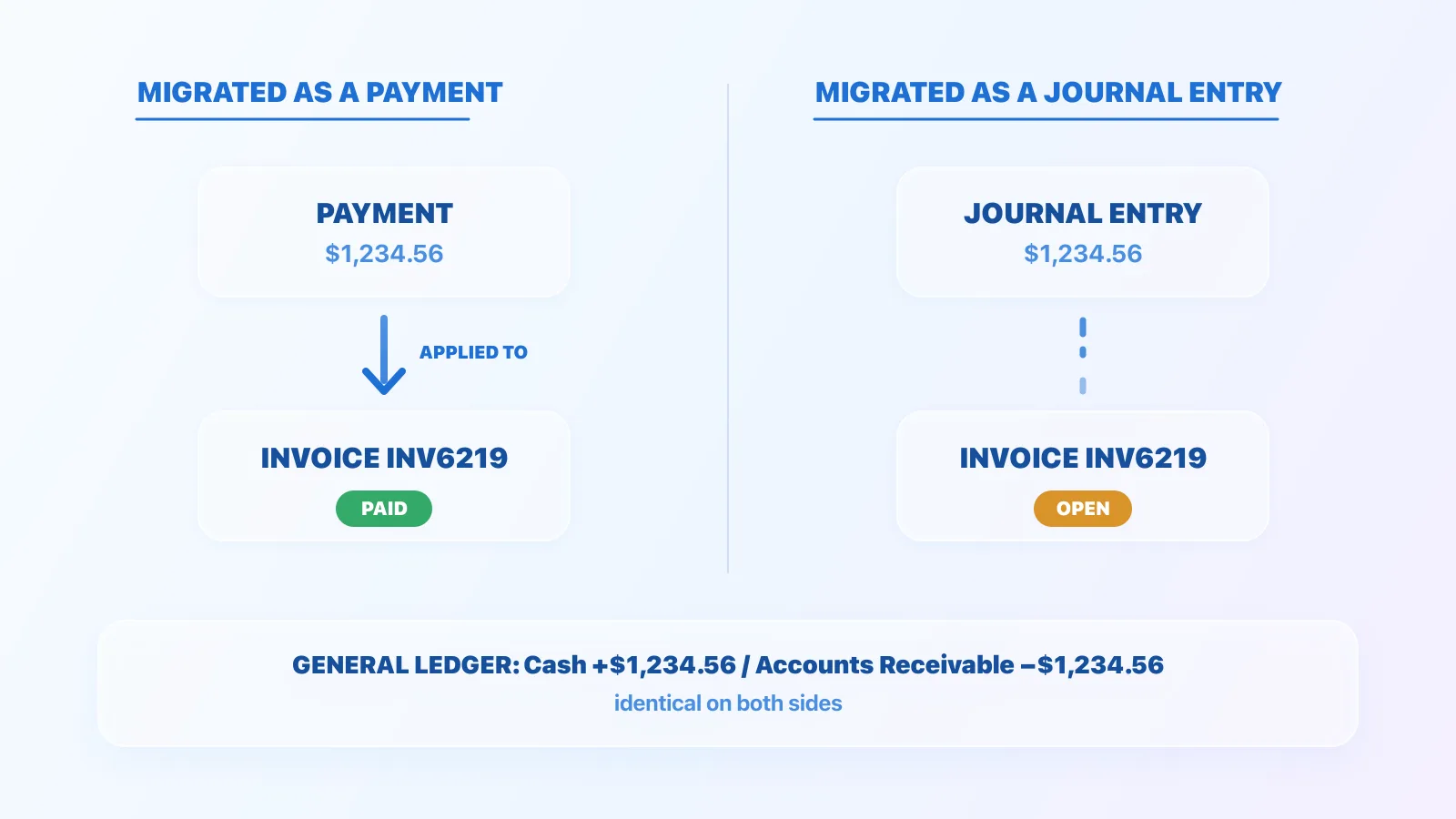
When a customer pays an invoice, two things happen. Money moves, and a specific invoice stops being owed. The second part is not a side effect of the first. In NetSuite, it is a distinct piece of data: an application link between the payment record and the invoice record. That link is what marks the invoice paid.
A journal entry can reproduce the money movement perfectly. It cannot carry the link, because journal entries have no application sublist. So the invoice never learns it was paid.
What that looks like in NetSuite
Here is a real invoice for $2,500.00, and a journal entry crediting the same A/R account for the same amount, with the customer named on the line. Exactly what a migration produces when it converts the payment to a journal.
Start with the invoice itself:
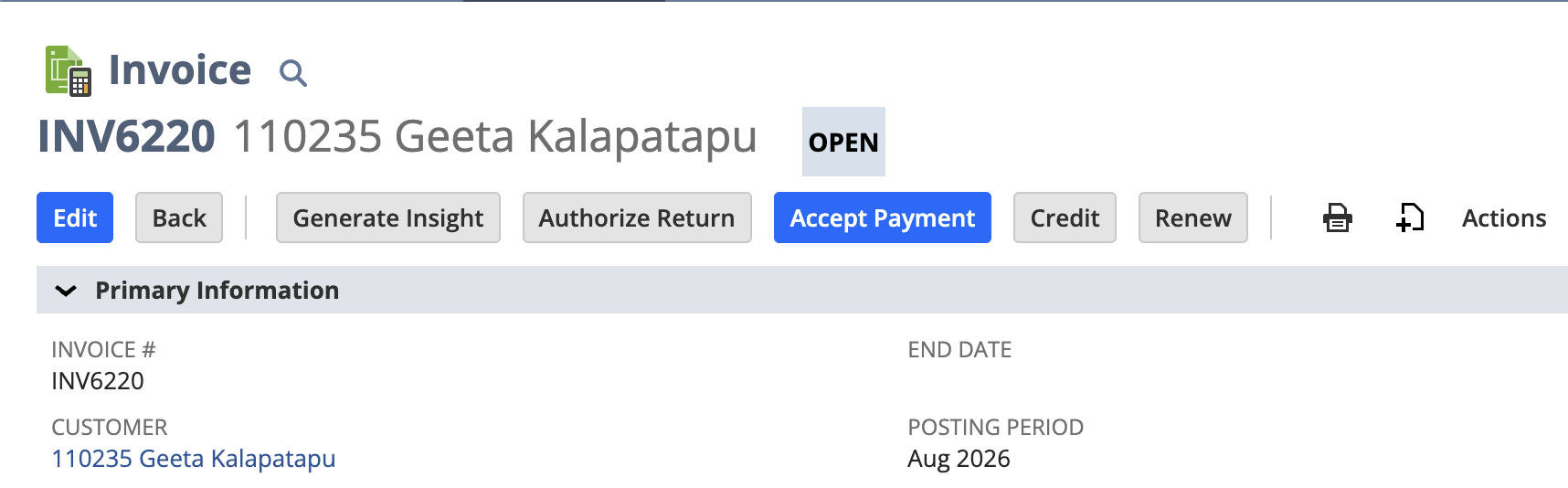
The status reads OPEN, and NetSuite is offering Accept Payment on an invoice whose payment, as far as the general ledger is concerned, was recorded weeks ago.
The A/R Aging Detail says the same thing:
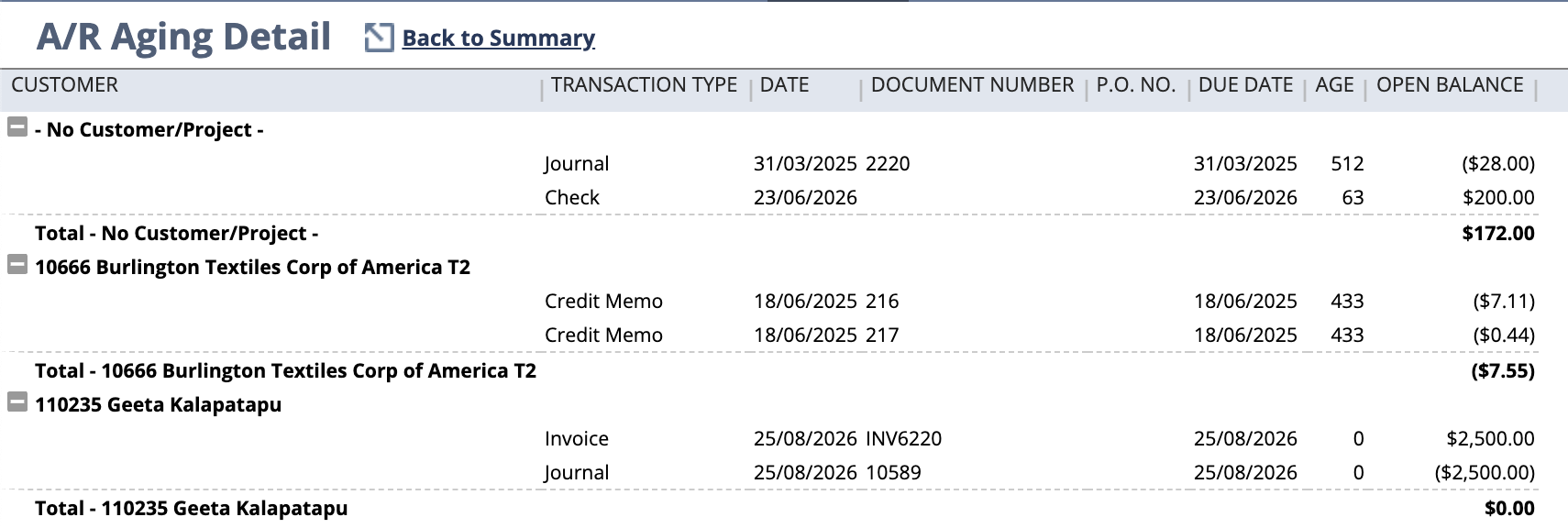
The invoice is open for the full amount, zero days aged, sitting there as receivable. The journal is a separate line, an unapplied credit on the same customer. They net to zero.
Netting to zero is not the same as being settled. The invoice has not been paid. It has been countered.
The report that would catch it, doesn’t
Now the same data in the A/R Aging Summary, which is the report most people actually run:
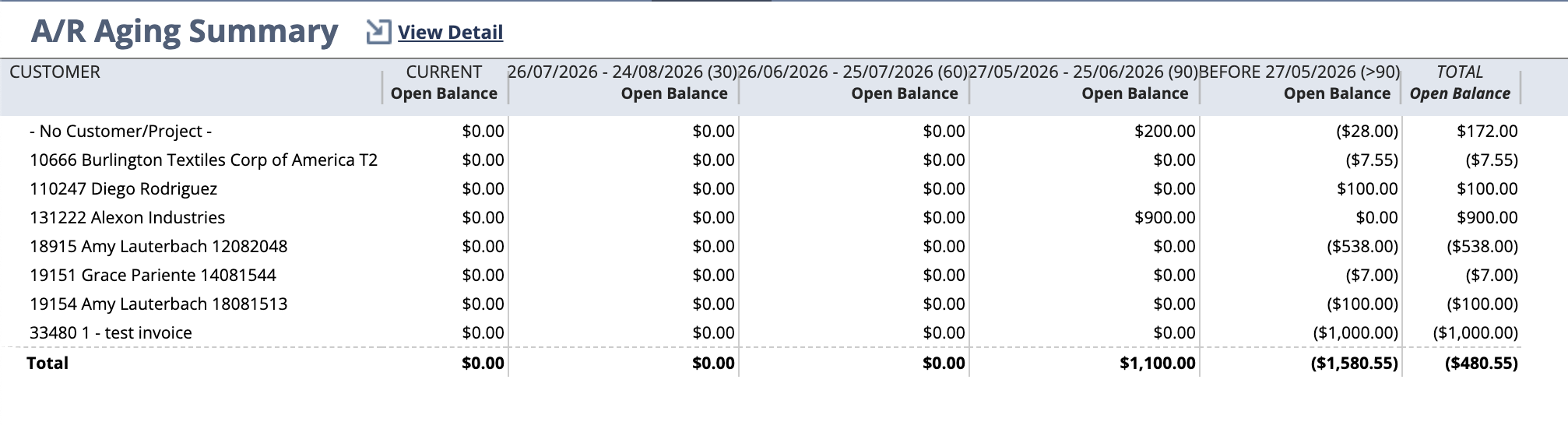
The customer is not there at all. There is no zero-balance row and no flag against the name; it simply does not appear. The summary aggregates to one net figure per customer and drops zero balance rows, so a customer whose invoice is exactly offset by a journal disappears from the report.
That is worth pausing on. We ran this report before applying the credit and again afterwards, and the two runs are identical. Same rows, same totals. The report cannot distinguish a broken ledger from a correct one.
So the usual checks all pass. Trial balance ties. A/R control account ties. Aging summary shows nothing to investigate. The only place the problem is visible is a report nobody runs unless they already suspect something.
What it costs later
The open invoice does not sit quietly, and nothing will ever close it on its own. No process in NetSuite notices that a journal entry was meant to settle it. It behaves like any other open invoice, because, as far as NetSuite is concerned, that is what it is, and it stays that way until a person opens it and does something about it. For an invoice migrated out of a system nobody looks at any more, that means indefinitely.
It appears the moment anyone goes to take a payment from that customer, offered up as though it were still owed. It also appears on customer statements, and in collections and dunning, so someone eventually chases a customer for an invoice they settled in 2021.
The unapplied journal is the other half of the problem. It is a loose credit on the customer’s account, and nothing marks it as belonging to the invoice it was meant to pay. It is available against any open invoice that customer has, including ones it has nothing to do with.
So it gets spent on the wrong thing. Whoever is applying a payment sees a credit on the right customer and uses it, reasonably, against whatever invoice they happen to be working on. The credit is gone, INV6220 is still open, and the one thing that could have closed it has been consumed by an unrelated invoice.
Or the mistake runs the other way:
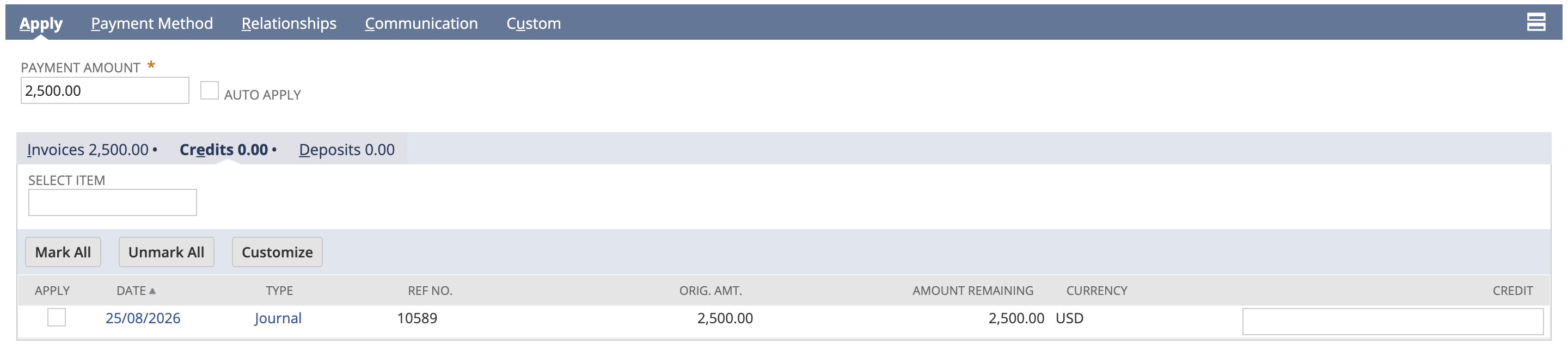
A real payment of $2,500.00 has arrived and is being applied to INV6220, which looked unpaid because it was. Journal 10589 is sitting in the Credits tab beside it, untouched, with the full $2,500.00 still available. Save that, and the customer has paid once but been credited twice, with the journal still loose and ready to do it again.
Vendor payments work the same way. NetSuite closes a bill through an applied vendor payment or credit, and A/P Aging reports what is still unpaid. So substituting a journal entry can leave bills open, which overstates A/P aging and makes vendors look unpaid for invoices you settled years ago.
An open bill is not only a reporting problem, because Pay Bills works from the list of open bills. A bill that was settled years ago sits in that queue looking payable, and whoever works through it has no way to tell it apart from a real one. On the receivables side, the mistake credits a customer twice. On the payables side, it sends money out of the door twice, to a vendor who has already been paid.
Deposits: the same cash can be banked twice
Deposits deserve their own section, because the consequence here is not a wrong report. It is a task sitting in someone’s queue, waiting to be actioned.
A customer payment in NetSuite does not go straight to the bank. It posts to Undeposited Funds, then appears on the Payments subtab of Make Deposits, and it is recording the deposit that moves the money into the bank account. The deposit record is not a summary of the payments. It is the thing that marks them banked.
A journal entry moves the same balance. Debit the bank, credit Undeposited Funds, and the general ledger is right. What it cannot do is mark the payments underneath as deposited, because that flag lives on the deposit record and nowhere else.
Here is a payment for $1,000.00 after exactly that journal entry has moved its cash into the bank:
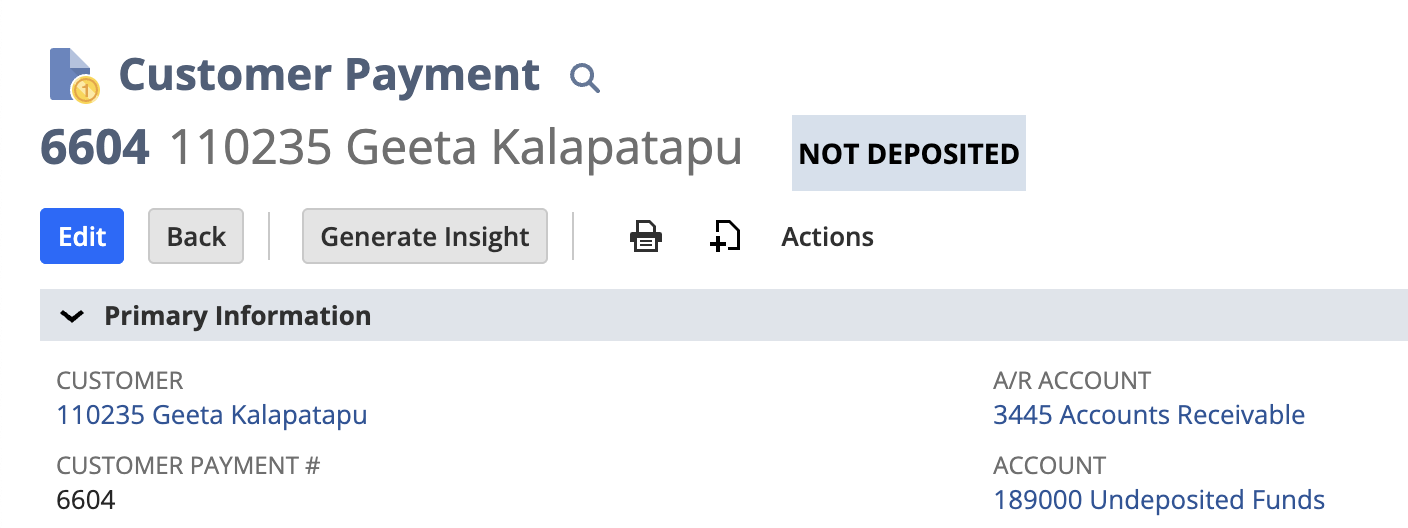
Nothing marked that payment as deposited, so it is still sitting in the queue:

Then someone banks it. Nobody would catch that, because the queue exists to be worked through, and a stranded payment looks identical to one that genuinely needs banking. The deposit posts, the cash is counted a second time, the bank is overstated, and Undeposited Funds is understated by the full amount.
The only places this shows up are the payment record and the queue, which is the same shape as the invoice case. The aggregate view looks clean, and the damage sits in the detail.
The proper way is already supported
This is what settles the argument: NetSuite supports importing the applications.
The Customer Payment CSV import has an Invoices sublist, where each line names an invoice the payment applies to. It works, with three conditions: invoices have to be imported before the payments, the sublist has to key on internal or external IDs rather than invoice numbers, and the A/R account on the payment has to match the A/R account on the invoice or the import errors.
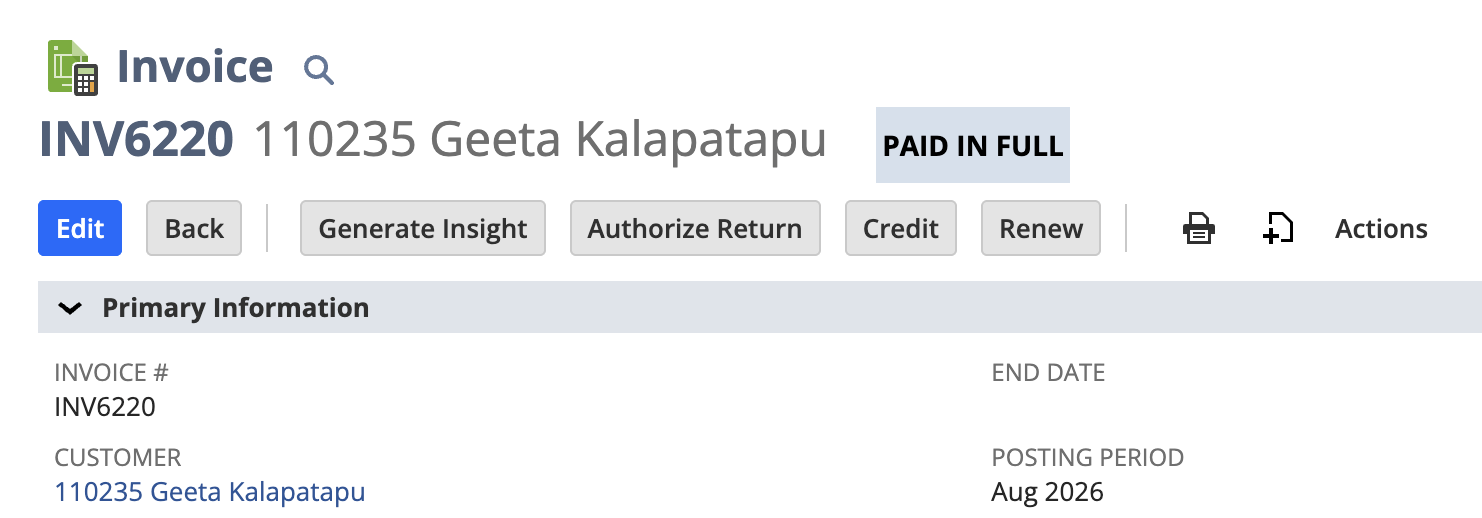
That is what the same invoice looks like once an application exists against it. Status PAID IN FULL, and the Accept Payment button has gone, because there is nothing left to pay. Nobody is going to chase it, apply a credit to it, or pay it twice.
Those conditions are exactly why journal entries feel easier. Ordering, stable identifiers, and account consistency are real work. But they are engineering problems with known solutions, and they get solved once, by whoever builds the migration. Open invoices are an accounting problem, they surface after go live, and they get solved by your finance team, forever.
The rule of thumb worth holding on to: invoices migrate as invoices, payments as payments, credits as credits, each applied to what it settled, so the subledger ties to the general ledger on day one. Journal entries are the fallback for the handful of record types NetSuite genuinely cannot accept, not the default for the ones it can.
How SuiteMigration handles it
SuiteMigration migrates customer payments, vendor payments, and deposits as their native NetSuite record types, and carries the applications with them. A payment arrives already applied to the invoices it settled, so the invoice closes on arrival rather than waiting for someone to notice it never did.
That means solving the three conditions the CSV import imposes, rather than avoiding them. Invoices and bills are pushed before the payments that settle them. Records are matched on stable identifiers, not document numbers. And the A/R or A/P account on each payment is reconciled against the account on the transaction it applies to, because a mismatch there is one of the more common reasons an application silently fails.
Where a source transaction genuinely has no native equivalent in NetSuite, we say so and mark it, rather than quietly converting it to a journal entry and leaving the consequences in your aging report.
FAQs
Can you migrate customer payments to NetSuite as journal entries?
Technically yes. A journal entry crediting Accounts Receivable with the customer in the Name field will post, and the general ledger will match the source system exactly. What it cannot do is apply to the invoice the payment settled, so the invoice stays open. Migrate payments as Customer Payment records instead, with their invoice applications intact.
Why is my invoice still open in NetSuite after the payment was migrated?
Almost always because the payment arrived as a journal entry rather than a Customer Payment. A journal entry moves the money in the ledger but carries no application link, and the application link is what marks an invoice paid. The invoice will show a full open balance and the journal will sit alongside it as an unapplied credit.
Can a journal entry be applied to an invoice in NetSuite?
Yes, but only by hand, one invoice at a time. Open the invoice, click Accept Payment, then tick the invoice on the Invoices sublist and the journal on the Credits sublist before saving. That is fine for one invoice. For years of migrated payment history it is not a cleanup task, it is a second migration.
Does the A/R Aging Summary show unapplied journal entries?
Not usefully. When a journal entry credits a customer for the same amount as their open invoice, the customer nets to zero and drops off the summary entirely. The summary looks identical whether the invoice is wrongly open or correctly closed. Run the A/R Aging Detail instead, which lists the open invoice and the unapplied credit as separate lines.
Can NetSuite import customer payments with their invoice applications?
Yes. The Customer Payment CSV import includes an Invoices sublist where each line is an invoice the payment applies to. Invoices must be imported first and keyed on internal or external IDs rather than invoice numbers, and the A/R account on the payment has to match the A/R account on the invoice.
What happens if deposits are migrated as journal entries?
The journal moves cash into the bank account, but the customer payments underneath it are never marked as deposited. They stay in the Undeposited Funds queue, still offered for deposit. Anyone who banks them later counts the same cash twice.