

The Ultimate Guide to NetSuite Chrome Extensions
There are more than a hundred NetSuite extensions on the Chrome Web Store and about two dozen that anyone actually uses. Which ones are worth installing, which are abandoned, which are already gone, and how to tell a real one from a fake.


Search for NetSuite Chrome extensions and you will find plenty of lists. One of them promises a top 45. What none of them tell you is how many people actually use any of these tools, when they were last updated, or which of the links are already dead.
So we checked on your behalf. We went through every NetSuite-related extension on the Chrome Web Store and recorded its install count, rating, publisher and last-update date.
There are more than a hundred live NetSuite extensions. Most sit in a long tail of single-purpose tools, a few hundred installs each, built for one team and never maintained. Two dozen are in genuine, widespread use.
That gap is the useful part. This guide covers those two dozen, grouped by what you are actually trying to do, and it is honest about which ones have been abandoned.
One note on the install figures before we start. Chrome reports them in rounded tiers rather than exact counts, so they are reliable for telling a widely used tool from a niche one, but not for a head-to-head between two tools showing the same number.
The extensions people actually use
| Extension | Installs | Rating | Publisher | Last update |
|---|---|---|---|---|
| NetSuite Field Explorer | 40,000 | 5.0 (33) | Michoel Chaikin | Aug 2024 |
| NetSuite Advanced Field Help | 20,000 | 4.4 (52) | Marcel Pestana | Apr 2026 |
| NetSuite: Saved Search and Dataset Export | 20,000 | 4.8 (62) | David Smith | Jan 2026 |
| NetSuite Field Finder | 10,000 | 4.8 (25) | Eric Lackey | Sep 2025 |
| NetSuite Utils | 10,000 | 5.0 (32) | George Harrington | May 2026 |
| NetSuite: Show Field IDs | 10,000 | 4.9 (28) | David Smith | Mar 2025 |
| Jobin & Jismi Portlet Refresher | 10,000 | 4.3 (12) | Jobin & Jismi | Jan 2025 |
| NetSuite: HTML Script Notes | 6,000 | 4.3 (24) | David Smith | Jan 2026 |
| Saved Search Export to SS 2.x | 4,000 | 5.0 (2) | Nathan Fiedler | Mar 2026 |
| ExtendSync — NetSuite Edition | 3,000 | 5.0 (1) | ExtendSync | Jan 2026 |
| NetSuite Helper for Your Works | 3,000 | 5.0 (10) | Salvatore Alparone | Jun 2024 |
| SuiteAdvanced™ for NetSuite | 3,000 | 5.0 (30) | SuiteAdvanced | Nov 2025 |
| NetSuite Better Export | 2,000 | 5.0 (4) | Eric Lackey | Dec 2025 |
| NetSuite Fixed Sublist Headers | 2,000 | 5.0 (7) | Kayla Kuhlman | Oct 2024 |
| NetSuite Portlet Refresher | 2,000 | 5.0 (4) | Caleb Moore | Aug 2025 |
| NetSuite Record Scripts | 2,000 | 5.0 (5) | ahmedrangel | Aug 2026 |
| NetSuite Scripted Records | 2,000 | 5.0 (10) | aviranyone1 | Apr 2025 |
| NetSuite SplitView | 2,000 | 5.0 (6) | Howell Manongsong | Dec 2024 |
| NetSuite Transaction Tree | 2,000 | 4.5 (8) | Waleed Bin Khalid | Nov 2024 |
| NetSuite SuiteScript Explorer | 2,000 | 4.2 (5) | felipenahuelviera | Jul 2023 |
| Suitelook: NetSuite Record Viewer | 2,000 | 5.0 (4) | Roberto Cideos | Sep 2025 |
| NetSuite Keyboard Shortcuts | 1,000 | 5.0 (17) | Milcho Dimkov | Jan 2025 |
| NetSuite Script Deployments | 1,000 | 5.0 (4) | — | Jul 2025 |
| Show Netsuite Field IDs | 1,000 | 5.0 (2) | WebPublishers | Jan 2025 |
Ratings are shown with review counts in brackets, because a 5.0 from two reviews is not the same claim as a 4.8 from 62.
A few things stand out. This is a hobbyist ecosystem: there is no Oracle-published NetSuite extension, and the most-installed tools come from a handful of named individuals. David Smith has three in the list, around 36,000 installs between them. Eric Lackey has two. Michoel Chaikin’s Field Explorer alone accounts for 40,000.
It is also an ageing one. Nine of these have not shipped an update in more than eighteen months, including the most popular tool in the category.
Find a field ID or read a record
This is what most people install an extension for, and it is where the best tools are.
NetSuite Field Explorer — 40,000 installs, and the default recommendation. Click the toolbar icon on any record and you get every field on it as a searchable, filterable JSON tree, including fields that never render on the form. The alternative is appending &xml=T to the URL and reading raw XML, which is slower and misses fields. It is open source, so you can read exactly what it does.
The caveat is real: the last release was August 2024. It still works, but nobody is maintaining it.
NetSuite: Show Field IDs — the companion to Field Explorer rather than a competitor. Hover any field label and its internal ID appears in place. Shift-click copies it. Ctrl+Shift+F searches the record by ID, Ctrl+Shift+L by label. Field Explorer is for understanding a record; this is for grabbing one ID without breaking your train of thought.
NetSuite Field Finder — solves a narrower and more irritating problem: finding a field inside the enormous dropdowns on Saved Search and Workflow definition pages. It makes those lists searchable and adds field detail inline. If you build saved searches, this saves more time than its install count suggests. Also open source.
NetSuite Advanced Field Help — extends NetSuite’s built-in field help popup with the internal ID, the field type, the current value and, for custom fields, the underlying configuration. Actively maintained, with an April 2026 release and the largest review count in the category. Its 4.4 rating is the lowest of the top tools, which mostly reflects having 52 reviews rather than five.
Suitelook: NetSuite Record Viewer — renders every field on a record in a clean panel with a dark mode. Overlaps heavily with Field Explorer; worth trying if you prefer its presentation or want something still being updated.
NetSuite Transaction Tree — different job. It draws the chain of linked transactions around the record you are on, so you can see the sales order, fulfilment, invoice and payment as one structure instead of clicking through each. Useful when you are trying to understand why a transaction is in the state it is in. Last updated November 2024.
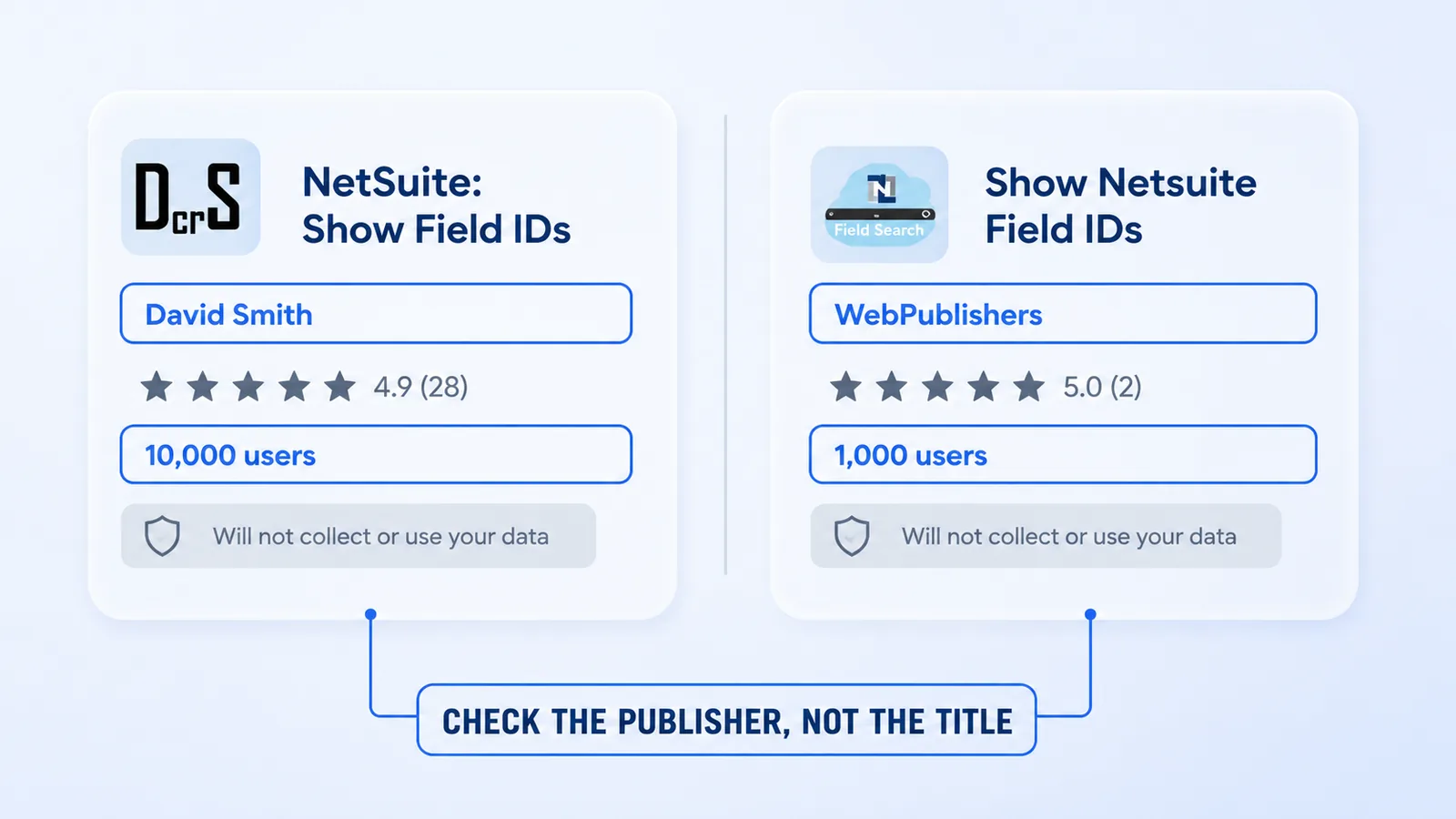
A warning on one entry. Show Netsuite Field IDs by WebPublishers is not the same extension as NetSuite: Show Field IDs by David Smith, despite a nearly identical name and a store description that is the same two sentences in the opposite order. Smith’s has 10,000 users; this one has 1,000. We are not suggesting the WebPublishers listing is malicious, only that you should know which one you are installing. Check the publisher name, not the title.
Get data out
NetSuite: Saved Search and Dataset Export — 20,000 installs and the highest review count of any tool here. From the Edit Saved Search page it converts the search you are looking at into working SuiteScript, and it handles datasets and workbooks as well as classic saved searches. Rebuilding a complex search by hand in search.create() is exactly the kind of tedious, error-prone work worth automating.
It was previously called NetSuite: Search Export, and several published guides still refer to it under that name.
Saved Search Export to SS 2.x — does the same job but emits TypeScript. If your SuiteScript is typed, this is the one you want. Updated March 2026.
NetSuite Better Export — for exporting search results rather than search definitions, with better format handling than the native export, including current Excel formats. From the same developer as Field Finder.
Debug scripts
NetSuite Record Scripts and NetSuite Scripted Records — two separate tools that answer the same question: what is actually running on this record? One click lists every script deployed against the record or Suitelet you are viewing. When a form behaves strangely in a customised account, this is the fastest way to find out why. Record Scripts was updated in August 2026, making it the most recently maintained tool in this guide.
Note that Scripted Records was republished under a new store ID. Older articles link to the original, which is dead.
NetSuite Script Deployments — approaches it from the other direction, surfacing deployments for any script-enabled record.
NetSuite: HTML Script Notes — makes script execution logs readable. JSON logged from a script normally arrives as one unbroken string; this pretty-prints it as a collapsible tree, adds styling, and turns record references into links. Anyone who debugs SuiteScript by logging objects will notice the difference immediately.
NetSuite SuiteScript Explorer — searches across script files for a string, so you can find the file containing a function without opening each one from the File Cabinet. Genuinely useful, but the last update was July 2023, the oldest in this guide, and it carries the lowest rating at 4.2.
NetSuite Utils — a bundle rather than a single tool: SuiteQL editing, log viewing, record inspection and assorted UI fixes in one extension. 10,000 installs, a 5.0 from 32 reviews, and a May 2026 release, which makes it one of the better-maintained options. Worth a look if you would rather run one extension than six.
Move around faster
NetSuite SplitView — two NetSuite records side by side in a single tab. Obvious once you have used it, particularly for comparing a record against its equivalent in another subsidiary.
Portlet refreshers — dashboard portlets do not refresh on their own, so a dashboard you leave open shows stale numbers. Two extensions fix this and both are well used: Jobin & Jismi’s at 10,000 installs, and Caleb Moore’s at 2,000. There is no strong reason to prefer one; install either.
NetSuite Fixed Sublist Headers — pins sublist column headers so they stay visible while you scroll. A small fix for a daily irritation on long line-item lists.
NetSuite Keyboard Shortcuts — custom shortcuts for pages you open constantly.
SuiteAdvanced™ for NetSuite — the largest single package here: theming and dark mode, saved-search split view, exposed internal IDs, CSV import status on the confirmation page, and browser tabs coloured to distinguish sandbox from production. That last feature alone justifies it if you work across several accounts. 30 reviews at 5.0.
NetSuite Helper for Your Works — a set of shortcuts for routine actions, built on SuiteScript 1.0. Reasonably popular at 3,000 installs, but untouched since June 2024, and its SuiteScript 1.0 foundation is worth noting given 1.0’s long-running deprecation.
Connect to other tools
ExtendSync — NetSuite Edition — pushes emails, calendar events and attachments into NetSuite from Gmail. The only vendor-built integration extension in the top tier, and the only one here with a commercial product behind it. It has 3,000 installs and a single review, so there is effectively no user feedback to weigh.
The security part nobody mentions
Every other guide to these tools skips this. It should not be skipped.
In January 2026, security researchers at Socket published an analysis of five Chrome extensions targeting enterprise ERP and HR platforms, NetSuite and Workday among them. Between them they had roughly 2,300 users.
They worked like this. The extensions harvested the __session authentication cookie and sent it to attacker-controlled servers every sixty seconds. That cookie is enough to take over an account without ever knowing the password. Two of them went further and blocked access to security-critical pages inside the target platforms, 44 pages in one case and 56 in the other, covering password changes, two-factor device management, session controls and audit logs. A victim who suspected something was wrong would find they could not investigate or lock the account down.
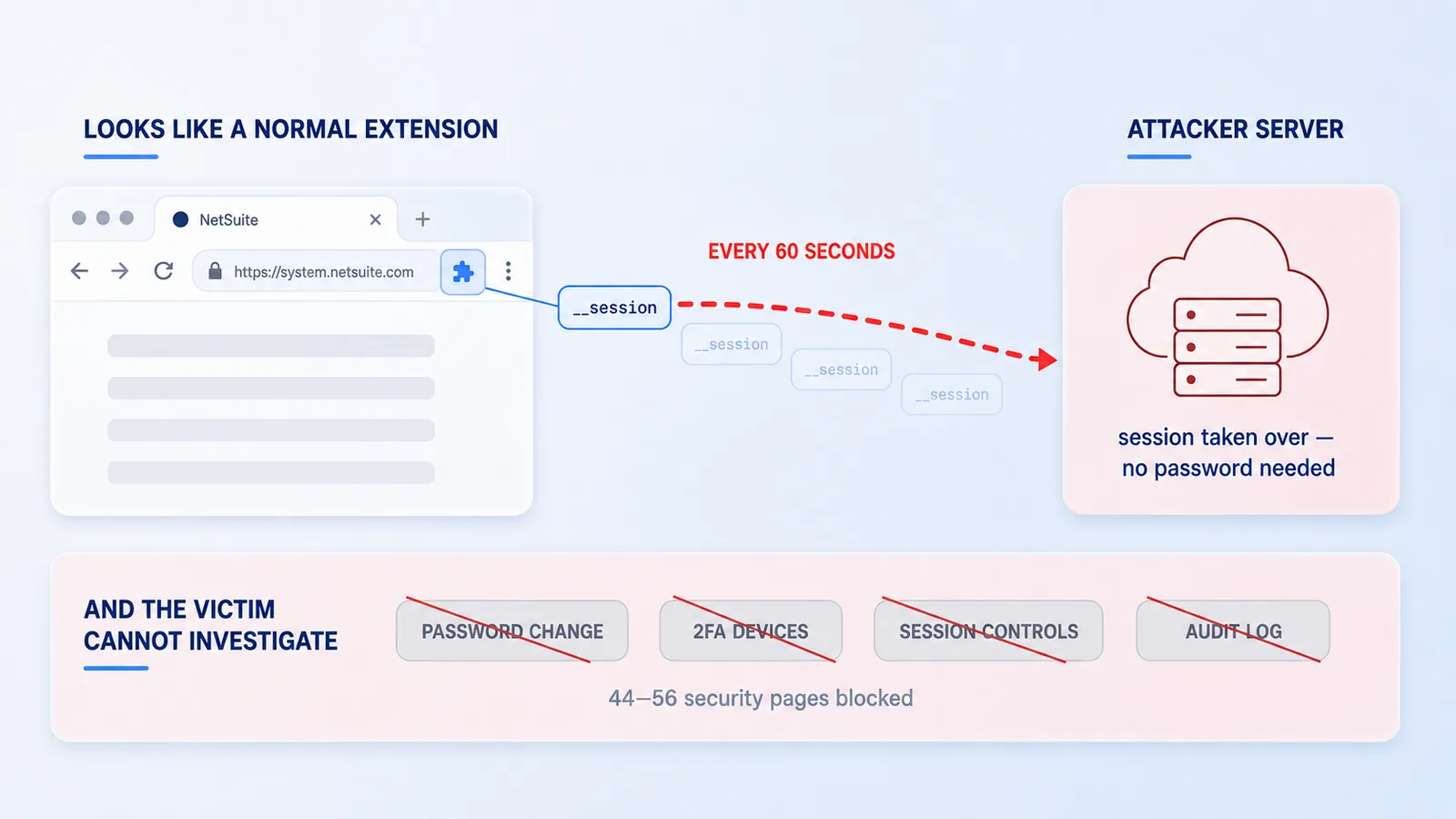
Oracle issued a Security Notification about Chrome extensions on the NetSuite community, advising customers to audit installed extensions, remove anything suspicious, reset passwords for affected users and enforce two-factor authentication across all roles.
All five have since been removed from the Chrome Web Store. We checked each one; none of them resolves any more.
Here is the detail that matters most, and the reason the usual advice is not good enough. All five declared “will not collect or use your data” in their Chrome Web Store privacy disclosure — the same badge Field Explorer, NetSuite Utils and every other legitimate tool in this guide carries. That disclosure is written by the developer and verified by nobody. Any guidance that tells you to check the privacy notice would have cleared all five.
What is already dead
Three extensions recommended by current, indexed articles no longer exist:
- NetSuite Links — removed. Still recommended by several consultancy blogs, all linking a dead page. NetSuite Utils and SuiteAdvanced cover similar ground.
- NetSuite Record JSON Viewer — removed. Field Explorer or Suitelook instead.
- NetSuite Scripted Records (original listing) — the ID that most guides link is dead. The extension was republished; the working listing is here.
Then there is the slower kind of decay. Nine of the 24 tools above have not been updated in over eighteen months: SuiteScript Explorer (Jul 2023), Helper for Your Works (Jun 2024), Field Explorer (Aug 2024), Fixed Sublist Headers (Oct 2024), Transaction Tree (Nov 2024), SplitView (Dec 2024), the Jobin & Jismi Portlet Refresher (Jan 2025), Keyboard Shortcuts (Jan 2025) and Show Netsuite Field IDs (Jan 2025).
Unmaintained does not mean broken. Most of these still work. But NetSuite ships two releases a year, and an extension that reads the DOM will eventually meet a change it was not written for. If one stops working after an upgrade, check the last-update date before spending an afternoon on it.
How to vet an extension yourself
Install counts move and this list will age, so the more durable thing is a way to judge one on your own.
Look at the publisher, not the listing. A named individual with a track record, a working website and other extensions is a much stronger signal than a plausible name. The malicious publishers had domains that returned errors.
Prefer open source where it exists. Field Explorer and Field Finder both publish their code. You cannot audit what you cannot read, and for a tool that sees every record you open, being able to read it matters.
Read the permissions, and ask whether they fit the job. A field-ID viewer needs to read the page you are on. It does not need access to your cookies, and it does not need permission to run on every site you visit.
Treat the privacy disclosure as a claim, not evidence. It is self-reported. See above.
Weigh reviews by count. Several tools here show 5.0 from two reviews. That is not a track record.
Pilot in sandbox. Install into a sandbox account first, especially for anything that writes rather than reads.
Remember whose session it is. An extension inherits the permissions of whoever installs it. The same tool is a minor convenience in a read-only user’s browser and a serious exposure in an administrator’s. Review what your admins are running more carefully than what everyone else is.
Re-check quarterly. Extensions update themselves silently, and ownership occasionally changes hands. A tool that was fine when you installed it is not guaranteed to be fine a year later.
FAQs
What is the best Chrome extension for NetSuite?
NetSuite Field Explorer is the most widely installed, with around 40,000 users. It shows every field on the current record, including hidden ones, as a searchable JSON tree. If you only install one thing, install that. Be aware it has not been updated since August 2024.
How many NetSuite Chrome extensions are there?
More than a hundred are live on the Chrome Web Store. Only about two dozen are in widespread use; the rest are largely one-off tools with a few hundred installs each, and many have not been touched in years.
Are NetSuite Chrome extensions safe to use?
The well-known ones are widely used by consultants and have been for years, but none of them are made or endorsed by Oracle. Every one is third-party. In January 2026 five extensions impersonating NetSuite and Workday were caught stealing session cookies, so vet the publisher rather than the listing. All five have since been removed from the store.
Does Oracle make an official NetSuite Chrome extension?
No. There is no Oracle-published NetSuite extension on the Chrome Web Store. Every tool available is built by an independent developer or a consultancy, most of them free and unaffiliated with Oracle.
How do I see field IDs in NetSuite without an extension?
Append &xml=T to a record URL to see the underlying XML, which exposes most field IDs. Extensions like Show Field IDs and Field Explorer exist because that trick is slow, does not cover every field, and cannot be used on list or search pages.
What happened to the NetSuite Links extension?
It has been removed from the Chrome Web Store. Several published guides still recommend it and link to a dead listing. NetSuite Utils and SuiteAdvanced cover much of the same navigation and quick-link ground.
Why do two extensions have almost the same name?
Anyone can publish an extension under almost any name. Show Netsuite Field IDs by WebPublishers has a nearly identical name and description to NetSuite: Show Field IDs by David Smith, which has ten times the users. Always check the publisher name before installing.
How often should I review installed NetSuite extensions?
Once a quarter is reasonable. Extensions update themselves silently, ownership can change hands, and an abandoned tool can break after a NetSuite release. Removing ones nobody uses also reduces how much of your session is exposed.