

How to Scope a QuickBooks or Xero to NetSuite Migration Project
Scoping calls ask people to describe a dataset nobody has counted, and the answers become a fixed fee and a go-live date. The four things that actually size a migration are volume, span, shape and condition, and all four are measurable before you quote.


Every migration starts with the same call. How many customers do you have? How many years of history do you want to bring? Any subsidiaries? Those answers go into a statement of work, the statement of work becomes a fixed fee and a go-live date, and then the project starts.
People are not careless on scoping calls. The trouble is that the questions are about the business when the answers have to be about the dataset, and nobody on the call has counted the dataset. “About four thousand customers” turns out to be 4,127 records, 3,912 of them active, and 124 of them will be refused by NetSuite on the way in for reasons nobody mentioned, because nobody knew.
How big the job is comes down to four properties: volume, span, shape and condition. Only the first one gets asked about on the call, and of the four it predicts the least. You can measure all of them before you quote.
Volume is the number people quote, and the least useful one
Start with the counts. They are the easy part, and they still get quoted wrong.
They are also the part you should never have to ask about, since a read of the source file returns them exactly, in minutes, before anyone has committed to anything. A Migration Readiness Audit exists for precisely that. Assume for the rest of this piece that you have run one, because every number that follows is something it hands you rather than something you estimate.
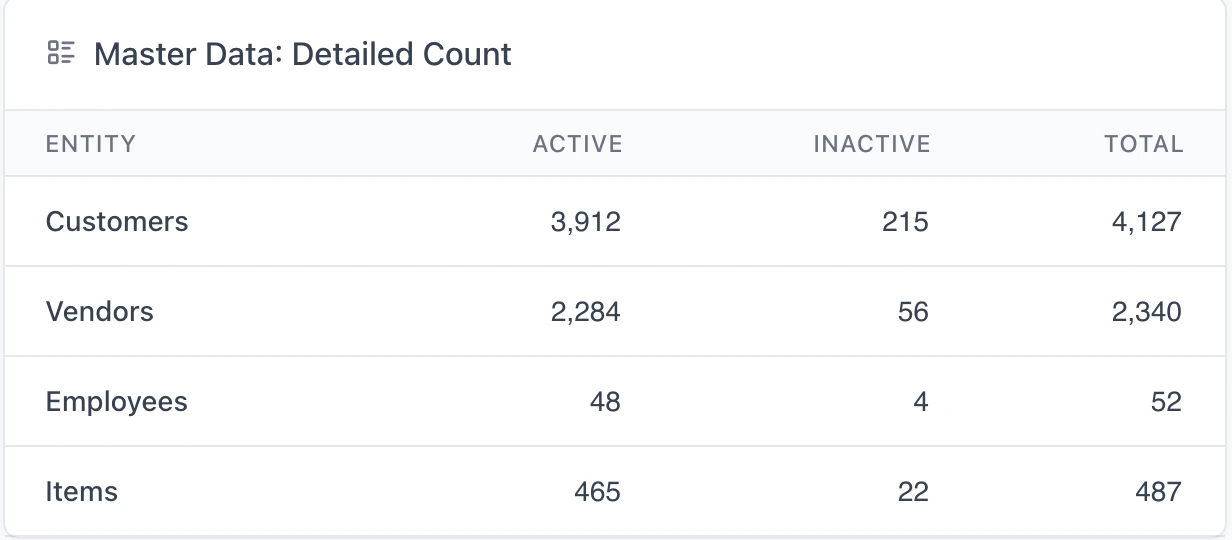
Behind those sit 217,359 transactions, which we will come back to.
The gap between the active and total columns is the first thing a scoping call gets wrong. People quote their active list because that is the list they work from, but NetSuite has no interest in your active list: every customer named on an invoice you migrate has to exist as a customer record, whether or not anyone has sold to them since 2021. Inactive is a flag you set afterwards. The records still have to be loaded, and on this file they come to 215 customers and 56 vendors nobody would have mentioned.
Past that point, volume mostly determines runtime rather than effort. 124,812 invoices is a single problem that you solve once and then repeat 124,812 times, and nobody’s project has ever overrun because of the invoices.
Span turns a preference into a number
“Five years of history, maybe seven” answers a question nobody has priced. Two figures price it: the date of the first transaction in the file, and the number of accounting periods between then and now.
On the dataset above, the first transaction is dated June 2020, which leaves 73 monthly periods to reconcile. Then there is the shape of the history:
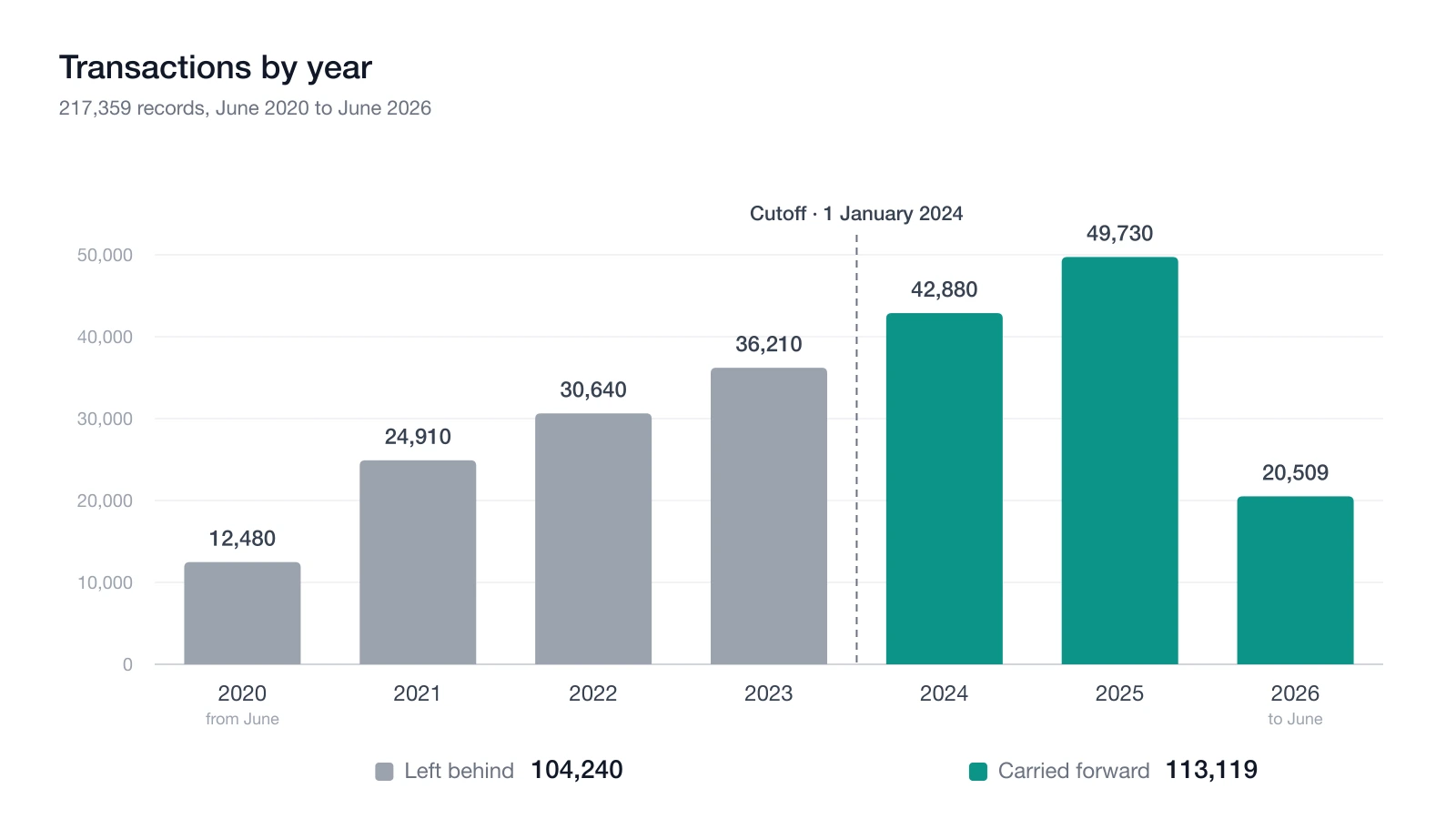
A cutoff at 1 January 2024 brings 113,119 transactions forward and leaves 104,240 behind, so a client gives up four of the six years and less than half the work goes with them. Put that in front of someone and you are having a different conversation from “five years or seven”.
The curve explains why. Transaction volume tracks the growth of the business, so the early years a client is most willing to give up happen to be the cheapest ones to keep, while the recent years they would never part with are the expensive ones. Argue a cutoff in the abstract and you will get this backwards every time.
There is one further thing about cutoffs that tends to get missed, which is that a cutoff never cuts cleanly. An invoice raised in 2022 and still open has to come across regardless, or its balance has to arrive some other way, and the same goes for every unapplied credit, every undeposited payment and every bill still sitting in A/P. The cutoff decides how much history you carry, but it has no say in what you are obliged to carry. We have written separately about when history is worth bringing and when it is not.
Shape: the three percent that costs the most
Invoices and bills account for 210,353 of those 217,359 transactions. That is ninety-seven percent of the dataset carrying almost none of the risk.
The remaining seven thousand records spread across a dozen other types, and the scoping decisions all live there. Every one of those types has a NetSuite equivalent, so the problem is never that a record has nowhere to go. The problem is that the source system never enforced NetSuite’s rules for it. Money-movement records are where that shows up first:
| Source record type | Count | What NetSuite requires that the source did not |
|---|---|---|
| Deposits | 386 | Only what is already sitting in Undeposited Funds can be deposited, so a deposit that references an invoice, or carries a bank-account line, is not a valid NetSuite deposit |
| Checks | 344 | A payee, a bank account of the right type, and no Accounts Payable account on the expense lines |
| Credit card charges | 251 | A payee who is specifically a vendor (a customer or employee is rejected), and no line posting to an A/P, bank or credit card account |
| Cash expenses | 122 | Pushes as a NetSuite Check, so it inherits every rule a check has, starting with a payee QuickBooks never asked for |
| Credit card refunds | 16 | The same rules as the charge, in smaller numbers and easier to forget |
A little over a thousand records in total, half a percent of the file. None of them is stuck on the strength of that list alone. “NetSuite rejects it” sounds much more final than it turns out to be.
When a record breaks one of those rules it gets held back rather than thrown out, tagged with the specific rule it broke, and offered a second route: post it as a journal entry instead of as its native type. The journal entry moves the same amounts between the same accounts on the same date. It also drops the structure that caused the rejection in the first place, because a journal entry has no payee field to leave empty and no expense sublist to refuse an Accounts Payable account. A check with no payee, a credit card charge whose payee is a customer rather than a vendor, a deposit carrying a bank-account line: all of them can still go in. Nothing has to be corrected in QuickBooks first.
So somebody has a decision to make about representation, and nobody has to repair a broken record. Those two things belong in different columns of a scope, and a decent report has already separated them:
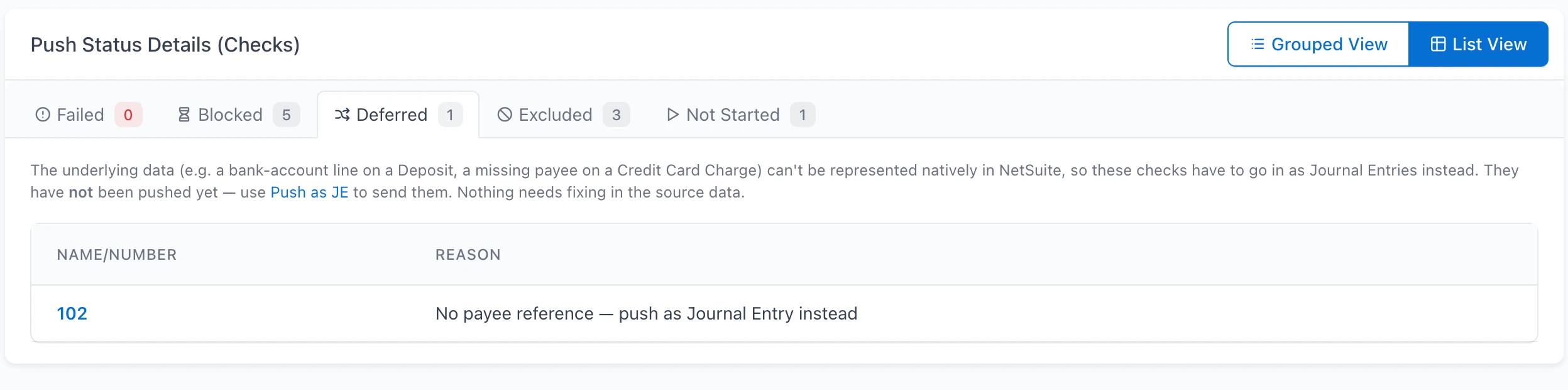
Failed, blocked, deferred and excluded are four different problems with four different owners. Roll them into a single count of “records to migrate” and you have hidden the only distinction that matters. Blocked clears itself once the dependency pushes. Deferred needs someone to choose. Excluded is never moving at all, and somebody should hear that before go-live rather than after.
The choice deserves more thought than it usually gets, because the reflex is to take the journal entry every time. They always post. Where NetSuite will not accept the native form, that reflex is right. Where NetSuite would have taken the record, it costs you something. A journal entry carries no application link, so migrating payments as journal entries leaves the invoices they settled sitting open, and the report most people run to check will not show it. Making that call during the migration, record by record, under deadline, is how a scope quietly doubles. Make it while you are scoping instead, with the counts in front of you.
A much smaller set closes off even that second route, and those are the only records where the answer really is no. Find them early, because nothing except a change to the source data will move them. A journal entry line posting to A/R or A/P needs a name on it, so a check or cash expense carrying an A/P line with no header payee and no customer or vendor on the line has nowhere to get one. A payee that is a Project cannot be a check payee, and cannot be a journal entry line name either. Item lines have no representation on a journal entry at all, which leaves a check or cash expense written against items rather than accounts stuck on both paths at once.
Transfers are the counter-example, and they fail for a reason that has nothing in common with any of the above. NetSuite does have a transfer record, and you can move money between two bank accounts in the interface perfectly well. You just cannot create one from outside. The API will not accept it, and there is no funds-transfer CSV import either; the only transfer-shaped imports NetSuite publishes are Transfer Order, Inventory Transfer and Bin Transfer, every one of which moves stock rather than money. Any automated migration therefore puts a transfer in as a two-line journal entry, debiting the account the money went to and crediting the account it came from, because NetSuite leaves no other way in.
A scope that lists transfers under “converted to journal entries” reads like a compromise, though nothing here was compromised. A transfer settles nothing and applies to nothing, so there is no link to lose and the journal entry is a complete representation of it. Hold onto that when a report comes back with “pushes as a journal entry” against several record types at once. On a transfer it is correct and unavoidable. On a customer payment it is the silent loss of the link that closes an invoice. Only the record type tells you which one you are looking at.
Condition: how many records break a NetSuite rule
Nobody asks about this property, and it is the one that moves dates.
QuickBooks and Xero let a great deal through that NetSuite will not. A company name of any length against NetSuite’s 83-character limit. An item sales description of any length against a 4,000-character limit. Two email addresses in a field NetSuite expects to hold one, validly formatted. Website URLs that pass a loose check at source and a strict one on import. Duplicate item names that resolve fine in a source system and fail on push. Bills posting to an account that is not typed as Accounts Payable, checks posting to an account that is neither Bank nor Credit Card. Sales receipts and checks with no payee at all.
The differences come in two shapes, and which shape you are looking at decides who does the work.
Most of them are fields NetSuite constrains more tightly, and email catches the most people. QuickBooks is happy to hold two or three addresses in a single email field, separated by a comma or a semicolon, and nobody has ever been prompted to tidy that up. NetSuite wants one address, correctly formatted, and rejects the record if it does not get one. That is a small problem repeated across a few hundred contacts, and it is entirely mechanical: split the extra addresses out into a custom field and nothing is lost, without anyone opening QuickBooks. Name lengths behave the same way. 83 characters for a company or display name, 32 for a first, middle or last name, 4,000 for an item description, 999 for a memo or a line description.
The second shape is rarer and more interesting: fields NetSuite does not have at all. Take a name suffix. No NetSuite entity has a native suffix field, so the value has nowhere to migrate to. It can be set aside and preserved, which means the record pushes and the suffix is still retrievable afterwards, but it is not coming into NetSuite and somebody should agree to that rather than discover it. Any scope that promises “all customer data” without naming the fields with no destination has promised something it cannot deliver.
A count of findings is not a scope, though, and this is where most readiness reports stop being useful. The calendar is set by who fixes each one, and where:
| Category | What it means | Whose calendar |
|---|---|---|
| Fix in source | Correct it in QuickBooks or Xero and re-sync. Duplicate item names, malformed URLs | The client’s, and they have a month-end |
| Fix in source, or stash | Better fixed at source. Otherwise the offending value is set aside so the record still pushes: it is preserved, but it does not migrate | Either, and it is a data-loss decision someone has to sign |
| Fix in app | A bulk action in the migration tool: truncate to the limit, split a malformed email, recategorize individual versus organization | Yours, and it is hours not weeks |
| Push as journal entry | Not a fix. A choice about representation, for records NetSuite will not take natively | Yours, but the consequences are the client’s |
Two findings deserve their own callout in any scope document. The first is anything tagged as affecting financials. A transaction mapped to an account of the wrong category does not just fail; it shifts balances across the statements, so it has to be reviewed before the push instead of caught after it. The second is any check that has not been run yet, because a validation that never ran is not a validation that passed, and treating the two as the same thing is how a project ends up discovering 900 unpushable records in week six.
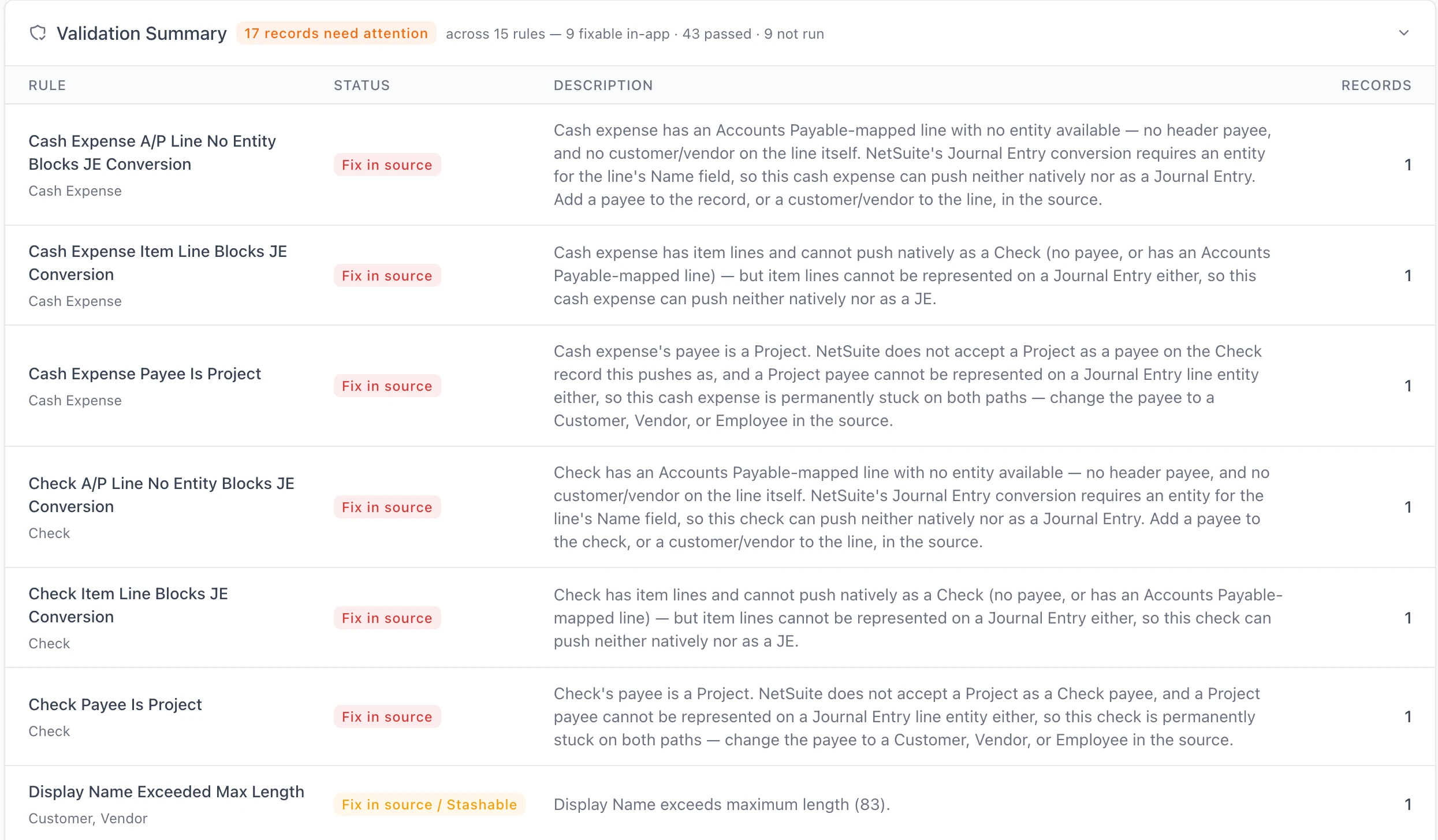
That header line is the one to put in a scope document, because it separates the four things a single “issues found” count runs together: the records affected, the rules that flagged them, the share you can resolve without the client, and the rules that have not run yet.
Ordering is part of the scope, not the schedule
Sequence usually gets filed under project management. In practice it decides which records can move at all, and when the ordering is left unresolved the symptom is a pile of blocked records rather than a late start.
The chain itself is unforgiving. Accounts and metadata come before everything else. Customers, vendors and items have to land before the transactions that name them. Invoices have to land before the payments that settle them, since NetSuite’s Customer Payment import requires the invoice to already exist, keys on internal or external IDs rather than document numbers, and will error where the A/R account on the payment does not match the A/R account on the invoice.
NetSuite also has a required surface of its own, with no equivalent in the source system and therefore no data to migrate into it. Every record belongs to a subsidiary. Every subsidiary has a base currency. Items need tax schedules and posting accounts. Departments, locations and classes have to be decided and mapped, including whether you are tagging them per line or per transaction, which is an accounting preference that changes what a correct migration even looks like. The same goes for terms, tax codes, payment methods, shipping methods and any custom fields you are carrying across.
Each of those is a decision, and every one left open is a class of records that cannot move. Two of them are worth reading up on before you commit to a mapping: class and location to department, location and class, and field mapping across the record types generally. Which method you use to move the records is its own decision, and the trade-offs between every available route belong in the scope alongside them.
Scope the proof, not just the push
Reconciliation is the most consistently under-scoped part of these projects, usually because it gets filed as a phase at the end instead of estimated as work with a size.
Balances are the easy half: trial balance, balance sheet, P&L and cash flow compared across the two systems, plus A/R and A/P aging. Budget for them, and budget for the fact that they will not agree on the first attempt. What tends to get missed is that a matching trial balance does not mean the migration is correct. Offsetting errors net out. A missing transaction inside a matching total is invisible, and a transaction that arrived in a different form still adds up to the same number. Checking that every record arrived, in the right form, with the right lines, is a separate exercise from checking that the totals tie, and it needs its own line in the scope.
The approach that actually holds a timeline together is verifying as you go. Push an interval, compare the source statement against the destination statement for that interval, then move on to the next one.
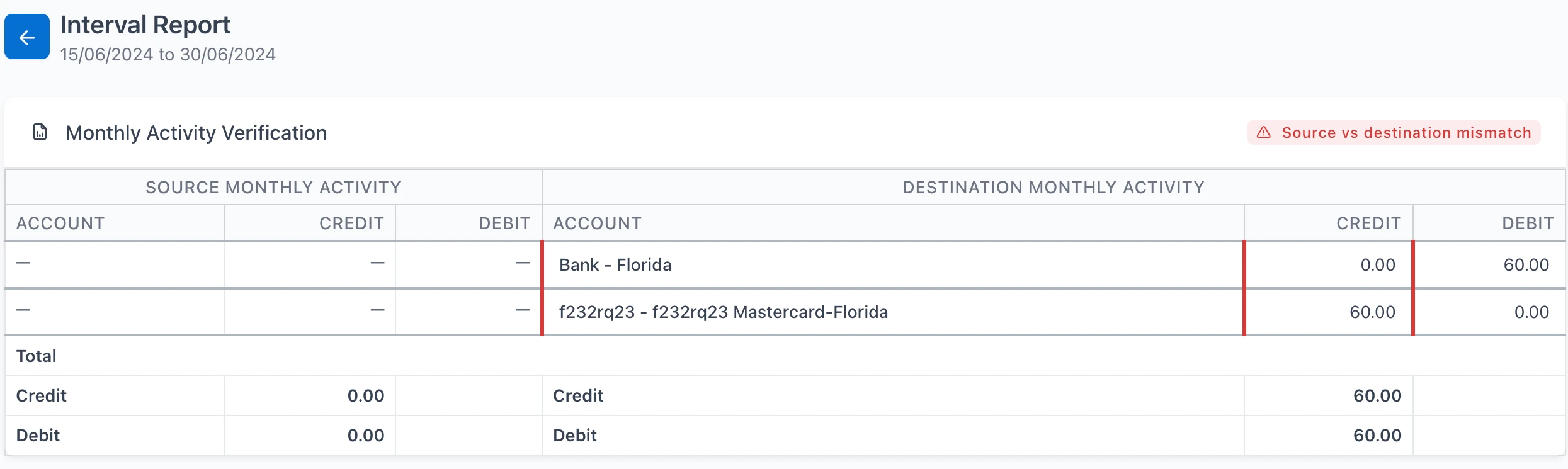
A discrepancy caught inside a fortnight of transactions costs you an afternoon. Find the same discrepancy after six years of pushes and it turns into a forensic exercise, because by then you are no longer asking what went wrong, you are asking which of two hundred thousand records went wrong.
Two more items belong in the scope for the same reason: a rehearsal in a sandbox account before anything touches production, and an explicit sign-off step naming whoever accepts the reconciled result. Both tend to get assumed, and neither of them is free.
What a scope document should actually contain
Most scoping documents stop at goals and roles, which is the easy half. The half that determines whether your estimate survives contact with the data looks like this:
- Record counts by type, and by year, with the active and total split for master data
- The cutoff date, the count on each side of it, and what has to cross it anyway
- Record types NetSuite will not accept in their source form, counted, with the decision for each already made
- Findings grouped by who fixes them and where, with counts and an owner per group
- The metadata and mapping decisions NetSuite requires, and who signs each one off
- Push order, derived from the dependencies rather than from convenience
- The reconciliation set, at both the statement and the record level, with a stated tolerance
- A sandbox rehearsal, and a named person who signs off the production result
Every item on that list resolves to a number you have counted or a decision somebody has actually made, which is what keeps the estimate off guesswork.
How SuiteMigration handles it
The Migration Readiness Audit was built to produce exactly this, before anyone commits to anything. It is free, and it is the deepest read the product performs. It pulls the source dataset in full, whether that is QuickBooks Online, Desktop and Enterprise, or Xero, into SuiteMigration and measures it there, because source systems cannot answer these questions about themselves.
You get the master-data counts with the active and inactive split, transactions broken out by type and by year, the first transaction date and the number of periods to reconcile, and every validation rule with an issue count against it. Rules report as Review, Passed, Not Run or Not Configured, which preserves the distinction between a check that passed and one that has not been evaluated yet. Every finding also carries its remediation category, so the four groups in the table above come out of the audit already separated and counted. The report is white-labeled and can go to a client as it stands.
The same structure then carries through the rest of the project. Records that cannot push get separated into the four categories above instead of being dumped into a single failure bucket, so the pile that needs a decision never gets confused with the pile that is merely waiting on something. When a record’s shape is not valid for its native NetSuite type, converting it to a journal entry is an explicit action that leaves a visible mark on the record, so nobody discovers a silent substitution months later in an aging report. Statements are compared interval by interval as the push proceeds, which means a mismatch surfaces against a fortnight of transactions instead of six years of them.
Frequently asked questions
How long does a QuickBooks to NetSuite migration take?
Volume matters far less than the condition and shape of the data. A quarter of a million clean invoices is largely runtime. The calendar time goes on the few thousand records that break NetSuite's validation rules, or that NetSuite will not accept in the form the source system kept them, because each one needs a decision and some need a fix made in the source system on the client's schedule. Any date quoted before both of those have been counted is a guess.
How many years of history should we migrate to NetSuite?
Look at the year-by-year transaction curve before answering, rather than deciding in the abstract. Recent years usually hold far more records than the early ones, so a cutoff tends to remove less volume than people expect it to. And whatever year you settle on, anything still open before that date has to come across anyway, or arrive as an opening balance.
How are QuickBooks transfers migrated to NetSuite?
As a two-line journal entry that debits the account the money moved to and credits the account it came from. NetSuite does have a transfer record, but it cannot be created through the API, and there is no funds-transfer CSV import either. The transfer-shaped imports NetSuite offers are Transfer Order, Inventory Transfer and Bin Transfer, all of which move stock rather than money. That leaves the journal entry as the only route in, and nothing is lost by taking it, since unlike a payment a transfer has nothing to apply to. Missing or unmapped accounts at either end are the only thing that will block one.
Why does NetSuite reject my customer email addresses?
Nearly always because the source field holds more than one address. QuickBooks will happily keep two or three of them in a single email field, separated by commas or semicolons, while NetSuite expects one correctly formatted address and rejects the record when it gets anything else. The extras do not have to be lost. They can be split out into a custom field and carried across that way. But the affected records have to be identified first, and there are normally more of them than anyone expects.
Why do records fail to import into NetSuite?
Almost always because the source system allowed something NetSuite does not. A name or description over NetSuite's character limit. Multiple or malformed email addresses, a website URL that fails stricter validation, duplicate item names, a transaction posting to an account of the wrong type, or a check or credit card charge with no payee. Every one of those can be counted in advance.
What is a Migration Readiness Audit?
It is a full read of the source dataset that reports what is actually in there: counts by record type, the year-by-year transaction distribution, the first transaction date and period count, and every NetSuite validation rule with the number of records that fail it. The point of it is to replace a scoping conversation with a set of measurements. SuiteMigration's audit is free, and the report is white-labeled.