

NetSuite Financial Statements API: Why There Isn't One
NetSuite has no financial statements API. Here's why that's not an oversight — and what it takes to rebuild the balance sheet, P&L, and trial balance yourself to prove your books match.


You’ve done the hard part. Ten years of QuickBooks history — customers, vendors, items, invoices, bills, payments, journal entries — now lives in NetSuite. Every record has an ID on both sides.
Now comes the part nobody scoped: proving the two systems agree.
For a real-world account of the silent failures this process is designed to catch, see our QuickBooks Online to NetSuite migration with Claude and MCP.
Why the manual tie-out collapses
The instinct is to do it by hand: run the trial balance in QuickBooks, run it in NetSuite, put them side by side, and work down the columns.
Three things kill it.
Volume. One month is an afternoon. Ten years is 120 months across four statements — 480 report pairs, each a hundred-odd account lines.
The columns don’t line up. Same account, different name. Same account, different position. One line in QuickBooks; a parent, two children, and a subtotal in NetSuite:
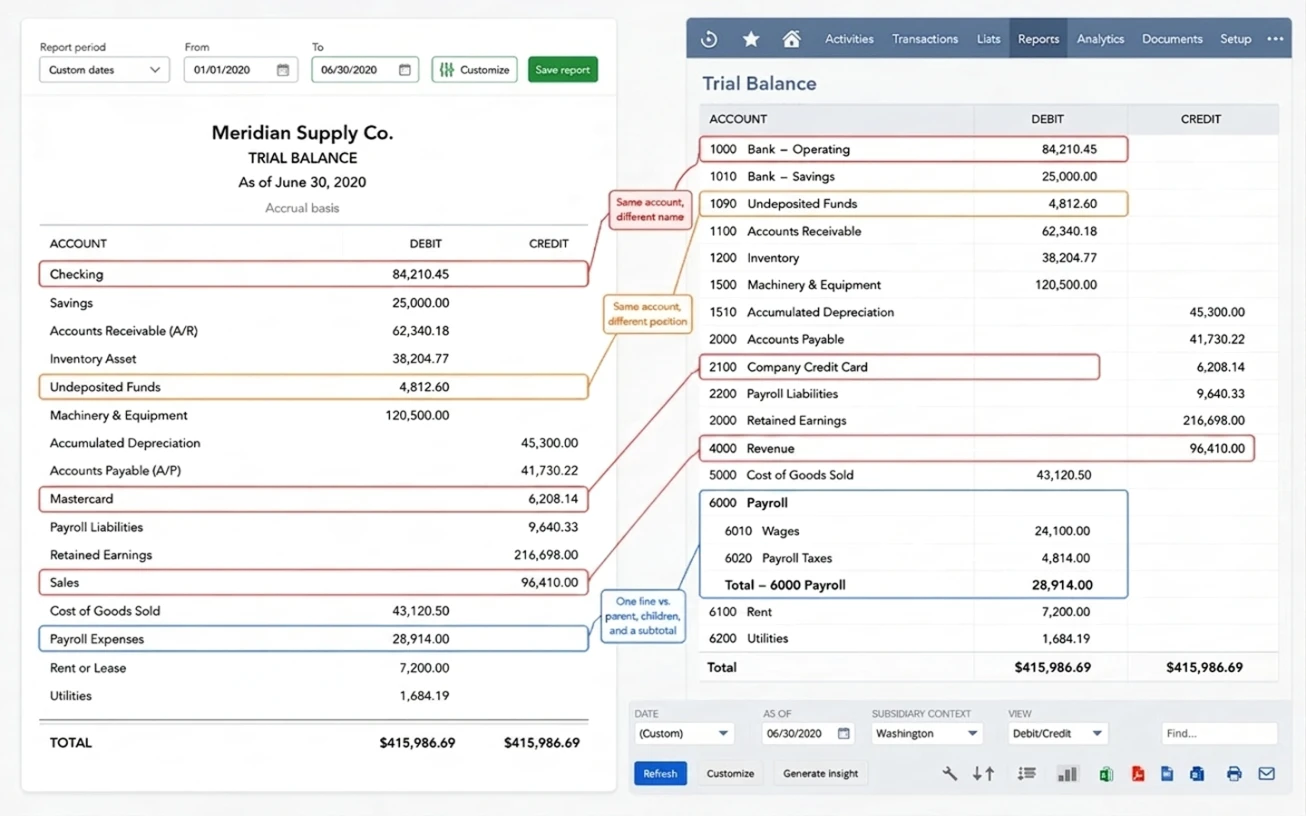
None of those mismatches is an error — both reports total $415,986.69. Even perfect agreement has to be matched row by row before it can be verified.
Iteration. Find a real problem, fix a mapping, re-push — and every comparison you’ve already finished is stale. Not 480 report pairs. 480 per iteration, and migrations iterate.
Which is why teams reach for automation.
Then you go looking for the API
The natural next step: pull both sets of statements programmatically and diff them.
QuickBooks makes that easy. Its Reports API returns a Balance Sheet, P&L, Trial Balance, or Cash Flow statement as structured data, for any period you ask.
Then you go looking for NetSuite’s equivalent, and it isn’t there. You’ll find a REST API for records, SuiteQL for querying tables, saved searches, SuiteAnalytics Connect for warehouse-style access. You won’t find an endpoint that hands you a balance sheet.
That’s not a gap Oracle hasn’t gotten around to filling. It’s a hint about what a financial statement actually is: A financial statement isn’t data. It’s a computation.
Your balance sheet isn’t stored in NetSuite. It doesn’t exist until you open the report — NetSuite computes it, on the spot, from the general ledger. No table holds “retained earnings as of December 2024” waiting to be fetched.
The API gives you the inputs. The computation stays inside the product.
So if you want statements programmatically, you don’t have an integration problem. You have an accounting problem: You have to rebuild the computation yourself.
“Can’t you just write a script for it?”
You can, and plenty of teams do. SuiteScript can walk the ledger; a saved search can aggregate it. In skilled hands, it works.
But look at what the script is: the statement computation, written by you, living inside NetSuite. You haven’t avoided the math — you’ve only chosen where to put it. Every rule in the rest of this post still has to exist somewhere in that code.
And those rules arrive the hard way. Version one answers “does the balance sheet total match?” — it does. Then retained earnings turns up off by a year’s profit. Then the cash flow signs look inverted. Each rule is discovered from a wrong number, after someone trusted the output.
Meanwhile the script is chewing through ten years of ledger inside NetSuite’s governance limits — so now there’s chunking, and resumption logic, and the quick script is a project.
And one limit no amount of effort clears: a script inside NetSuite can only ever compute the NetSuite side.
A tie-out means something only if both sides are computed the same way — and now they aren’t. Your NetSuite figures come from your script; your QuickBooks figures come from Intuit’s Reports API. Every difference has two explanations: a real migration problem, or two systems applying different rules. Nothing in the numbers tells you which, so you end up investigating discrepancies that were never there.
One ledger, many lenses
Here’s the reframe that makes this tractable.
The four statements aren’t four datasets. They’re four aggregations over the same transaction rows:
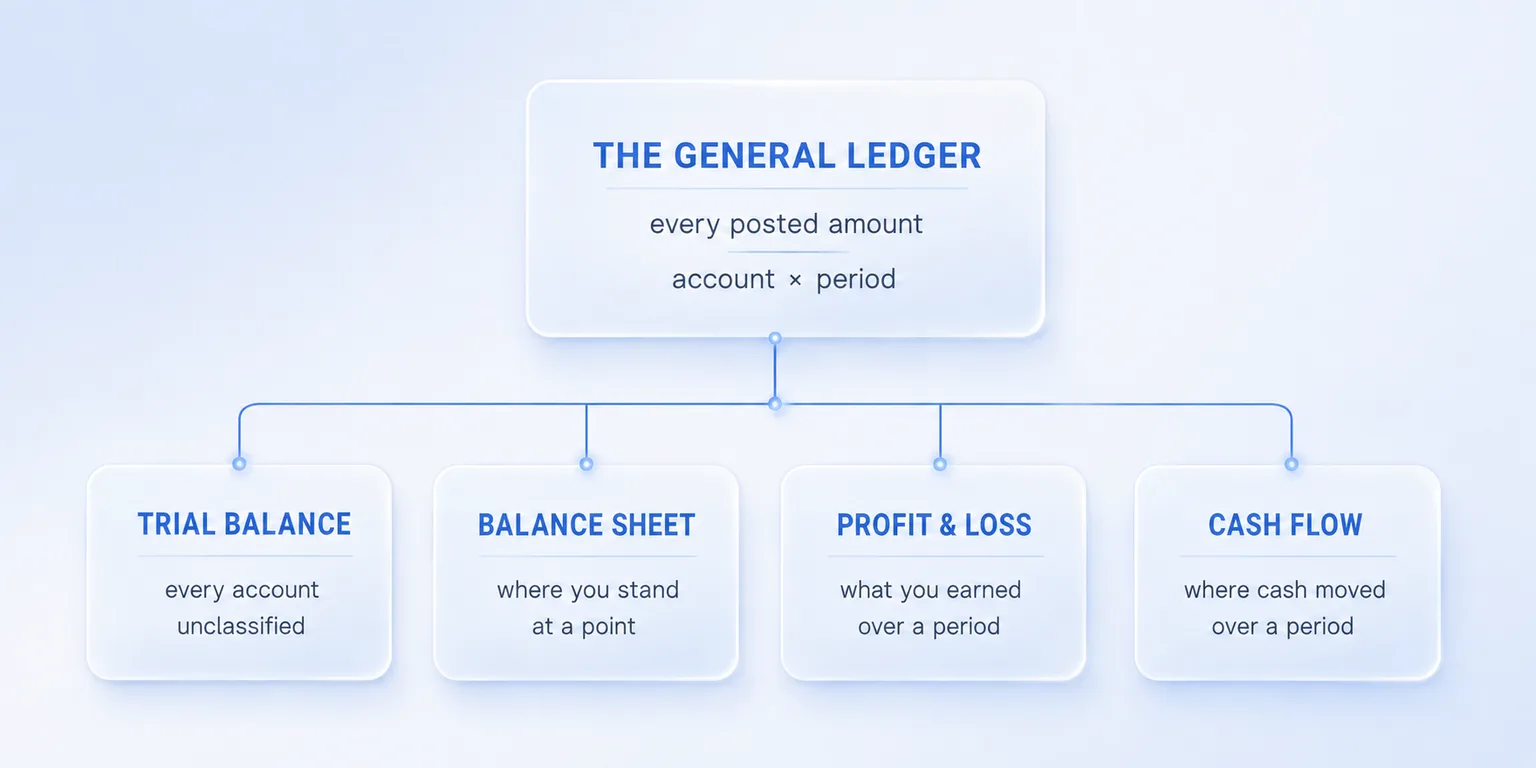
What differs is the lens: which accounts are included, over what window of time, with what sign, grouped into which sections.
Which is good news — you don’t build four report generators. You build the computation once, and each statement is a different set of rules over the same aggregated ledger.
So what is that computation made of?
What the computation involves
Five things. None are exotic, but each is a place where a naive implementation produces a statement that balances and is still wrong.
1. Time semantics: some accounts remember forever, others reset
Balance sheet accounts — bank, receivables, payables, equity — accumulate from inception. Their balance on any date is every transaction that ever hit them.
P&L accounts — income, expense, cost of goods sold — reset. They start each fiscal year at zero.
Your operating account holds $50,000 on 31 December. On 1 January it still holds $50,000 — nothing happened, but the balance carries. Your office supplies account ran $12,000 of expense through the same year. On 1 January it reads $0.
Same ledger. Same query. Different window.
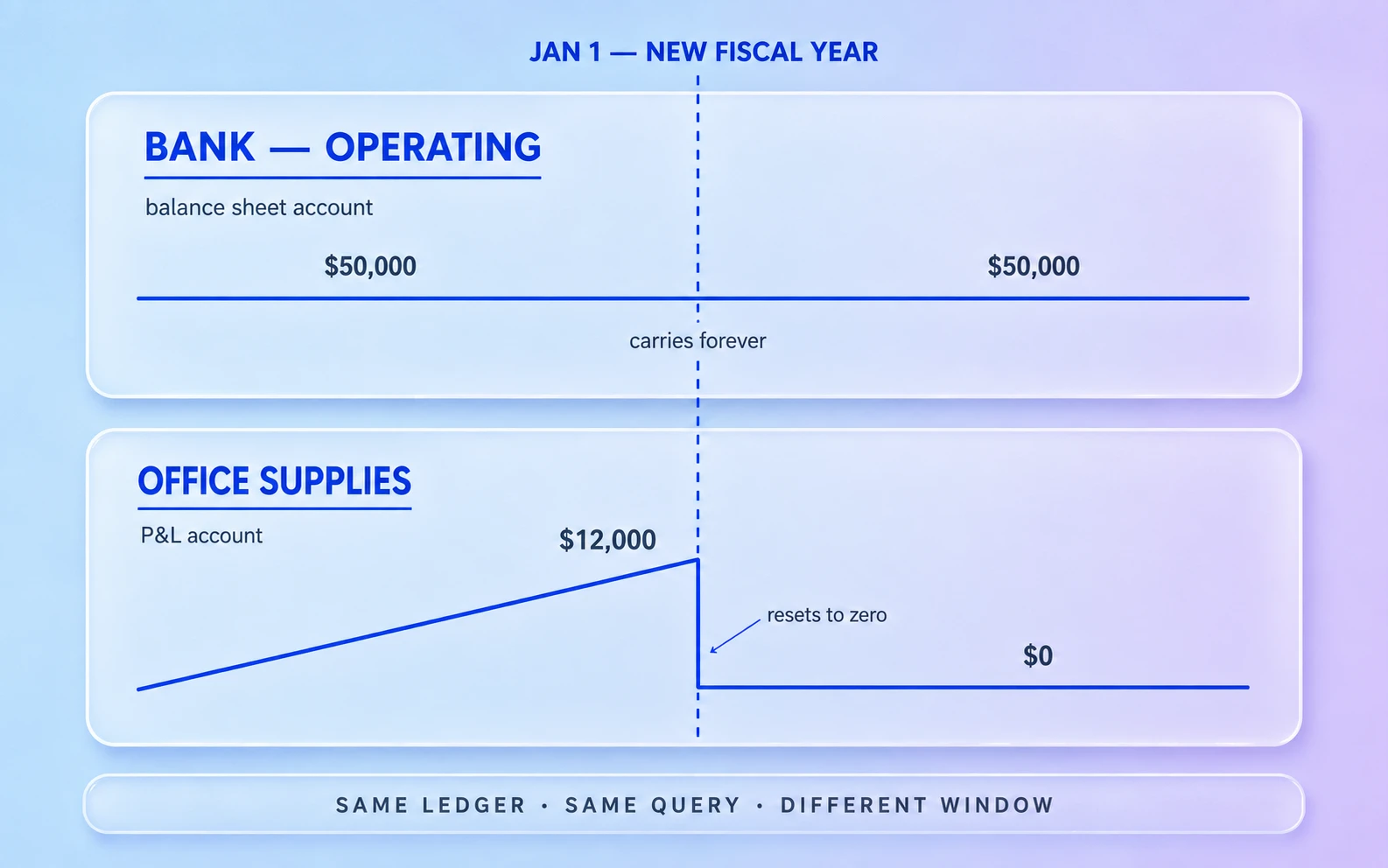
The difference isn’t in the data. It’s a rule in the computation, keyed to the account’s type.
2. The fiscal-year close: retained earnings is an output, not an input
When a fiscal year ends, prior-year profit doesn’t evaporate — it moves. Every P&L account closes out, and the net result lands in retained earnings. Migrating ten years of history means crossing that boundary nine times.
If year one netted $180,000 and year two $220,000, retained earnings must hold $400,000 entering year three — even though not a single transaction ever posted to the retained earnings account.
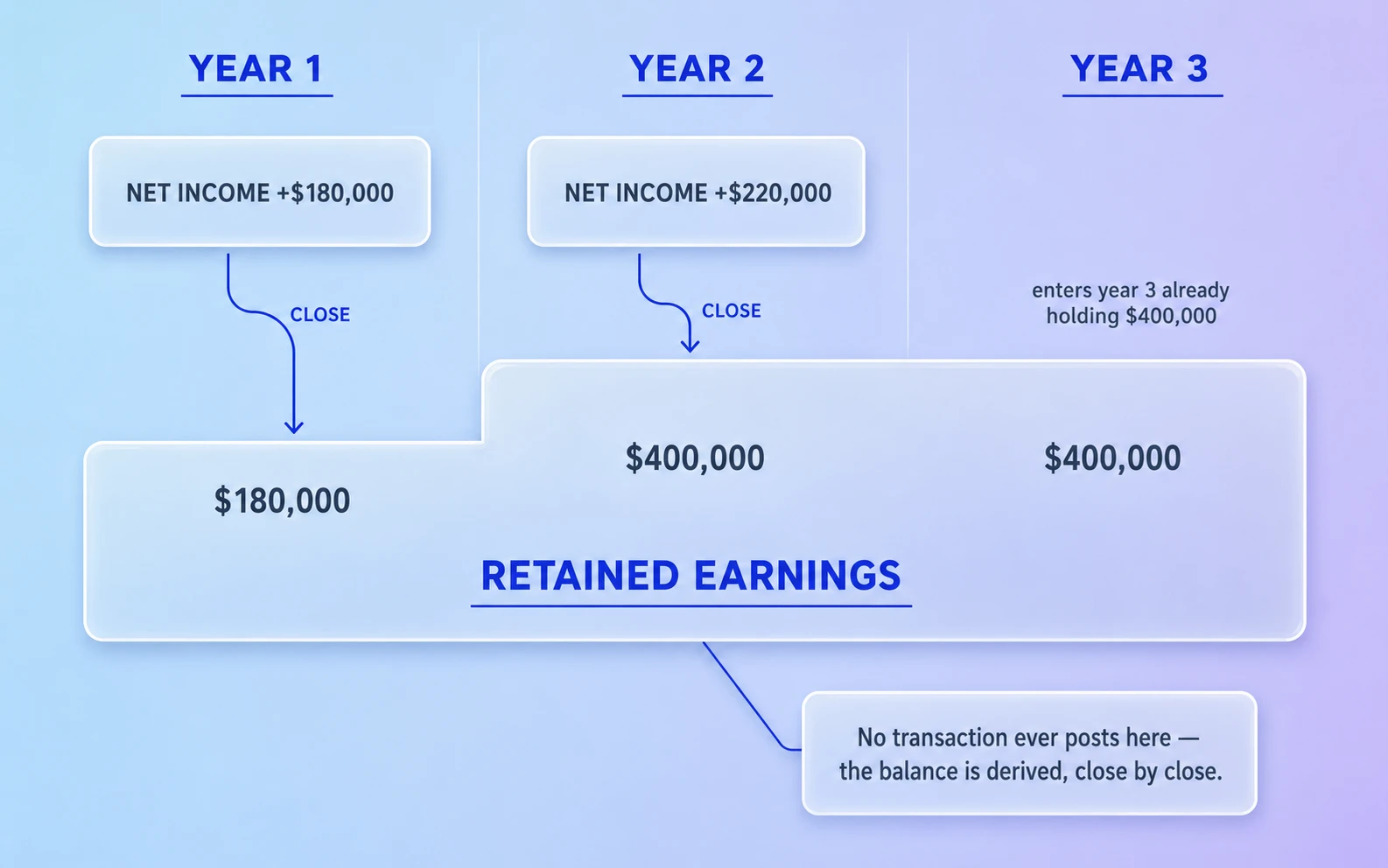
You can’t copy that number across. No transaction produced it. Your computation has to derive it by running the closes in order — and if it skips one, retained earnings is silently short by exactly one year’s profit.
One more thing, said plainly: retained earnings is a real account, not a plug figure to force the balance sheet to balance. A system that treats it as a plug will always produce a balanced balance sheet. That’s precisely the problem.
3. Sign conventions: debit − credit is the raw truth, but “positive” depends on who’s asking
At the ledger level there are only debits and credits. Everything else is presentation.
An income account with $0 in debits and $95,000 in credits has a signed balance of −95,000. On the trial balance, that’s a $95,000 line in the credit column. On the P&L, it’s revenue of positive $95,000. On the cash flow statement, it feeds net income with its sign flipped again to express cash direction.
One number, three presentations — because a reader expects “revenue: 95,000,” not “revenue: −95,000.” Every flip is a rule the computation has to encode explicitly.
4. Classification: the account’s type decides which statement it lands on
An amount doesn’t know where it belongs. Its account’s type does the routing.
A credit card account is a liability on the balance sheet. On the cash flow statement, the same account is a working-capital adjustment inside operating activities. Change that account’s type and the amount silently relocates to a different section of a different statement.
This is why account type mapping matters more in a migration than name mapping. A misnamed account is cosmetic and obvious. A mistyped account still balances the trial balance perfectly — a trial balance doesn’t classify anything — while quietly deforming the balance sheet, P&L, and cash flow.
5. Completeness: you can’t compute a correct statement from partial data
The last piece is structural rather than accounting.
March’s closing bank balance doesn’t depend on March’s transactions. It depends on every transaction since the account opened.
That rules out the tempting implementation — accumulating statement lines page by page as data arrives. Statement math is a finalization step over a complete snapshot, not a running total.
And because migrations get re-run, finalization has to be idempotent: run it twice, get the same statement — not double the numbers.
Where this breaks in practice
Everything above sounds theoretical until you watch it fail. Here’s the failure that captures the pattern.
A ledger pull comes back with one month missing — say January of a middle year. Maybe nothing posted that month; maybe pagination skipped it. Either way, the computation fills the gap by carrying December forward.
Seems harmless. It isn’t. January is a fiscal year boundary. Carry December forward without recognizing that, and the year never closes — prior-year P&L balances never reset.
The result: a subscription expense account that should read $0 on the new year’s trial balance still shows last year’s total, and retained earnings is short by exactly last year’s net income.
The trial balance still balances — perfectly. It’s simply wrong, for every period after the gap.
Missing data doesn’t mean missing fiscal years. The computation has to know year boundaries exist even when the ledger has no rows to prove it.
The same shape of bug shows up in the other statements:
- Balance sheet — prior-year profit left sitting in Net Income instead of retained earnings. Equity still totals correctly; both lines are wrong.
- P&L — sign convention backwards for one account family. Revenue displays negative, quietly distorting net income.
- Cash flow — non-bank amounts not negated. A growing receivables balance reads as cash arriving, not cash tied up.
The common thread: no errors, no broken totals — just plausible statements that disagree with the source books. Nothing tells you to look.
The payoff: a tie-out that runs itself
Here’s why doing this work is worth it.
Once you own the computation, you can point it at either system’s ledger. Run it over the QuickBooks data. Run it over the NetSuite data. Compare line by line.
Both sides went through identical rules, so a difference can only mean one thing: the underlying data differs. That’s exactly the ambiguity the in-account script couldn’t resolve — and removing it is most of the value.
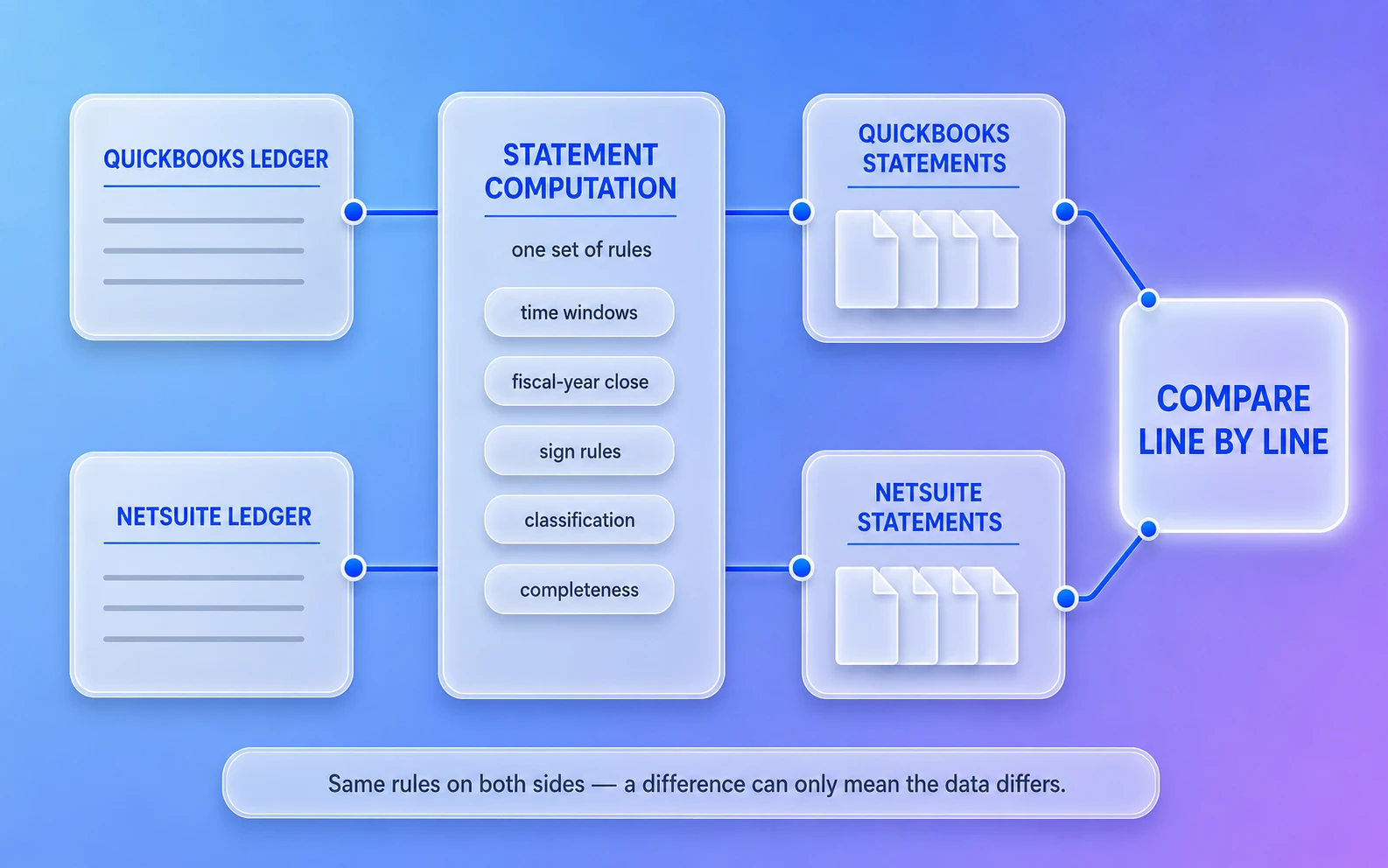
The tie-out stops being an 11pm spreadsheet exercise before go-live and becomes a check you can re-run at any point, as many times as you like.
Better: differences become diagnostic. A variance isolated to one account points at a mapping. A variance that moves between sections points at an account type. A variance that appears only after a year boundary points at the close. “Why don’t these match?” becomes “which rule did we get wrong?” — a much smaller question.
That’s the principle SuiteMigration’s validation is built on: statements from both systems, normalized into one structure and compared under one set of rules — mechanical and repeatable rather than manual.
One caveat worth carrying away: a statement tie-out proves the magnitudes agree, not that the same transactions are behind them. A record can be missing, or flattened, or posted as a journal entry instead of its native type, and every statement will still tie. That is the other half of the job — reconciling transactions rather than totals.
Frequently asked questions
Does NetSuite have a financial statements API?
No. NetSuite’s REST API exposes records, SuiteQL queries tables, and SuiteAnalytics Connect offers warehouse-style access — but nothing returns a finished balance sheet, P&L, trial balance, or cash flow statement. Statements have to be computed from the general ledger.
Can QuickBooks Online return financial statements through its API?
Yes. QuickBooks Online’s Reports API returns the balance sheet, P&L, trial balance, and cash flow statement as structured data for any period — which is why the QuickBooks side of a tie-out is the easy half.
How do you pull a trial balance from NetSuite programmatically?
You query the ledger — posted transaction lines joined to accounts and accounting periods, via SuiteQL — and aggregate debits and credits per account and period. Then you apply the statement rules yourself: time windows by account type, sign conventions, fiscal-year closes, and a finalization pass over the complete dataset.
Doesn’t NetSuite carry retained earnings forward automatically?
In its own reports, yes — NetSuite derives retained earnings at report time, without ever posting closing entries to the ledger. That’s exactly why a rebuilt computation has to derive the fiscal-year close itself: there are no closing rows in the ledger to pull.
Why doesn’t my trial balance match after a QuickBooks-to-NetSuite migration?
Check the three usual suspects in order: a variance isolated to one account points at a mapping, a variance that moves between sections points at an account type, and a variance that appears only after a year boundary points at the fiscal-year close. And remember: a trial balance can balance perfectly and still be wrong.
How does SuiteMigration validate a migration?
It normalizes statements from both systems into one structure and compares them under one set of rules — trial balance, balance sheet, P&L, and cash flow, period by period, with account mappings applied. A difference that survives means the data differs, not the methodology.