

Migrating Historical Transactions: What to Bring, What to Leave
Which historical transactions to bring into NetSuite, and which to leave behind. A per-record-type default and the four questions that flip it for your books.

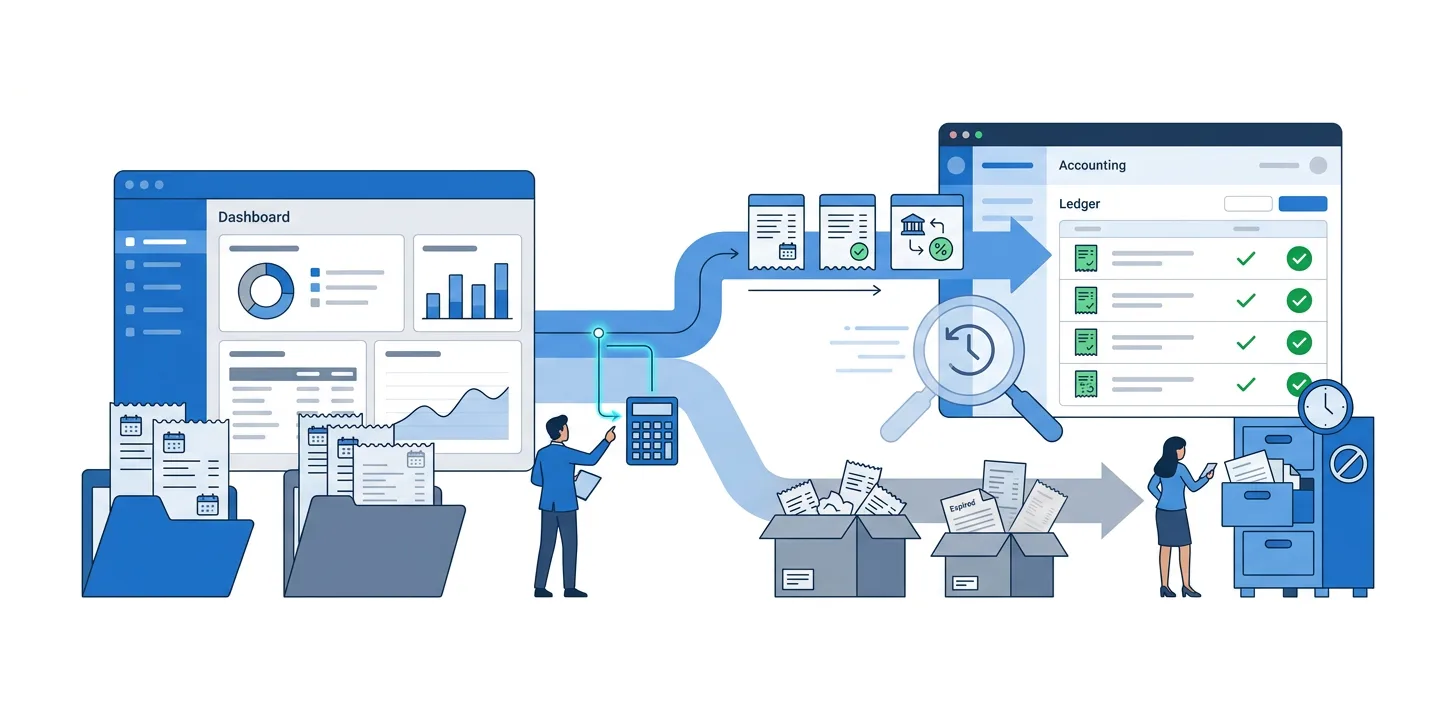
Sooner or later in a QuickBooks or Xero to NetSuite migration planning meeting, someone asks how much history to bring. The last three years? Ten? Everything? Nothing at all, and start clean on day one?
The right answer depends on your books. What holds across every migration is a default for each type of record, and a small set of questions that decide when to flip those defaults for yours.
What “historical” means here
A historical transaction, for this decision, is a posted transaction dated before the cutover: invoices, bills, payments, credit memos, deposits, and journal entries. Open A/R and A/P are historical by date but always come across because you still have to collect on them and pay on them, so the bring-or-leave question is only about transactions that are already closed.
Master records like customers, vendors, items, and the chart of accounts are a separate question. Almost everything active goes, and inactives are a housekeeping call, not a scope call.
The default answer, by record type
Start here. These are the defaults most implementations settle on when nothing else changes the equation. The four questions in the next section are how you decide when to reverse a default for your books.
| Record type | Default | When to reverse |
|---|---|---|
| Open invoices (unpaid A/R) | Bring | Always. You cannot collect on what NetSuite does not know about. |
| Open bills (unpaid A/P) | Bring | Always. Same reason, in reverse. |
| Open credits still available to customers or vendors | Bring | Always. A remaining credit balance has to be visible before the next invoice or bill. |
| Closed invoices from prior years | Leave | Bring if collections, sales, or CS looks up historical customer purchases inside NetSuite, or year-over-year revenue detail runs inside NetSuite rather than in the source system. |
| Closed bills from prior years | Leave | Bring if AP investigates historical vendor activity inside NetSuite. |
| Payments that settled closed transactions | Leave | Follows the invoices or bills they settled. Bring the payment if you brought the document it applied to, otherwise the payment has nothing to apply to. |
| Historical journal entries | Leave, or bring as monthly summary journals per period | Bring the individual entries only if audit or reconciliation references them inside NetSuite. |
| Historical estimates, quotes, and non-posting records | Leave | Bring only if a pipeline or forecast in NetSuite genuinely needs them; usually the CRM keeps its own copy. |
Two familiar shapes fall out of this table naturally.
Take every Leave default as-is: what arrives in NetSuite is open balances plus a set of journals for the closing trial balance. Reverse every Leave: full transactional history for the chosen year range. The middle option, summarised history, is the specific choice to leave the individual transactions but add period-level summary journals so prior-period P&L and balance sheet still run inside NetSuite. Each of those is a valid pattern; which one you end up with is a consequence of the individual defaults you flipped, not a shape you pick up front.
The four questions that flip the defaults
Answer these against your own data. Each one moves specific rows in the table above from Leave to Bring, or the other way.
1. What are you actually required to keep?
Retention is the floor. Everything above is a business choice; this part is not.
The IRS’s period-of-limitations table gives the general rule:
- 3 years for standard records.
- 6 years if you underreport income by more than 25%.
- 7 years for a claim from a bad debt or worthless-securities loss.
- Indefinitely for a fraudulent return, or a year in which no return was filed.
- 4 years for employment-tax records, separately.
State tax authorities, industry regulators, and long-tail contracts (leases, warranties, indemnities that survive termination) can extend any of these.
Retention rules care about producing records to an auditor. They are silent on where those records happen to live. A legacy Xero login you keep read-only will satisfy them fine, and on the retention question alone the answer is “keep the source system alive for however many years the rules require.” The math changes when someone in Finance costs that out. Seven years of a second ERP subscription is not nothing. Once the licensing spreadsheet lands on the CFO’s desk, the retention question quietly turns into a licensing question, and the closed-invoice default gets flipped for reasons that have nothing to do with reporting.
2. Who inside the company looks up prior-period detail?
Walk through the specific workflows that would break if the history were not in NetSuite:
- A collections analyst opening a customer to see the invoice being disputed. If the invoice is a year old and history was not migrated, they open the source system instead.
- An AP clerk investigating a vendor overpayment claim.
- A CSM answering a “what did we bill you last April” question mid-call.
- A finance team pulling year-over-year trends. Trends by month, department, or class need periodised data, and that data must be in the system that runs the report.
If none of those workflows exist for prior periods, the defaults hold and you are done with this question. Where they do exist, each one maps onto a specific row in the table. A collections analyst who opens closed invoices is a vote for the closed-invoice row to flip. An AP clerk who investigates old vendor claims is a vote for the closed-bill row. Year-over-year revenue detail votes for both. Audit that references historical journals votes for the journal row. “We sometimes need it” is not a vote. Pick the row deliberately or hold the default.
The level of detail matters as much as the workflow itself. A revenue trend by month wants totals per period, and summarised history is enough for it. A collections analyst wants the actual invoice from March 2023 open in front of her, and summarised history is not.
3. What state is the source data in?
Importing everything from a source that has years of duplicates, misspellings, and orphaned references is not preservation. It is transferring a problem. A migration is one of the few structured chances a company gets to clean records that no one has budget to clean in the normal course of business.
Before flipping a Leave to Bring, pull an old year out and look at it. Are the customers still the customers you know, or are there three versions of Acme Corp sitting in there from a period when nobody was running the deduplication merge? Do the transactions in that year still reference records that exist today, or do half of them point at vendors that got purged in the last cleanup? And did the chart of accounts, the tax setup, and the subsidiary map look the same then as they do now?
A change in any of those turns a like-for-like migration for those older years into a translation project that costs a multiple of what the recent-year migration cost.
If newer years are clean and older years are not, the cut-off writes itself: bring the clean years, leave the messy ones. That may not line up with a round number like “last five years.” It might be three and a half years, or “everything after the Q2 2023 chart-of-accounts rebuild.” Use the actual date the mess started, not the number that fits neatly on a slide.
4. What does the volume make achievable?
Volume is where a strategic decision often gets made for a non-strategic reason. If moving twelve years is genuinely not doable with the tools the team has, someone in the room floats a clean break, everyone agrees quickly because the alternative sounds worse, and “we’re doing open balances only” becomes the plan. Nothing about your books actually drove that call. The CSV pipeline did. See the spreadsheet trap below.
If your volume is genuinely small, say a young company with a couple of hundred transactions a month, the volume question does not bind. Every default is up for you to decide on its merits. If the volume is large, the honest question is whether the migration approach in front of you can carry the choice you would otherwise have picked. If it cannot, name that out loud before the meeting reaches a consensus that dresses up a tooling constraint as strategy.
What the defaults produce, at scale
The numbers on SuiteMigration’s product, 217,359 transaction records across 124,812 invoices, 85,541 bills, and 4,127 customers, are typical of a mid-market business with a long trading history. Suppose that dataset spans 12 years and the four questions above are being worked through.
Every default held. What NetSuite gets is a few hundred open A/R lines, a few hundred open A/P lines, whatever open credits are still available to customers, and one set of journals for the closing trial balance. Under a thousand records total. This goes live in a week. The trade-off is that the old QuickBooks or Xero has to stay live too. It stays live for the retention window. For the collections analyst who wants to see last April’s invoice. For the AP clerk who has to explain what a vendor was actually paid for in 2022.
Closed invoices flipped, nothing else. Because the sales team looks up historical purchases in NetSuite and nobody wants them clicking into a legacy Xero tab. The invoice count moves from zero to around 124,812. Bills are still in the old system. Historical journals are still in the old system. Any workflow that touches a paid invoice runs in NetSuite; anything that touches a paid bill still lives in Xero.
Closed invoices, closed bills, and the payments that settled them, all flipped. This is the fullest version short of a period-summary layer. It brings across most of the 217,359 records; the pre-cutover journal entries you did not opt into are the only real exception. Every transactional workflow now runs in NetSuite. The old system only needs to stay up long enough for the oldest year still in the retention window to age out.
All the above, plus period-level summary journals for the years before the cut-off. A few hundred additional records: twelve years times twelve months times whatever your subsidiary count is. Prior-period P&L and balance sheet now run inside NetSuite even for years where the individual transactions were left behind.
At one-tenth the scale, say a five-person startup with a Xero organisation holding 20,000 lifetime transactions in total, none of this volume math matters. A CSV-and-macros approach will finish the job in an afternoon. So whatever choice you land on for that company is a real choice about the books. If the investor deck needs three years of history in NetSuite, bring three. If the CFO cares more about a clean start, take the clean start. The tooling constraint that dominates every mid-market planning meeting simply falls away at this scale.
What changes when you leave something behind
Anything you drop or summarise on the way in shows up as a different-shaped record on the other side. Two consequences of that are worth naming. Both pass every aggregate check on cutover day. Both surface months later, when a specific person tries to look up a specific thing and cannot find it.
Take Acme Manufacturing. At cutover they owed you $47,500 across eight invoices. Migrate Acme as a summary customer and their record in NetSuite shows a $47,500 balance in the right place, but none of the eight invoices sit under it. A CSM opening Acme’s file to see what makes up that balance gets the total and nothing else. She might call Finance to ask where the detail went. She might also quietly build her own report against the old Xero, tell nobody, and get away with it for six months until someone else’s numbers contradict hers. Both outcomes cost more than an email would have. Put the list of summarised customers in front of the CS team before go-live, and pull it back out the first time someone opens a support ticket that references history.
A payment migrated as a journal entry does not close the invoice it settled. If any part of your migration converts source payments into journals (a shortcut people reach for when the source and NetSuite payment models do not line up), the invoices those payments settled will stay open in NetSuite forever. Nothing on the A/R Aging Summary will tell you, because the journal shows up as a credit against the A/R account, not as an application against invoice INV-4592. The dedicated post on payments as journal entries walks through what breaks.
Any transaction that changes type on the way in has the same shape of problem: the balance is right, the record is wrong, and you find out about it from an angry customer who says their invoice was paid three months ago.
Neither of those shows up in a trial-balance reconciliation. Both need record-level reconciliation to catch.
The spreadsheet trap
There is a version of the bring-or-leave question that is not really about the books at all. It is: given the tools on hand, what is the largest migration we can actually complete without the project collapsing?
Twelve years of history through spreadsheets is the kind of plan that survives the first four years and collapses in the fifth. Year five is where someone renamed the “Software Subscriptions” account to “SaaS” and forgot to update the mapping tab, so a $340,000 line lands in the wrong bucket. Two days to trace it. Another day to fix the three downstream lookups pointing at the same tab. You are now four days into year five out of twelve, and the effort per year has just doubled.
By year eight the team is repairing formulas faster than they are migrating rows. Someone floats a “clean break” on the standup, everyone agrees quickly, because at that point it genuinely sounds sensible.
That is the meeting where the scope quietly gets cut. Someone senior floats the word “phased.” Someone else agrees that starting with open balances “sounds safer.” Twelve years shrinks to three by lunch. By the following Monday it has quietly turned into open balances only, and everybody leaves feeling the plan is stronger than it was on Friday. Sometimes the plan really is stronger. Sometimes the tool has made the decision and nobody in the room wanted to be the person to say so.
The hidden-costs post covers this in more depth. The point worth ending on here is smaller. “How much history do we bring?” is a question about your retention obligations, your workflows, the state of your source data, and the cost of keeping a second ERP subscription alive. It is not a question about how much your CSVs can carry before the pipeline collapses.
One page before the next planning meeting
Pull the default table into a document and read down the Leave column, one row at a time. For each row, decide out loud what would flip it in your business. Is there a report your CFO runs the third Monday of every month that needs paid invoices from the last fiscal year? Does your external auditor ask for the AP subledger back three years, or five? Is there a collections rule that reopens accounts past ninety days? Write the answer next to the row, along with how far back that answer applies. Anything you cannot come up with an answer for stays a Leave.
That page is your migration scope, in a form the CFO can look at on Monday. If any row surprises you as you fill it in, the plan you had before was based on an assumption about that row. Working through it now is cheaper than working through it on the Tuesday after cutover, in an incident channel, with sales asking why a customer’s balance looks wrong.
Every downstream question in the project, from reconciliation to cutover mechanics, is built on top of the scope you set here. The full QuickBooks to NetSuite migration guide walks through those in the order they come up.
Frequently asked questions
What counts as a historical transaction in a NetSuite migration?
Anything posted in the source system before the cutover date. The invoices you sent last quarter, the bills you paid last year, the journals that closed each month. Open A/R and A/P are technically historical too, but they always come across because you still have to collect and pay on them. So the bring-or-leave question really covers the closed ones from earlier periods.
Should I bring closed invoices and bills from prior years?
The default is to leave them. Bring them if collections, sales, or accounts payable look up historical purchase or vendor history inside NetSuite, or if you need year-over-year revenue and expense reporting at record level inside NetSuite rather than in the source system. Retention rules require that the records exist somewhere, and a live, read-only source system satisfies that as well as a migration does.
What about historical journal entries?
Default to leaving them, or bringing them as period-level summary journals that reproduce prior-period P&L and balance sheet movement. Bring individual historical journals only if audit or investigation references them inside NetSuite and cannot use the source system to look them up.
How many years of history should I bring?
There is no single number. Start from what statute or contract actually requires you to keep. The IRS's general rule is three years, with six for substantial underreporting and seven for bad-debt or worthless-securities claims. Then add whatever additional years your team looks up operationally inside NetSuite. Anything older than that adds cost without a use case.
What breaks if I bring payments as journal entries instead of native payment records?
The invoice stays open. Journal entries have no application link, which is the field that ties a payment to the specific invoice it settled, so NetSuite has no way to know that the money that just landed was meant to close invoice INV-4592. It sees a credit against A/R, the balance is right, and the aging report still shows the invoice sitting there past due. Migrate payments as Customer Payment records applied to the invoices they settled; that is the only way an invoice actually closes.