

QuickBooks to NetSuite Reconciliation: Matching Totals Isn't Enough
A trial balance that ties proves the buckets weigh the same — not that the same transactions are in them. Here's the class of migration errors that leaves every total intact, and what record-level reconciliation catches that aggregate checks can't.


You’ve finished the migration. The trial balance ties out to the penny. The balance sheet matches, the P&L matches, retained earnings rolls forward exactly as it did in QuickBooks. Every report you know how to run agrees with the source books.
So the migration worked — right?
Not necessarily. A matching total is not proof of a matching ledger. It’s proof that the buckets weigh the same. It cannot establish that the same transactions are actually in those buckets. And there’s a whole class of migration errors that live precisely in that gap — errors that leave every total untouched while quietly corrupting the individual records underneath.
A migration has to answer two separate questions. Did the numbers survive? And did the transactions survive? Aggregate checks — trial balance, statement comparisons — answer the first. On their own, they cannot answer the second.
Part 1 — Why totals lie: the blind spots every NetSuite migration risks
Before talking about how to catch these problems, it’s worth seeing why the checks most teams rely on can’t. Every one of the scenarios below leaves the trial balance and the financial statements perfectly intact. That’s exactly what makes them dangerous.
A correct total can hide an incorrect transaction
Aggregate checks work by summing, and summing is lossy by design: once individual transactions are rolled into a balance, you can’t recover them from the number. That’s not a flaw in the trial balance — it’s what a total is. But it means any error that leaves the totals intact is an error no total-based report can show you. And that’s a wider family of reports than people assume: the balance sheet, the P&L, and the cash flow statement are all rollups of individual transactions into balances.
Imagine a five-line customer invoice in a migration that is checked only through totals. It arrives with the correct total, tied to the correct customer, posting to the correct income and accounts receivable accounts, dated in the correct period. Every figure a report rolls up is right — so the trial balance ties, the P&L ties, and the cash flow statement ties.
But a faulty transformation has flattened its five itemized lines into a single summary line. Not one dollar changed. The customer, the accounts, the period, the total: all correct. Here’s what each layer of checking sees:
| Check | What it verifies | Result |
|---|---|---|
| Trial balance | Balance per account | ✓ Ties |
| Balance sheet / P&L | Statement totals | ✓ Ties |
| Cash flow statement | Cash movement by section | ✓ Ties |
| Record-level reconciliation | Each record against its source, line by line | ✗ 5 lines vs 1; class and location lost |
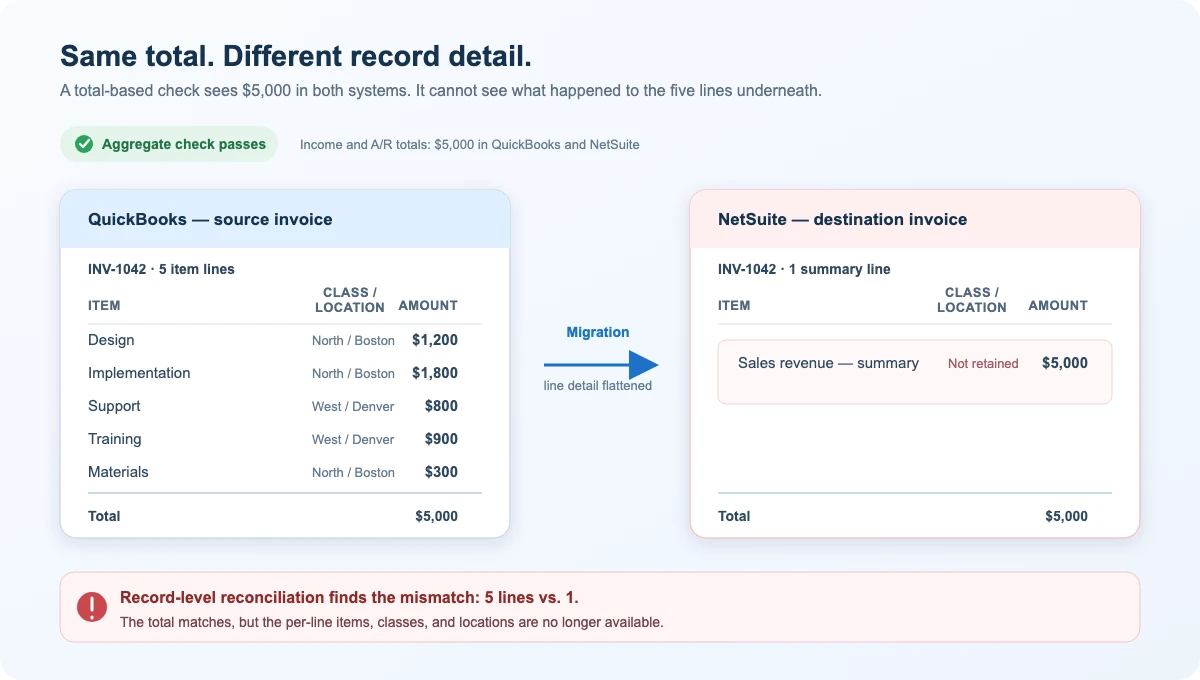
Same total, different record detail: aggregate checks pass because both records total $5,000; record-level reconciliation exposes the five-lines-versus-one mismatch.
The money is entirely correct, so every report built on money agrees. What’s gone is the composition: the line-level detail a total was never going to carry. And the moment someone needs it — product-level revenue, a sales commission, a class or location profitability cut, an audit sample — it isn’t there. The only thing that ever surfaces is a comparison that looks at each record against its source: line count, and the class, location, and entity on each line.
Completeness is a record-level question by nature
Whether every transaction even made it across is the same kind of problem — and not a soft one. Completeness is a formal audit assertion: “all transactions and accounts that should be presented in the financial statements are so included” (PCAOB AS 1105, ¶.11). A total can be exactly right with a record missing, as long as something unrelated came across high by the same amount in the other direction — and no total, however you slice it by account, period, or dimension, can distinguish “complete and correct” from “two differences that happen to cancel.” A more granular report narrows the set of records that can offset one another; it never proves that a given source transaction became its intended destination transaction. The only way to know each source record has exactly one counterpart in the destination — no more, no fewer — is to line them up and check.
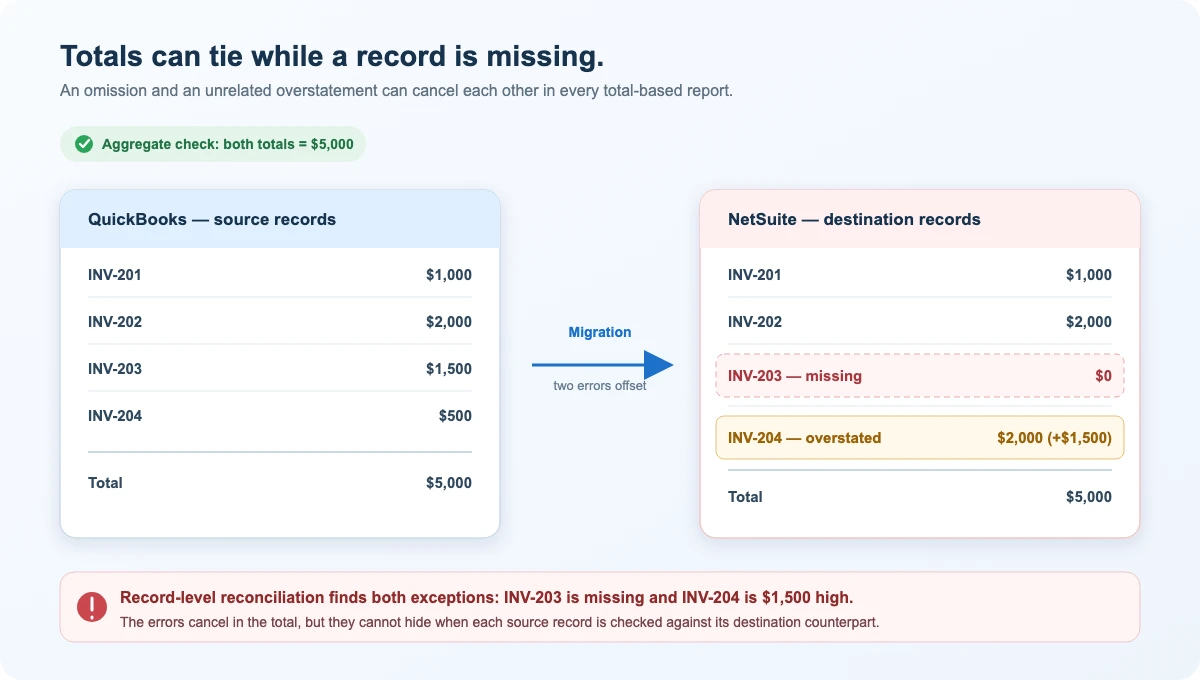
A total can still tie when errors cancel: record-level reconciliation identifies the missing source record and the unrelated offsetting error.
A transaction can arrive in a different form
Balance checks verify the numbers. They are blind to something else entirely: how a transaction is represented.
Not every QuickBooks transaction needs a one-for-one native counterpart in NetSuite. When the source and destination models do not align cleanly, a migration team may deliberately represent the event as a journal entry — a record that posts debits and credits to ledger accounts directly, without the originating invoice or bill. That can be the clearest and most auditable way to carry a transaction’s intended debit-and-credit effect into NetSuite.
This is not a failed migration. It is a change of form. A source payment, deposit, or expense can be carried as a journal entry rather than as the corresponding native transaction while the financial impact remains correct. Whether that is the right choice depends on what the business needs from its migrated history: faithful historical reporting, operational continuity, auditability, or some combination of the three.
The question is not whether a journal entry is inherently better or worse than a native record. It is whether the representation was chosen intentionally and is understood by the people who will use the data. A trial balance cannot answer that question. It can show that the money arrived in the right accounts, but it cannot reveal that the record changed form or tell you why.
That is why the change belongs in record-level review. The goal is not to force every journal entry back into a native transaction. It is to make each re-representation visible, so the source form, destination form, and reason for the choice can be reviewed together. Totals cannot provide that visibility because nothing about the totals has changed.
Even checking records isn’t automatically enough
By now the fix seems obvious: don’t trust the totals, check the transactions. But that’s only as good as how deeply you check. A record comparison that looks only at header totals can still miss a swap between two lines whose amounts trade places — the header sums to the same figure either way. So transaction-level verification has to be deep enough to matter, it has to catch records that went missing or changed form, and it has to turn into a list someone can actually work through. Doing all of that by hand, across a full transaction history, is where most migration QA quietly gives up.
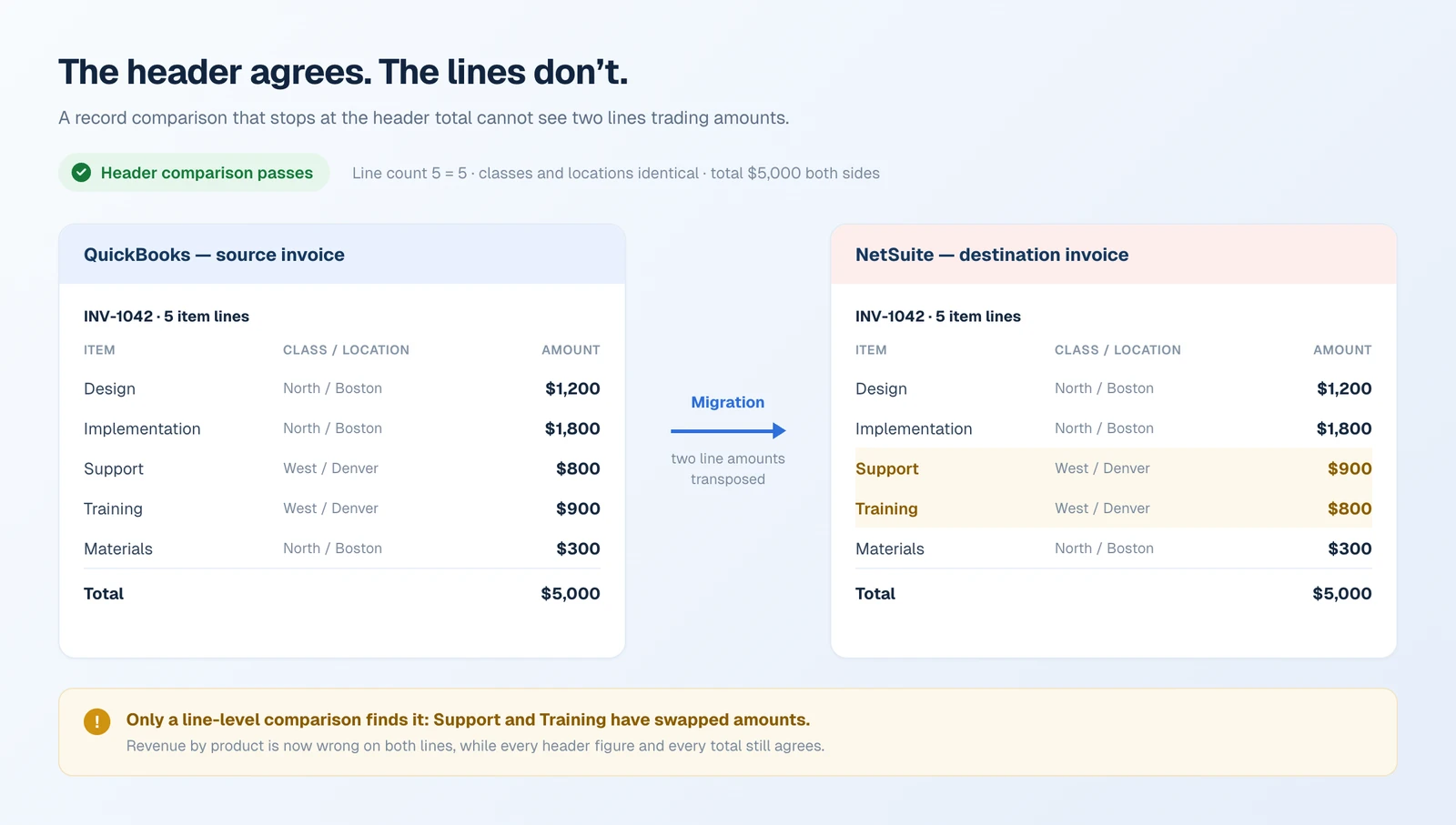
How shallow a record check can be and still pass: two lines trade amounts, and every header figure agrees.
Part 2 — How SuiteMigration closes the gap
This is exactly the gap SuiteMigration is built to close. Alongside the trial-balance and statement comparisons, it runs record-level reconciliation: instead of comparing totals, it compares transactions, one by one.
Before pushing transactions, map the required accounts, entities, and dimensions, then push the related customers, vendors, and items they depend on. Source-side problems that would otherwise surface later as mismatches are cheaper to find first, which is what the free migration readiness audit reads for. SuiteMigration pushes each transaction in its appropriate native NetSuite form where possible; for eligible records whose native path is unavailable, you can deliberately select a Journal Entry representation and review those decisions through the Pushed as JE tag.
That is what record-level fidelity looks like in practice. A five-line QuickBooks Sales Receipt can be pushed as a native NetSuite Cash Sale — the equivalent record on that side, for a sale paid at the time of delivery — with the same five item lines, quantities, descriptions, rates, and amounts preserved, not merely the same total.
QuickBooks — Sales Receipt #1056
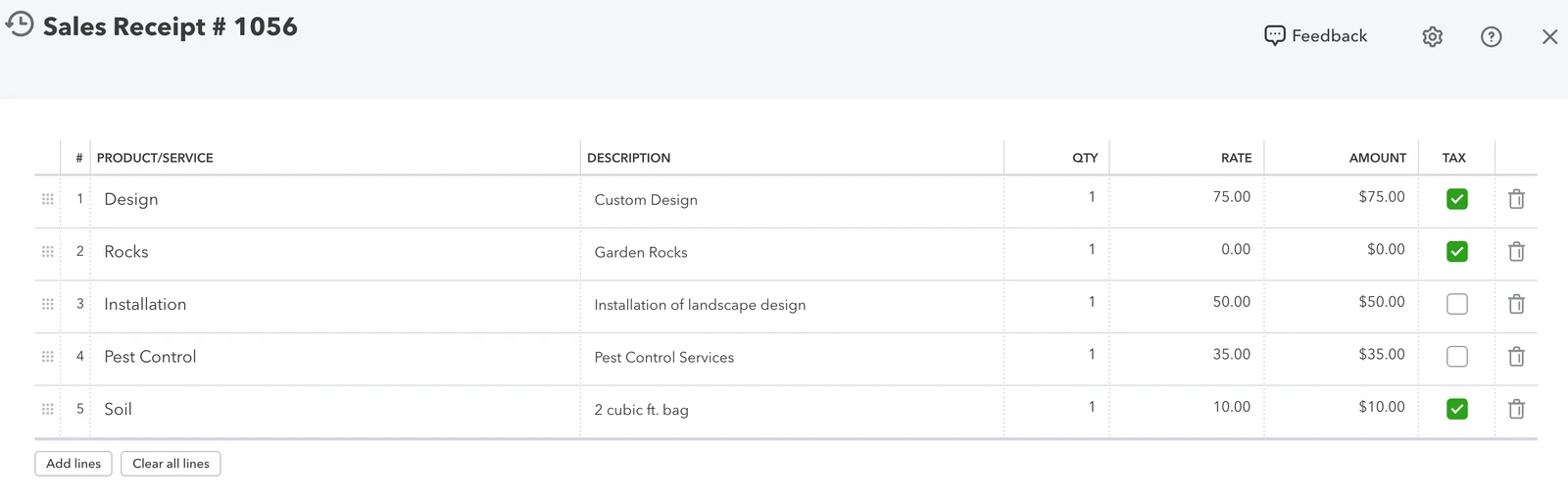
NetSuite — native Cash Sale
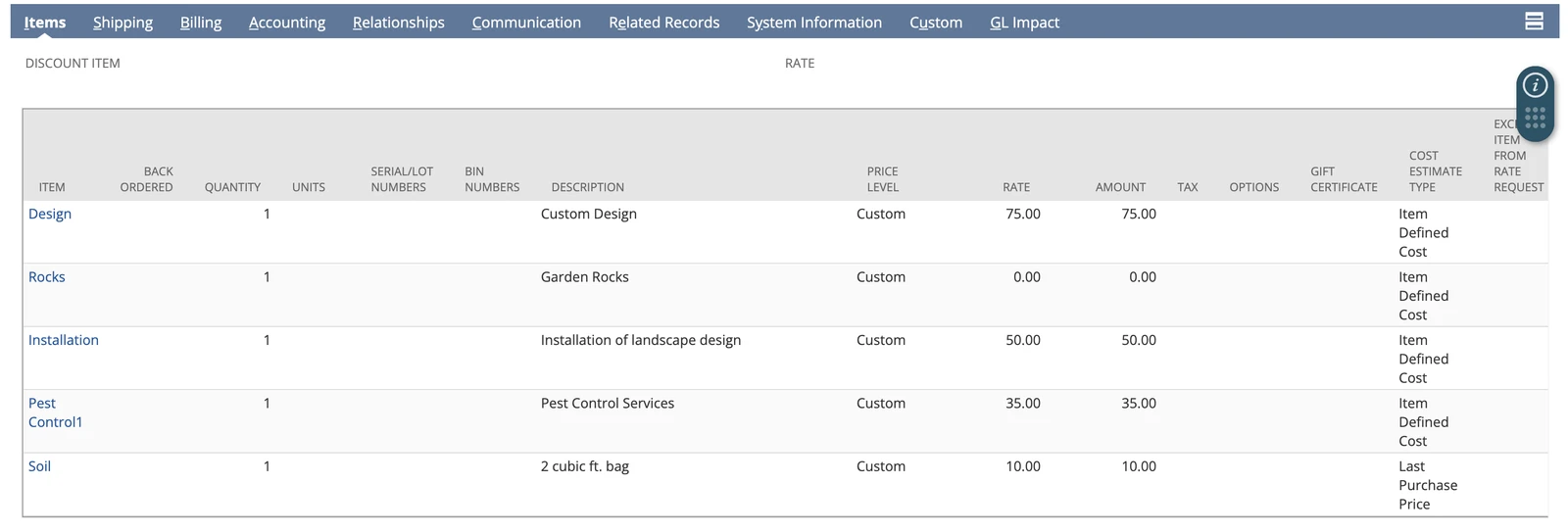
A record-level match: QuickBooks Sales Receipt #1056 is pushed to a native NetSuite Cash Sale with all five item lines, quantities, descriptions, rates, and amounts preserved.
It pulls linked records back and compares them
For every source record in the selected scope, SuiteMigration pulls its linked record back out of NetSuite — when one exists — and diffs it against the original QuickBooks record. What gets compared depends on the transaction type and the fields reconciliation supports for it; it isn’t one universal field list. In general the comparison covers:
- Amounts — subtotal, tax, and total; and, for the types that carry them, amount paid and amount due
- Debits and credits — for journal entries, where the direction matters as much as the figure
- Line count — did all five lines of that bill make it, or only four?
- Line-level dimensions — the class, location, and entity tagged on each individual line, for the types that support it. NetSuite calls these per-line classifications, and they are exactly what a header-level comparison never sees
Every record gets a status
Each record lands in one of a small set of mutually exclusive states — the vocabulary that turns a migration into a worklist:
| Status | What it means |
|---|---|
| Matched | Every selected check passed against the destination snapshot. |
| Mismatched | The record exists in NetSuite, but one or more compared fields disagree with QuickBooks. |
| Missing in Destination | A pushed record was not found in the destination pull. |
| Not Pushed | The record has not yet been successfully pushed to the destination. |
| Not Reconciled | No reconciliation snapshot has been captured for the record yet. |
These map straight onto the failure modes from Part 1. The hypothetical five-line invoice flattened into one — correct in total, correct on every statement — surfaces as Mismatched the moment its line count and per-line dimensions are compared against the source. The record that never arrived is caught as Missing in Destination no matter what unrelated record happened to cancel it at the total level. Neither can hide, because each record is evaluated individually rather than summed.
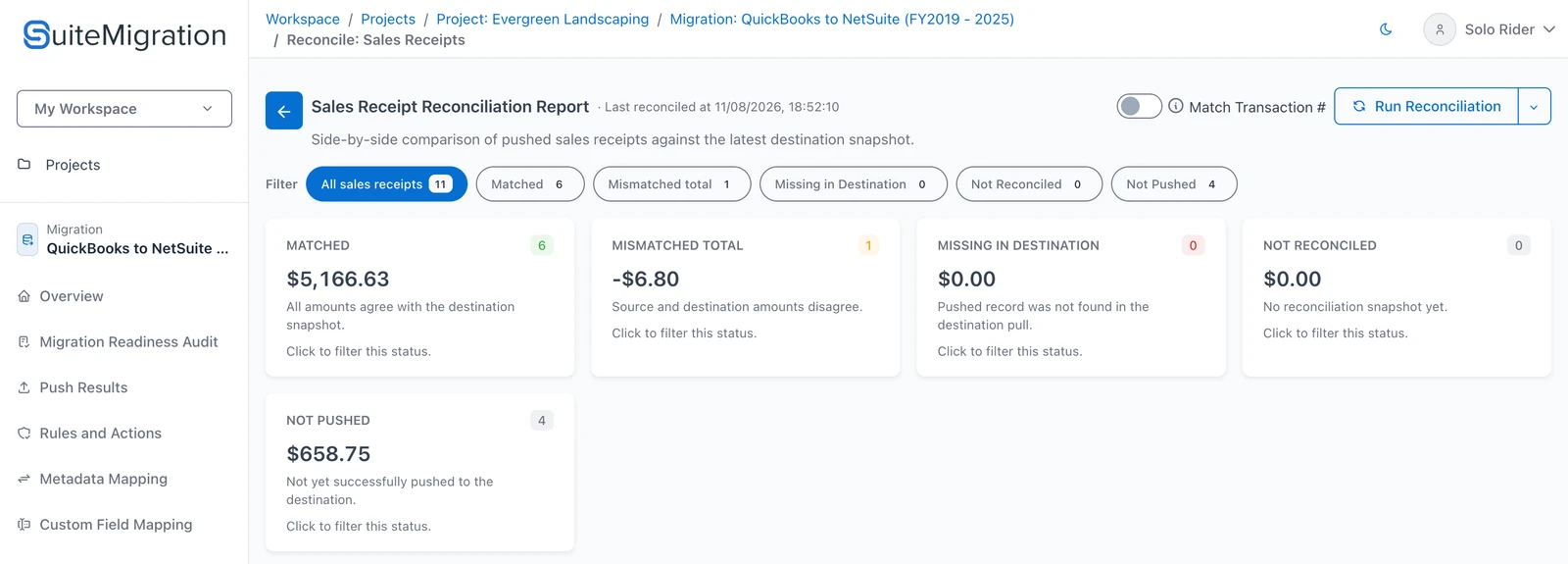
Every pushed record lands in exactly one status — the counts and totals are the migration worklist.
Two depths of matching
A handful of transaction types support two reconciliation modes: a leaner totals-only comparison, and a fuller one that checks additional fields — amounts paid and due, per-line dimensions, and for some types a status check. The two aren’t equivalent. A record marked Matched under totals-only mode has only confirmed the smaller set of fields, so “Matched” is only as strong as the mode that produced it — know which one you ran.
Even full mode isn’t a forensic, field-for-field line audit. It won’t prove every line amount, GL account, item, tax code, memo, and attachment is correct — two same-count lines sharing a class and location can still have their amounts swapped while every header figure agrees. If a field drives payment, inventory, tax, revenue recognition, or a regulatory filing, give it a purpose-built reconciliation or a deliberate sampling control. The right question is never simply “Did it match?” — it’s “What exactly did this match prove?”
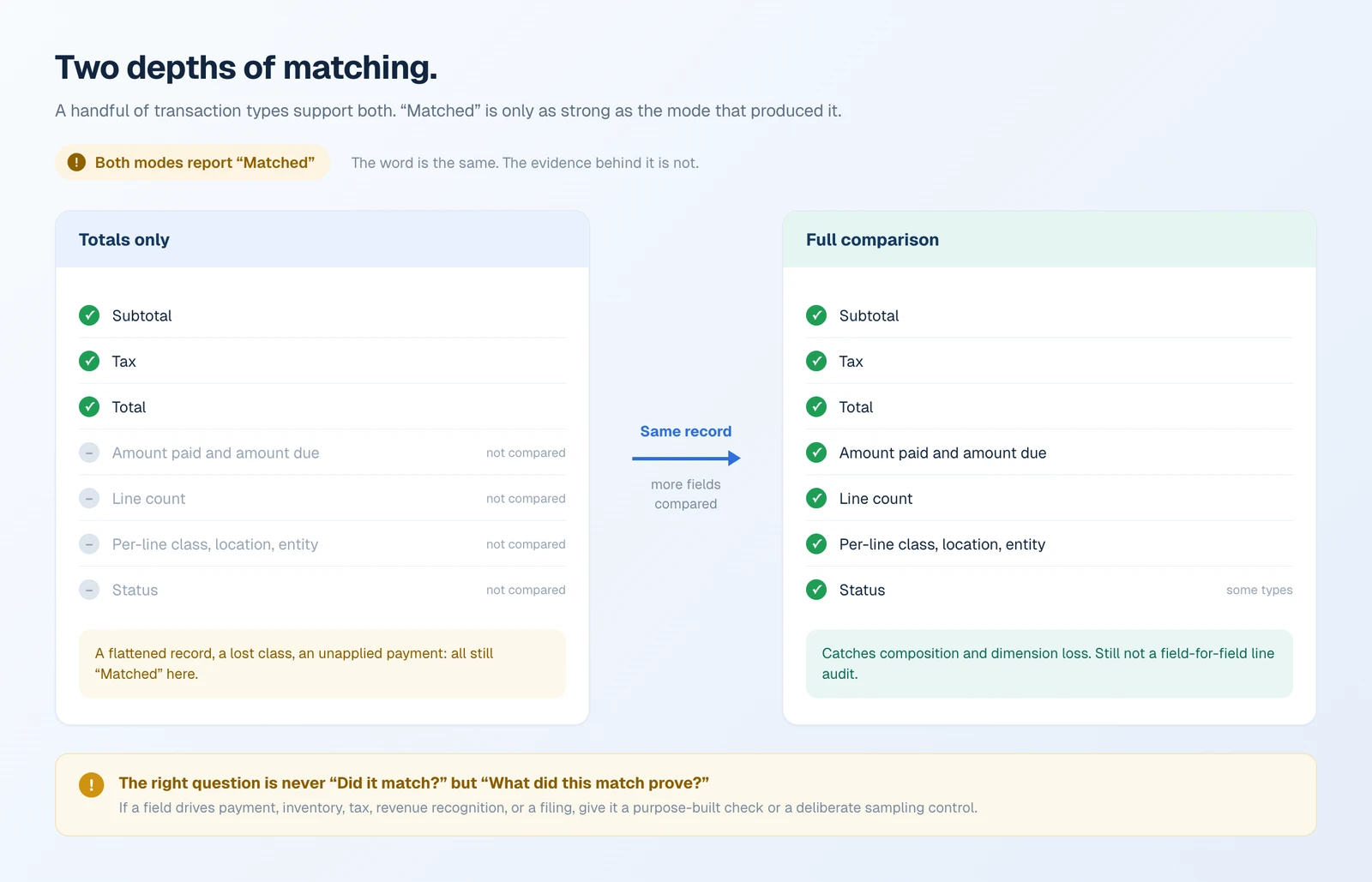
Both modes report “Matched.” The word is the same; the evidence behind it is not.
“Pushed as JE” makes the representation visible
Remember the payment that reconciled perfectly but was recorded as a journal entry. That change of form is exactly what balance checks are blind to — so SuiteMigration surfaces it with a dedicated Pushed as JE tag.
It’s a tag, not a status — a separate layer that sits across the others. A record can be Matched and Pushed as JE at once, or Mismatched and Pushed as JE. It flags records SuiteMigration deliberately posted to NetSuite as a journal entry — the representation it uses for eligible records you select when a native form isn’t available. (A fallback JE that never lands in the pull is flagged Missing in Destination instead.) A record can reconcile perfectly on the numbers and still be a different kind of record than its source, and a record-type-aware view surfaces exactly that — which a field-by-field value check alone would not.
Use the tag as a review queue, not a footnote. It gives you the full list of records that were re-represented, each linkable back to its source, so the right person can confirm the journal-entry form is the one the business wants — or single out the few that warrant a native replacement. Whether an alternate representation is acceptable is a business decision; this is where you make it deliberately, instead of discovering it after go-live.
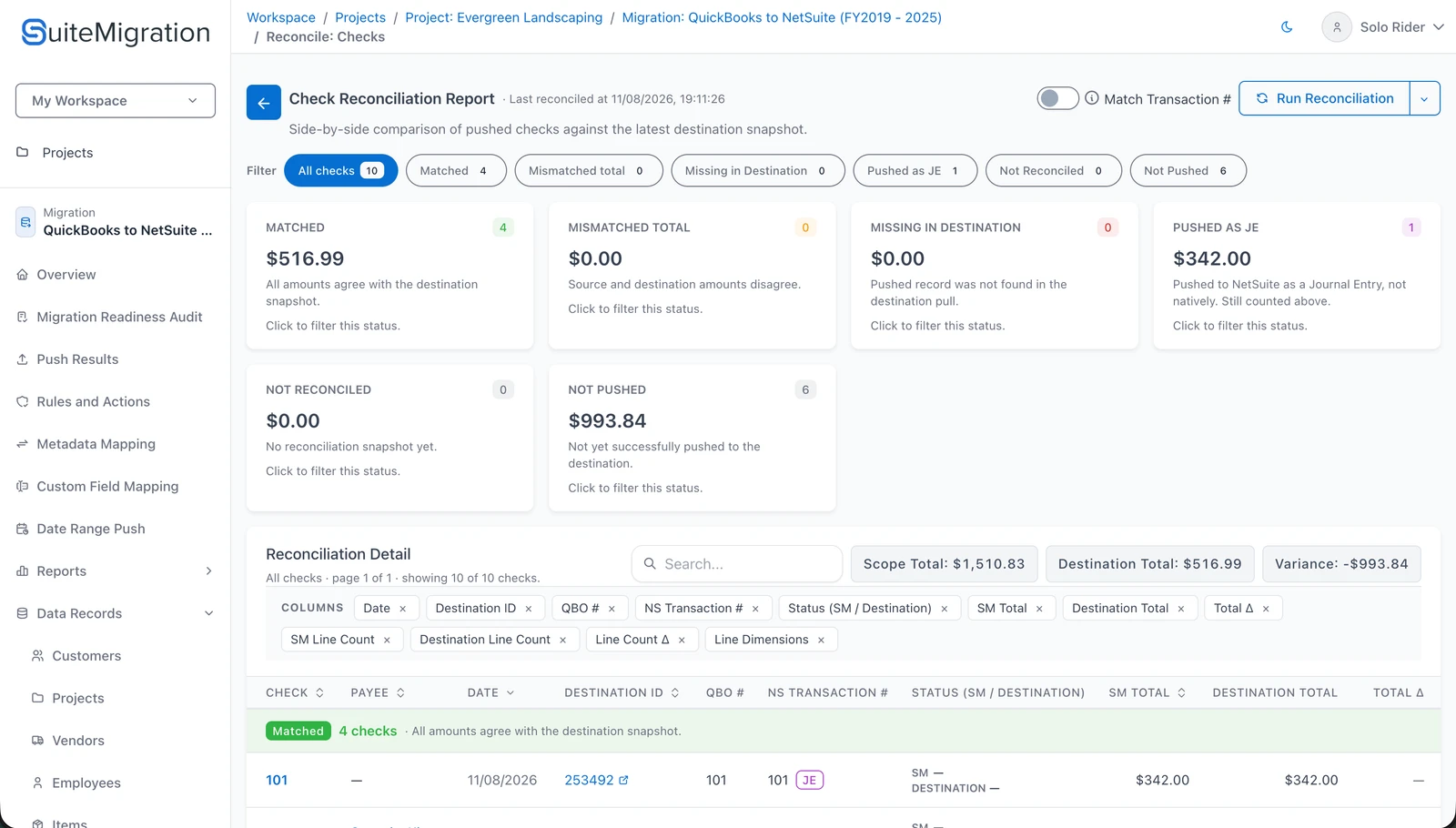
A visible representation decision: SuiteMigration identifies checks pushed to NetSuite as Journal Entries and keeps them in the reconciliation worklist for review.
Two layers, not one check done twice
Aggregate and record-level reconciliation answer different questions, and neither substitutes for the other:
- Aggregate checks catch magnitude problems — is the total right, and did the buckets end up the same size?
- Record-level checks catch identity and completeness problems — does each source record have a matching destination record, do the compared fields agree, and (via the Pushed as JE tag) did it land as the right kind of record?
Run in sequence, they reinforce each other: the aggregate checks point to the accounts and periods worth attention, and record-level reconciliation turns that signal into a worklist of specific records to locate, correct, or reclassify.
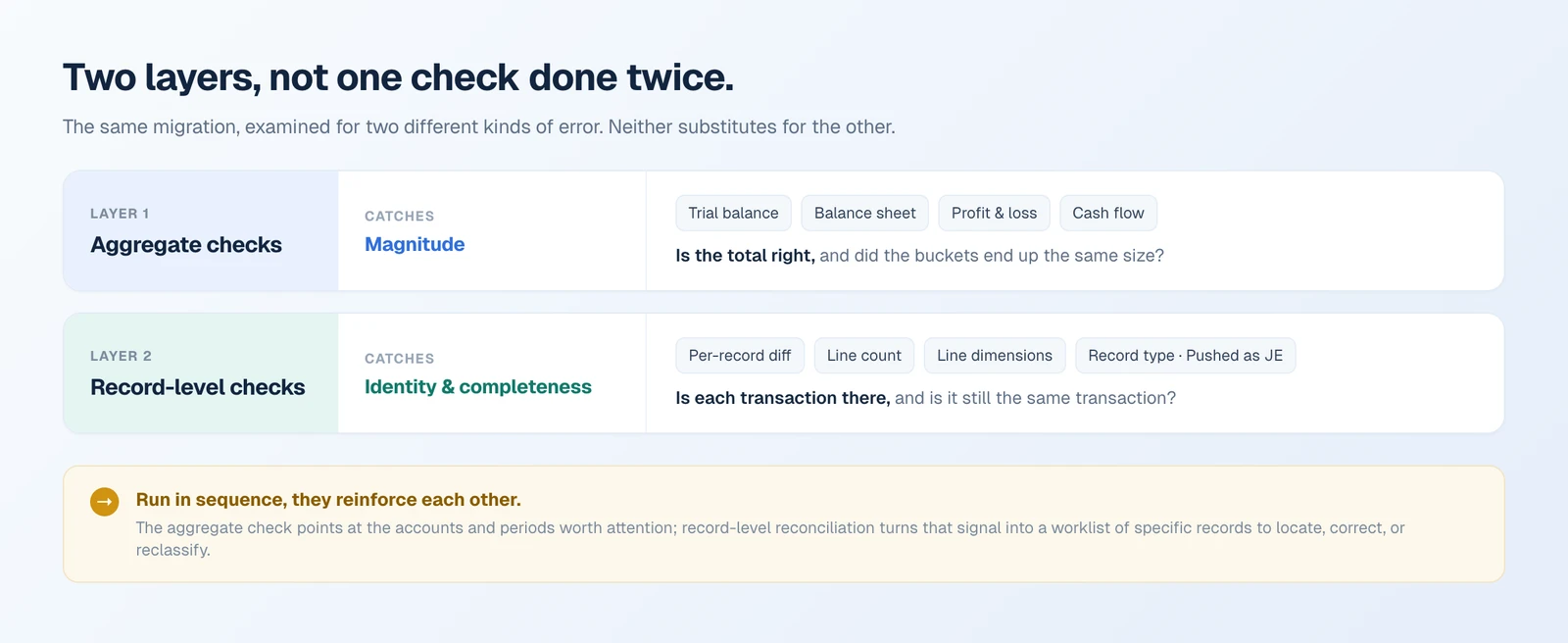
Two different questions about the same migration — which is why passing one says nothing about the other.
A clean trial balance tells you the magnitudes line up. It cannot establish identity or completeness — by construction, because totaling discards exactly that information. Offsetting errors, masked omissions, and type conversions all live where aggregate math can’t see, and that’s the space SuiteMigration’s record-level reconciliation is built to check. Passing the aggregate check is necessary. It was never sufficient.
Frequently asked questions
Does a matching trial balance mean a QuickBooks to NetSuite migration is correct?
No. A trial balance that ties proves the balance per account agrees; it cannot prove the same transactions are behind that balance. Summing is lossy by design, so any error that leaves the totals intact is invisible to every total-based report, including the balance sheet, the P&L, and the cash flow statement.
What migration errors can a trial balance not catch?
Three classes. A record can arrive with the correct total but the wrong composition, as when five itemized lines are flattened into one summary line. A record can be missing entirely while an unrelated record is overstated by the same amount, so the total still ties. And a transaction can arrive in a different form, posted as a journal entry rather than its native type, with the financial impact unchanged.
What is record-level reconciliation?
For every source record in the selected scope, SuiteMigration pulls the linked record back out of NetSuite and diffs it against the original QuickBooks record. Depending on the transaction type, that comparison covers amounts, debits and credits, line count, and the class, location, and entity tagged on each individual line.
Why is a missing transaction hard to detect from totals?
Because a total can be exactly right with a record missing, as long as something unrelated came across high by the same amount in the other direction. Slicing the report more finely by account, period, or dimension narrows the set of records that can offset one another, but it never proves that a given source transaction became its intended destination transaction.
What does the Pushed as JE tag mean in SuiteMigration?
It flags records SuiteMigration deliberately posted to NetSuite as a journal entry, for eligible records you select when a native form is not available. It is a tag rather than a status, so a record can be both Matched and Pushed as JE, which makes a change of representation something you review rather than something you discover after go-live.
Does record-level reconciliation replace the trial balance check?
No. They answer different questions and work best in sequence. Aggregate checks catch magnitude problems and point to the accounts and periods worth attention. Record-level checks catch identity and completeness problems, and turn that signal into a worklist of specific records to locate, correct, or reclassify.