

What a NetSuite Data Migration Actually Costs
Published NetSuite implementation costs run from roughly $30,000 to $150,000 or more, and every one of those figures prices a whole implementation. The data migration is a slice of it, quoted in hours against a dataset nobody has counted yet. This is what sits inside that slice.


Search for what a NetSuite implementation costs and the answers converge quickly. Somewhere between $30,000 and $50,000 for a straightforward deployment, rising to $120,000 or $150,000 and beyond for a complex multi-subsidiary one, over three to six months. Those numbers are broadly right, and they are on almost every partner’s website.
They are also answering a different question from the one most people are asking. Each of them prices a whole implementation: discovery, configuration, the chart of accounts, integrations, user training, go-live support, and the data migration.
If you have already chosen NetSuite and already chosen a partner, the number you actually need is the one for the data. That is the line item that behaves differently from all the others.
Configuration is priced against decisions, and decisions can be made in a workshop. The data migration is priced against a dataset, and nobody on the call has read it. That is the whole of the difference, and it explains nearly everything about why migration estimates move.
What the published numbers actually say
Taking the figures at face value first, because they are useful. Note who publishes them: implementation partners, consultancies and a staffing firm. Oracle does not publish implementation pricing, so these are the only public numbers there are, and every one of them comes from a party that bills against it. That does not make them wrong. It does mean the hourly rate in particular is quoted by people who sell hours.
| What is being priced | Published range | Published by |
|---|---|---|
| Whole implementation, straightforward | $30,000 to $50,000 | Versich, an implementation partner |
| Whole implementation, complex multi-subsidiary | $120,000 to $150,000 or more | Versich |
| Data migration, as a share of services | 15% to 20% of the services budget | KORE1, a staffing firm |
| Data migration, elapsed | Four to eight weeks, running parallel | KORE1 |
| US consultant rates | $85 to $250 an hour, architects higher | KORE1 |
| Typical timeline | Three to six months, kickoff to go-live | Epiq, a NetSuite consultancy |
| Timeline by size | 8 to 14 weeks starter, 4 to 6 months mid-market, 7 to 11 months complex, 9 to 18 months OneWorld | KORE1 |
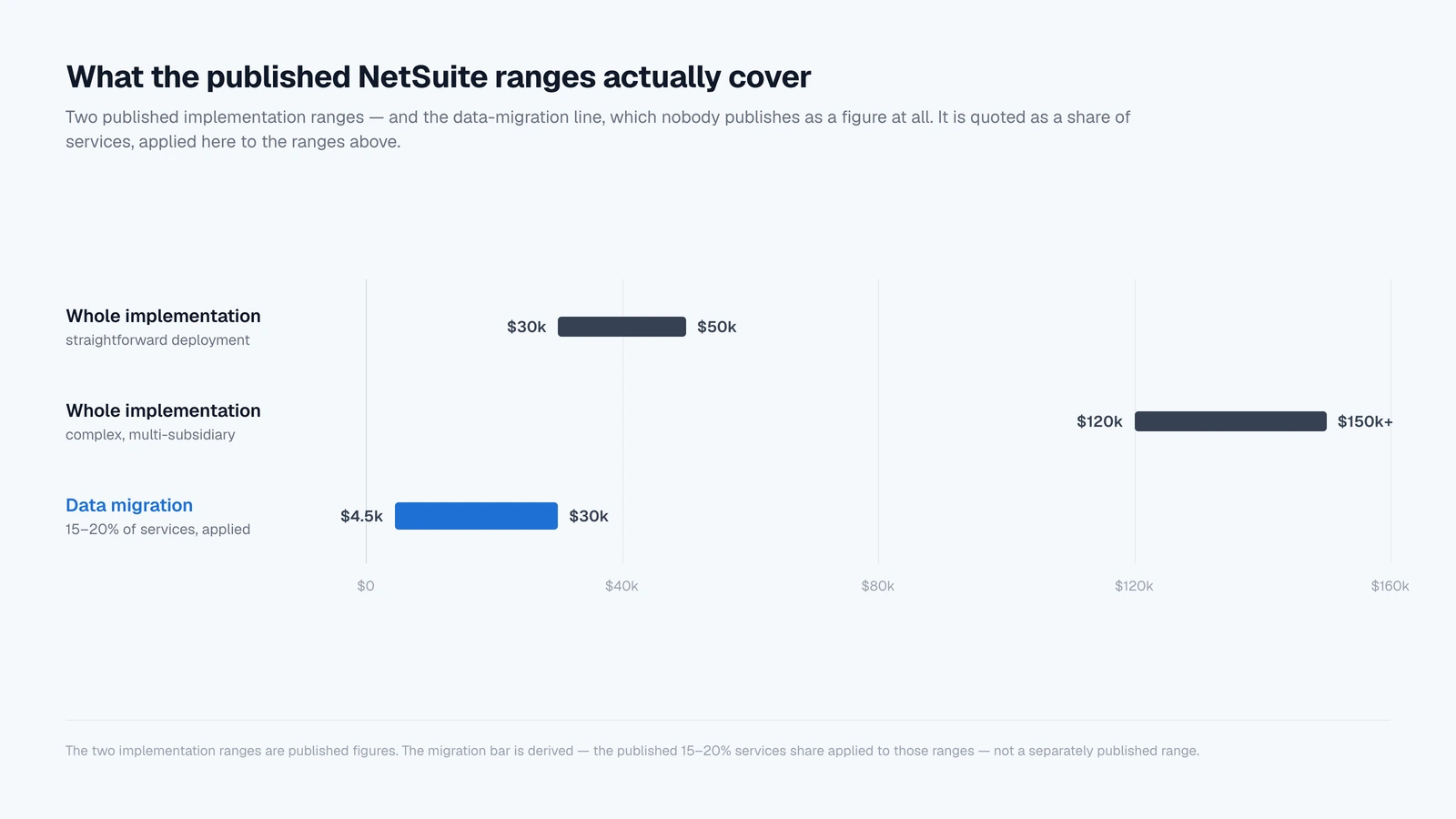
Two things stand out. The first is that nobody publishes the migration line as a figure at all. It comes as a share: fifteen to twenty percent of the services budget. Apply that to the implementation ranges above and you land somewhere between roughly $4,500 and $30,000, a spread of more than six times.
The second is that several of the same guides note migration, integrations and training adding twenty to fifty percent to a project when they are not scoped early. That is a polite way of saying these are the items most likely to arrive as a change order.
Neither observation is an argument against the ranges. They are an argument that the ranges describe uncertainty rather than price, and it is worth knowing exactly what the uncertainty is made of.
The arithmetic nobody shows you
A migration quote is hours multiplied by a rate. The rate is public and fairly stable: $85 to $250 an hour across most US engagements, with senior functional consultants in the middle of that and solution architects above it. Nobody disputes the rate.
The hours are the estimate, and they are an estimate of how much trouble is in a file nobody has opened. That is an unusual thing to be selling, and it is why two businesses that look identical on a scoping call can differ threefold in what the migration actually takes.
Take the dataset we use throughout these posts: 4,127 customers, 2,340 vendors, 487 items, 52 employees, and 217,359 transactions, of which 124,812 are invoices and 85,541 are bills. Every one of those figures is the kind of thing a scoping call asks about, and none of them tells you very much.
Invoices and bills are ninety-seven percent of the file and close to none of the work, because they are one problem solved once and then repeated. Volume buys runtime. It does not buy effort.
What buys effort is the other three percent, and two properties that never come up on the call.
The first is how many record types are in scope, because each type carries its own mapping, its own position in the dependency order, and its own reconciliation.
There are twenty-two transaction types in a full QuickBooks or Xero ledger: invoices, sales receipts, credit memos, refund receipts and customer payments; bills, vendor credits and vendor payments; checks, cash expenses, credit card charges, refunds and payments, deposits and transfers; purchase orders and sales orders; journal entries; sales tax payments and adjustments; payroll checks and tax payments.
A quote built on “about four thousand customers and six years of history” has priced none of that.
The second property is condition, and it is the one that moves dates. Scoping a migration properly means measuring both before anyone commits to a figure. This post is about what they cost once you have.
The 98 ways a record gets refused
Before anything is pushed into NetSuite, SuiteMigration runs 98 validation rules against the source data. Sixty-five apply to transactions, seventeen to companies, thirteen to items and three to metadata. Most are errors, which block a push outright; the rest are warnings.
Thirty-one are NetSuite pre-checks, which catch mapping problems rather than data problems: an account mapped to a NetSuite account of the wrong category, an item whose income account resolves to a bank account.
That number is the single most useful thing to hold in your head when you read a migration quote. A scoping call asks about four or five things. There are ninety-eight ways for a record to be refused, and the estimate in front of you was built without counting any of them.
The rules are not exotic. They are the accumulated places where QuickBooks and Xero are more permissive than NetSuite:
- A company name over 83 characters, a first or last name over 32, an item description over 4,000, a memo or line description over 999.
- Two or three email addresses in a field NetSuite expects to hold exactly one, correctly formatted.
- A phone number outside seven to thirty-two characters, or a website URL that passes a loose check at source and a strict one on import.
- Duplicate item names that coexist happily in a source system and collide on push, because NetSuite enforces name uniqueness per account.
- A vendor bill posting to an account that is not typed Accounts Payable, a check posting to one that is neither Bank nor Credit Card, an item whose income and expense accounts are the same.
- Sales receipts with no customer, checks and credit card charges with no payee, journal entry lines posting to A/R or A/P with no name on the line.
- Invoices that have been open for more than a year, which need a write-off decision rather than a fix.
On the dataset above, 124 customers, 70 vendors, 17 items and 2 employees need attention. Two hundred and thirteen records out of nearly seven thousand master records.
That sounds like a rounding error and is not one, because each is a decision somebody has to make, and some of them are decisions somebody else has to make.
The bill that belongs to someone else’s calendar
Here is the part that converts data quality into money, and it is not the count of problems. It is where each problem can be fixed.
Of those 98 rules, 27 can only be resolved by correcting the data in the source system and re-syncing. Another 16 can be fixed at source or, failing that, by setting the offending value aside so the record still pushes, which is a data-loss decision somebody has to sign.
Eleven are fixable with a bulk action in the migration tool itself. Eleven more are not fixes at all but choices about representation, where a record NetSuite will not take natively can go in as a journal entry instead.
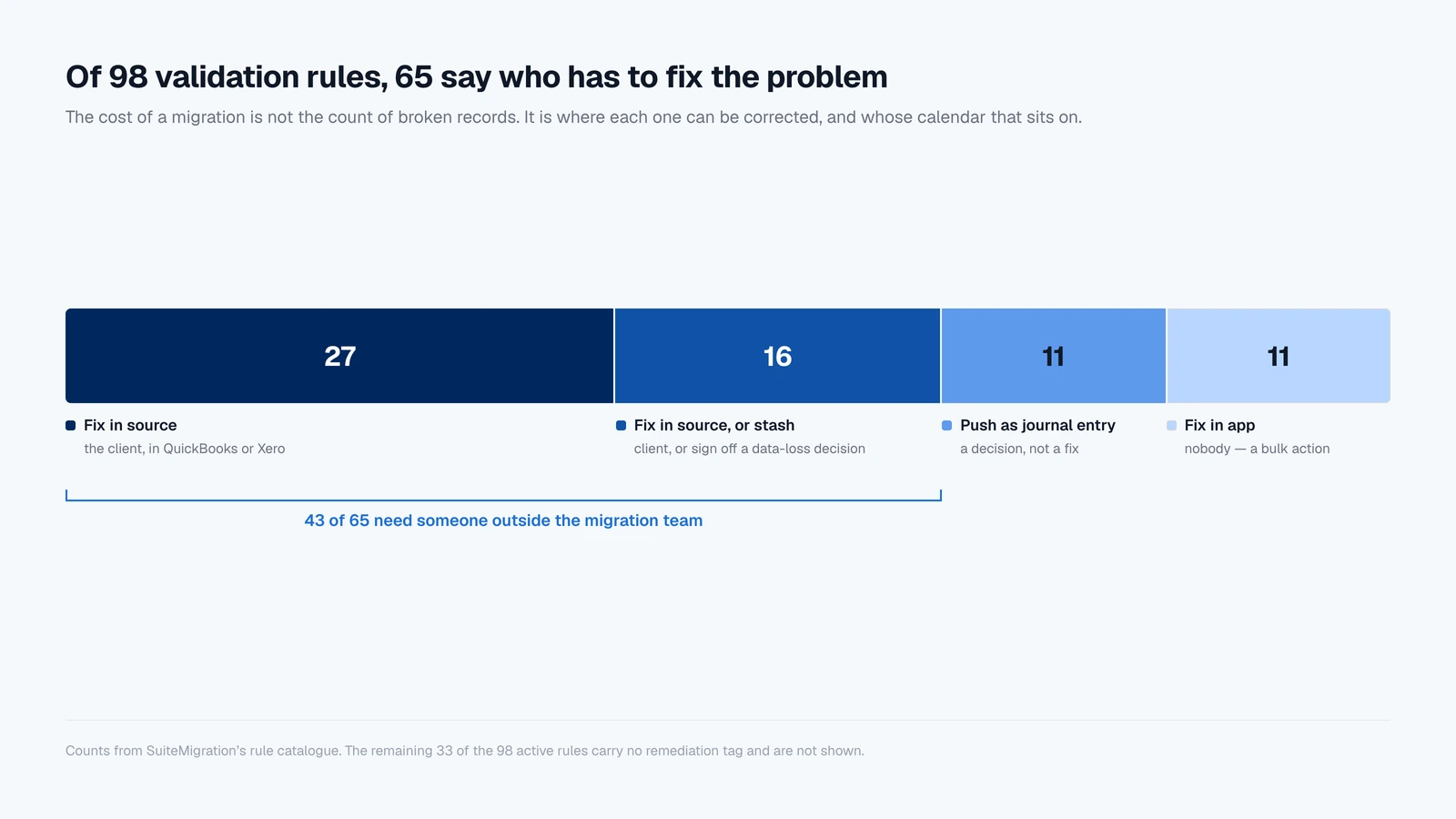
Only the third group costs hours. The first group costs weeks, and it costs them for a reason that has nothing to do with the difficulty of the work.
Consider a single rule. A vendor payment in QuickBooks can apply to documents posting to more than one Accounts Payable account, and NetSuite’s vendor payment record cannot: it carries one header A/P account, and every document applied in that payment has to share it. So the payment fails on push.
The fix is not complicated. Open the payment in QuickBooks, delete it, and re-enter it as separate payments, one per A/P account. Ten minutes of work.
But it is ten minutes of work in the client’s live accounting system, performed by someone who is closing the month, on a record that has already been reconciled once. It does not happen this afternoon.
It happens when the controller has time, which is after close, which is next week, and it happens alongside forty others like it. There is a matching rule on the receivables side, for customer payments applied across multiple A/R accounts.
Under an hourly engagement, that week is billable to somebody. The consultant is on the project, the project is not finished, and the reason it is not finished is a queue of source-system corrections nobody estimated.
The records that cost the most on a migration are the ones the migration vendor cannot fix alone. No record count anywhere in a scoping document distinguishes them from the ones that can be fixed in a single bulk action.
The setup that happens before any data moves
There is a second category of cost that appears in no estimate, because it is not migration work and it is not configuration work, so it falls between the two.
NetSuite has to be prepared to receive the data. Three custom fields have to be created and applied to every record type you intend to push, carrying values NetSuite has nowhere native to put: additional email addresses beyond the one it accepts, stashed values from fields with no NetSuite equivalent, and migration notes on transactions.
Document number override has to be enabled on invoices, credit memos, journal entries, purchase orders and customer payments. Without it NetSuite assigns its own numbers, and every reference in the source data points at nothing.
Duplicate number warnings have to be turned off. Items need a tax schedule, which is required rather than optional. If the source system’s tax data is coming across at all, SuiteTax has to be configured first.
None of that is difficult and all of it is somebody’s afternoon, on an administrator’s rate, before a single record has moved. It is also the kind of task that surfaces in week two of a project quoted in week minus one.
Rework is the line item with no estimate
The most expensive hour on a migration is the one spent doing something for the second time, and the reason it is so expensive is that nothing announces it is necessary.
We have written at length about what breaks when a migration is run through spreadsheets, where a CSV import job can report Complete at 100% having created precisely zero records. The same failure mode has a more modern form.
In our own run of a migration driven by an AI agent over MCP, every record was created and every API call returned success, and tax posted as zero on every invoice. The books were wrong and nothing in the process said so.
This matters to a budget because a trial balance will not catch it. Offsetting errors net out, a missing transaction inside a matching total is invisible, and a transaction that arrived in a different form still sums to the same number.
Reconciling at record level rather than at statement level is a separate exercise from tying the totals, and it needs its own line in a scope. The alternative is discovering the problem after go-live and paying the same hourly rate to redo the work on live books.
Test loads are the other half of this. A migration is not one push. It is a push to sandbox, a reconciliation, a set of fixes, another push, and the same loop again until the numbers hold, with the test data cleared out between runs.
Partner guides routinely recommend budgeting for at least two full test cycles before go-live. The question worth asking is what the third one costs, because it is the third one you will want.
Timeline is a cost, not a schedule
Three to six months is the figure attached to a traditional migration, and it is usually presented as a schedule constraint rather than a price. It is both.
Every month a migration runs is a month the business is operating two systems. The books close twice. Anything posted in the source system after the extract has to be caught and carried forward.
If a cutover slips a quarter, the opening balances have to be rebuilt against a new date, and everything still open at the old date that was carefully handled has to be handled again. None of that appears on the invoice as a line item, and all of it is real.
It is also the part of the estimate most sensitive to everything above. The number of accounting periods you are reconciling is not a judgement call: it is the span between the first transaction in the file and today, and anyone can measure it before quoting.
So is the year-by-year distribution that determines how much history is worth bringing across. A date quoted before both have been counted is a guess, and guesses in this particular position tend to be optimistic.
Why a per-migration price behaves differently from an hourly one
Everything above describes hourly billing under uncertainty. It is worth being precise about what changes when the price is fixed per migration instead, because the difference is structural rather than promotional.
Under an hourly engagement, the vendor’s revenue rises with the number of broken records. This is not an accusation; it is arithmetic, and it is true of every good-faith consultant working honestly at a fair rate.
Discovering that a dataset has three times the validation failures anyone assumed is, from the vendor’s side, more work at the agreed rate. From the client’s side it is a change order.
The incentives are not aligned so much as pointed in different directions. The only defence is measuring the data before the contract is written rather than after.
Under a per-migration price, that same discovery is the vendor’s problem. The read happens first, the number is set against what it found, and then the number stops moving. What the read could not anticipate is absorbed rather than invoiced.
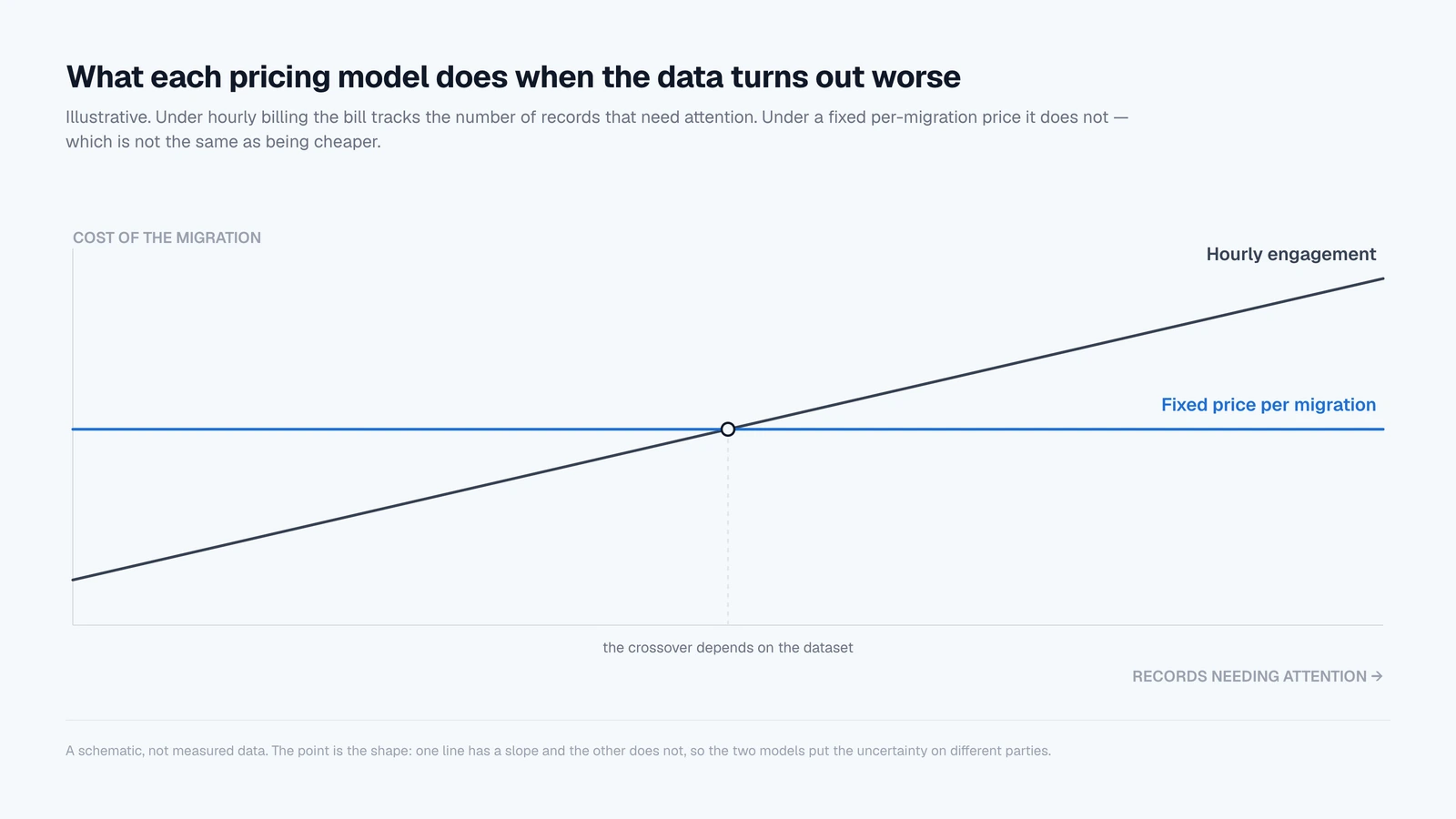
The re-run is the clearest illustration. Test loads are exactly the thing hourly billing makes expensive, which is why estimates tend to include two of them and projects tend to need more.
When pushes to sandbox and production are unlimited under a single migration price, the loop of push, reconcile, fix and push again stops being a budget decision and goes back to being an engineering one.
The same goes for seats. A price per migration rather than per user means putting the client’s controller in front of the account mappings costs nothing, and the controller is usually the only person who can tell you an account has been mapped to the wrong category.
None of this makes a fixed price cheaper in the abstract, and it would be dishonest to claim it does. What it changes is which party carries the uncertainty, and when you find out the number.
What to ask before you sign anything
Whoever you are buying from, and whatever the pricing model, these are the questions that separate a quote that will hold from one that will move.
- Is historical transaction data in the base fee, or is it a change order? This is the single most common source of mid-project price increases.
- How many test loads are included, and what does the next one cost? Two is the usual assumption. Find out what the third is priced at before you need it.
- What rate does rework bill at? If a load has to be redone because something posted incorrectly, establish now whether that is billable and to whom.
- Who absorbs it when the source data is worse than the estimate assumed? There is a right answer to this, and it depends on who was in a position to measure it first.
- Is reconciliation at record level or statement level? A matching trial balance is not evidence that the migration is correct, and the two exercises are priced very differently.
- What has to be configured in NetSuite before the migration can start, and who is doing it? Custom fields, document number overrides, tax schedules.
- Does the price change per source organisation? If several QuickBooks or Xero files are being consolidated into one NetSuite account, this is usually where it does.
- What is counted, and when? Ask to see record counts by type and by year, the number of accounting periods, and the count of records failing each validation rule. If those numbers do not exist yet, the quote in front of you is an estimate of an unread file.
How SuiteMigration handles it
The Migration Readiness Audit exists to answer the last of those questions before anyone has committed to anything, and it is free.
It reads the source dataset in full, out of QuickBooks Online, Desktop and Enterprise, or Xero. It reports counts by record type, the active and inactive split on master data, the transaction distribution by type and by year, the first transaction date and the number of periods that implies.
It also reports every one of the 98 validation rules with the number of records failing it. Each finding carries its remediation category, so the rules needing a fix in the client’s source system are separated from the ones resolvable in a single bulk action, and counted.
The report is white-labeled, so a partner can put it in front of a prospect as their own.
That is deliberately the deepest read the product performs, and it sits before the paid work rather than inside it, because a quote written against measured data is a different object from a quote written against a questionnaire.
The pricing itself is per migration rather than per seat. It depends on the source system, the data volume, the complexity, the number of source organisations, and whether you bring trial balance only or full transaction history, with trial-balance-only the simplest and lowest-priced option.
Unlimited users are included, so there is no cost to adding the client’s controller to review the mappings. Unlimited pushes to sandbox and production are included, so rehearsing the migration as many times as it takes is not a line item.
Support from the migration team is included rather than a tier above.
Creating an account, connecting a source system and running audits are all free. You pay when you are ready to run a live migration, against a quote issued before the work begins.
Frequently asked questions
How much does a NetSuite implementation cost?
Published ranges run from roughly $30,000 to $50,000 for a straightforward deployment to $120,000 to $150,000 or more for a complex multi-subsidiary one. Those figures cover the whole implementation: discovery, configuration, integrations, training and go-live support. The data migration is one line inside it, and it is the line most likely to move after signing.
How much of a NetSuite implementation budget goes to data migration?
Published guides tend not to give a figure at all. They give a share: around fifteen to twenty percent of the services budget, running four to eight weeks alongside the rest of the project. Applied to published implementation ranges that is roughly $4,500 to $30,000. Several guides also note that migration, integrations and training together can add twenty to fifty percent when they are not scoped early.
How long does a NetSuite implementation take?
Most QuickBooks to NetSuite migrations run three to six months from kickoff to go-live. Broken down by size, published benchmarks put a starter project at eight to fourteen weeks, a mid-market core at four to six months, a complex mid-market one at seven to eleven months, and a global OneWorld rollout at nine to eighteen. Timeline is a cost in itself: every extra month is another month of running two systems and closing the books twice.
Why do NetSuite data migration quotes vary so much?
Because the quote is hours multiplied by a rate, and only the rate is known at the time of quoting. US NetSuite consultants bill roughly $85 to $250 an hour, architects higher. The hours are an estimate of how much trouble is in a dataset nobody has read. Two companies with identical record counts can differ threefold in effort.
What is a change order on a NetSuite migration, and how do you avoid one?
It is a mid-project price increase, usually triggered by historical transactions added to scope late, a volume of data problems larger than the estimate assumed, or extra test loads. All three are measurable beforehand. A full read of the source dataset first removes most of the surface a change order is written against.
How much does SuiteMigration cost?
Pricing is per migration rather than per seat, and depends on the source system, the data volume, the complexity, the number of source organisations, and whether you bring trial balance only or full transaction history. Unlimited users, unlimited sandbox and production pushes, and support are all included. Accounts and Migration Readiness Audits are free.
Is it cheaper to migrate to NetSuite yourself?
For master data, open items and opening balances it often is, provided someone in-house has run NetSuite imports before. For full transaction history it usually is not, because the cost moves to your finance team's time and rework lands on live books. Self-service is the route where those hours stay invisible until they have been spent.