

QuickBooks Online to NetSuite Migration with Claude & MCP
Lessons from a 319-record QuickBooks Online-to-NetSuite migration using Claude and MCP: permissions, per-record timings, silent posting failures, and reconciliation checks.


We connected Claude to a QuickBooks Online sandbox and a NetSuite OneWorld sandbox, both over MCP, and asked it to move the company across.
The source company holds 319 records. Of those, 121 are transactions that post to the general ledger.
Most of it went well. The records were created. The fields read back and matched their source. Receivables ended up tying to the cent.
One thing did not. The tooling reported that invoice tax had been carried, and wrote that into the run report. Tax had posted as zero on every invoice. Receivables were 441.84 short. There was no error anywhere, because nothing had failed. Every call returned success.
This post covers the setup you need before the first write, what each record costs, and what tied and what did not when we reconciled object by object.
What we set out to migrate
A QuickBooks Online sandbox company. One subsidiary in NetSuite, against a chart of accounts that already existed.
| QuickBooks object | Count |
|---|---|
| Accounts | 89 |
| Customers | 29 |
| Vendors | 26 |
| Items | 18 |
| Invoices | 31 |
| Credit memos | 1 |
| Customer payments | 16 |
| Sales receipts | 4 |
| Refund receipts | 1 |
| Bills | 15 |
| Bill payments | 10 |
| Purchases | 35 |
| Deposits | 5 |
| Journal entries | 3 |
| Estimates, purchase orders, time activities, employees | 14 |
The migration also has to land on a specific set of numbers.
| Control total | QuickBooks value |
|---|---|
| Accounts receivable | 5,281.52 |
| Accounts payable | 1,602.67 |
| Checking | 1,201.00 |
| Savings | 800.00 |
| Undeposited Funds | 2,062.52 |
| Inventory Asset | 596.25 |
| Mastercard | −157.72 |
| Notes Payable | −25,000.00 |
| Loan Payable | −4,000.00 |
| Opening Balance Equity | 9,337.50 |
Take these out of QuickBooks before you write anything. Afterwards they are the only way to tell a finished migration from one that merely stopped.
The next thing to understand is the two servers, because they behave nothing like each other.
Connecting QuickBooks and NetSuite over MCP
QuickBooks connects through a local MCP server. NetSuite connects through Oracle’s AI Connector Service.
If you need the connection setup before following this migration, Kipper has step-by-step guides for connecting Claude to QuickBooks Online through MCP and connecting Claude to NetSuite through MCP. This post starts after both connections are working.
| QuickBooks MCP | NetSuite MCP | |
|---|---|---|
| Transport | local, stdio | HTTPS, OAuth 2.0 with PKCE |
| Reads | up to 1,000 records per request | SuiteQL, large results in one call |
| Writes | disabled by us on purpose | one record per call |
| Batch write | not applicable | none available |
| Delete | not applicable | no delete tool at all |
| Metered against | your Intuit allowance | your NetSuite account limit, shared with live users |
Reading is nearly free. The whole QuickBooks extract took 33 calls and about 21 seconds.
Writing is the opposite. The standard record tools operate on one record per call. There is no batch endpoint and no bulk tool. Every record is its own request. Oracle’s MCP Standard Tools SuiteApp documentation lists create, retrieve, metadata, and update tools, but no delete or bulk-import tool.
There is also no way to undo anything. The toolset covers create, read, update and query. Nothing removes a record, and voiding a journal entry returns a server error. Plan on the basis that everything you write is permanent.
Lock QuickBooks to read-only before you start. Three settings stop every create, update and delete tool from loading, which leaves 70 read tools and no way to write. Your old system has no reason to be writable during a migration.
Before any of that matters, the NetSuite role has to be able to see the records at all.
Granting permissions before the first write
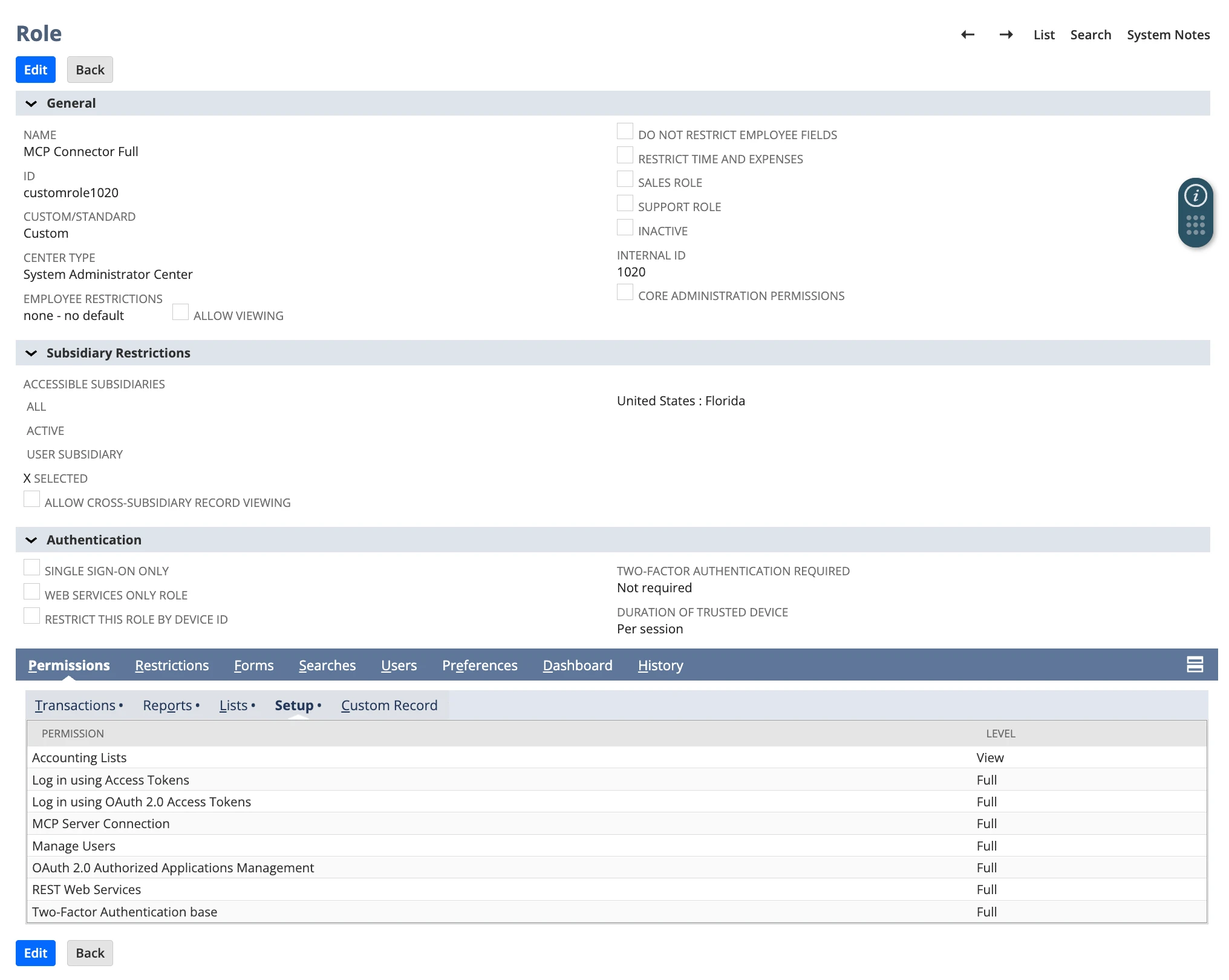
Oracle requires a non-Administrator role with MCP Server Connection, Log in using OAuth 2.0 Access Tokens, and REST Web Services permissions. Together they give you no business records. Record access is granted separately, one permission at a time. See Oracle’s required features and permissions.
Grant these before the first write:
| Subtab | Grant at Full |
|---|---|
| Lists | Items first. No items means no invoice lines, and nothing for payments to apply to. Then Vendors, which also covers tax agencies. Accounting Lists for terms, payment methods and refund methods. Tax Records for tax codes and rates. Currency, Subsidiaries, Employees, Classes, Departments, Locations |
| Transactions | Make Journal Entry, the best first test because it needs no customer and no item. Then Invoice, Credit Memo, Accept Customer Payments, Cash Sale, Customer Refund, Enter Vendor Bills, Pay Bills, Write Checks, Customer Deposit, Deposit, and Find Transaction |
| Setup | Journal Approval. Without it, every journal entry you create posts nothing |
Items really are the keystone. NetSuite will not accept an invoice line without a real item reference, so no items means no invoices, which means nothing for payments to apply to.
Two of these are easy to miss. Journal Approval is not obvious, and without it your journal entries sit there looking correct and moving no balance. Write Checks looks optional and is not: without it the balance sheet cannot tie, because most purchases become checks.
Check the role before you stage anything. ns_getRecordTypeMetadata with no argument returns every record type your role can reach. Anything missing from that list is blocked. Finding that out during a push is expensive.
Some things cannot be checked in advance at all. Mandatory field settings, approval preferences and whether a period is open are not listed by anything. You find those by hitting them.
With the role sorted, the migration itself is three steps: read, map, push.
Pulling the data and mapping it across
Reading is the easy half. Claude pulled all 319 records in 33 calls.
Mapping is where the work is, and where Claude was genuinely good. It matched all 89 QuickBooks accounts onto the existing NetSuite chart. It decided which NetSuite record type each QuickBooks object should become. It wrote every payload to disk first, so everything could be reviewed before anything was sent.
The classification choices behind that mapping need their own review; see our guide to mapping QuickBooks classes and locations to NetSuite.
It also caught two accounts that matched perfectly by name and were wrong.
A QuickBooks expense account called Installation matched a NetSuite account called Installation. The NetSuite one is an income account. A QuickBooks income account called Decks and Patios matched a NetSuite account of the same name, which is an expense account. Both leaf names were identical in the two charts. NetSuite raises no objection to either, because posting an expense to an income account is legal.
What caught it was comparing the account type as well as the name. In a manual review, those are two rows in an 89 row spreadsheet that look exactly like the other 87.
The fix has a cost worth knowing. Each of those QuickBooks accounts was merged into its NetSuite parent instead. So 89 accounts map onto 87, and two QuickBooks reporting lines no longer exist as accounts. Recreating them is cheap now and awkward once transactions have posted against them.
One other account crosses a type boundary on purpose. Depreciation is Other Expense in QuickBooks and Expense in NetSuite. Same account, different placement on the profit and loss. That one was accepted deliberately, which is the useful counter-example: a type mismatch is not automatically a bug.
Three bank and card accounts were matched on inference rather than certainty, because the type check cannot help when Bank matches Bank. Two of the three were logged as unconfirmed. Cash accounts are the one place a plausible wrong answer is guaranteed to be found by the client, at the first reconciliation.
With the mappings agreed, the push is the part everyone asks about.
Pushing the full transaction history
The number to plan with is 4.3 seconds per record. That is total push time divided by records that landed, so it includes the failures, the retries and the gaps between calls. It is what you actually sit through.
| Record type | Count | Mean | 95th percentile |
|---|---|---|---|
| Inventory item | 4 | 1.8s | 2.6s |
| Customer | 29 | 2.3s | 4.9s |
| Vendor | 26 | 2.6s | 3.8s |
| Service item | 14 | 3.9s | 6.5s |
| Check | 21 | 4.1s | 6.5s |
| Invoice | 30 | 5.8s | 10.8s |
| Journal entry | 14 | 6.6s | 13.2s |
| Vendor bill | 15 | 7.5s | 12.6s |
| Cash sale | 4 | 8.0s | 9.9s |
| Credit memo | 1 | 14.4s | |
| Deposit | 2 | 17.0s | 17.7s |
Simple records land in a few seconds. Anything carrying lines takes longer. Deposits and credit memos take about three times as long as an invoice. Most calls finish in under four seconds and the slowest took twenty.
Thirty invoices took just over three minutes, which is fine when you have thirty invoices. The obvious move when you have three thousand is to send them in parallel, so we ramped it up to eight writes at once.
Nothing was ever rate limited. What happened instead was quieter: the speed stopped improving.
| Writes at once | Speedup |
|---|---|
| 1 | 1.00x |
| 2 | 1.36x |
| 3 | 1.94x |
| 4 | 1.93x |
| 6 | 2.36x |
NetSuite accepts everything you send, then works through it one at a time anyway. Past three at once you gain nothing and add ways to fail. You cannot raise the ceiling either. It is set by account type, somewhere between five and twenty, and everything else touching that account shares it.
So plan close to serial:
| Records | At 4.3s each | Best case in parallel |
|---|---|---|
| 100 | 7 min | 4 min |
| 1,000 | 1.2 hours | 36 min |
| 10,000 | 12 hours | 6 hours |
| 100,000 | 5 days | 2.5 days |
Those are optimistic. They assume nothing fails, nothing needs redoing, and an agent session that stays coherent for days.
For comparison, the routes NetSuite actually provides for loading data move 200 records per SOAP request, or 25,000 per CSV import job. You cannot reach any of them through MCP. Our rough crossover is around 5,000 records. Below that, pushing through MCP is fine. Above it, you want a different route, and Claude is better spent on the mapping and the checking than on moving one row at a time.
There is a cheaper option, and for closed periods it is usually the right one.
Pushing balances instead of history
Our trial balance is 47 rows. In NetSuite that is one journal entry with 47 lines, which is one call.
Ten thousand transactions is twelve hours. The trial balance behind those same transactions is under a minute, from the same source data.
You keep every reported number. Balance sheet, profit and loss and trial balance all tie back to the source, because you are posting the source’s own totals.
You lose everything underneath. Open items, aging, drill-down from a balance to a document, statements, and any answer to “which invoice was this payment for”.
That gives the rule most consultants already use, now with timings behind it. Closed periods can cross as balances. Open receivables and payables cannot, because collections and aging need the documents. It is the same split we walk through in migrating historical transactions.
Three things to get right if you go this way. Approve the journal entry when you create it, or it posts nothing. Use one entry per period per subsidiary, dated at period end, or you cannot report a prior year. And put opening balance equity on its own line and call it what it is.
Whichever route you take, the only thing that settles it is a reconciliation.
For a deeper look at validating the numbers after a migration, see how to validate a QuickBooks-to-NetSuite migration with financial statements. An agent over MCP is one of several routes into NetSuite, and our guide sets it against the alternatives.
Reconciling object by object
Three questions per object. Did the count match, did the amount match, and did it post.
One thing about the order of work. A payment can only be applied once the invoice or bill it settles already exists, so the push runs in two passes: the documents first, then the payments against them. Stop after the first pass and it looks finished, while payables still read gross.
| QuickBooks object | Count | Value in QuickBooks | Landed in NetSuite |
|---|---|---|---|
| Accounts | 89 | 89, mapped onto 87 | |
| Customers | 29 | AR 5,281.52 | 29 |
| Vendors | 26 | AP 1,602.67 | 26 |
| Items | 18 | Inventory 596.25 | 18, plus 1 invented discount item |
| Invoices | 31 | 10,134.14 | 30 |
| Credit memos | 1 | 100.00 | 1, unapplied |
| Customer payments | 16 | 4,752.62 | 14, all applied |
| Sales receipts | 4 | 781.25 | 4, as cash sales |
| Refund receipts | 1 | 87.50 | 1, as a journal entry |
| Bills | 15 | 6,142.17 | 15 |
| Bill payments | 10 | 4,539.50 | 10, as journal entries |
| Purchases | 35 | 3,424.17 | 21 checks, 14 journal entries |
| Deposits | 5 | 2 deposits, 3 journal entries | |
| Journal entries | 3 | 3, inside a NetSuite total of 31 | |
| Estimates, purchase orders, time activities, employees | 14 | never attempted | |
| Transactions that post | 121 | 118 |
Three transactions never landed. One invoice carries no item lines, only a subtotal, so NetSuite cannot represent it at all. Its matching payment was skipped to keep receivables consistent. A third payment has a total of zero, which NetSuite refused as sent.
Those two skipped records offset each other exactly, so receivables are unaffected. Cash is 81.00 light and revenue 75.00 light, the difference being tax.
Now the amounts. Receivables started 361.09 apart, and the whole gap was two things:
| Cause | Effect on receivables |
|---|---|
| Invoice tax not carried | −441.84 |
| Discount lines dropped | +80.75 |
| Net | −361.09 |
Both were fixed and receivables landed on 5,281.52 exactly. Payables moved to 1,602.67 and matched too.
And the third question, which is the one nothing in the toolchain asks. Did it post?
Thirty journal entries were created with approval left off. They held opening balances, credit card purchases, bill payments and deposits. Every one existed, was queryable, and moved no balance at all. Until they were approved, payables read 6,142.17 instead of 1,602.67.
That is the difference between a record existing and a balance moving, and it is the single most useful thing on this page.
Counts and amounts can both tie, though, while the records underneath have quietly turned into something else. That is the next thing to look at.
What changed on the way into NetSuite
Counts and totals can tie while the records underneath are not what they were. None of the following raised an error.
Some records arrived as a different kind of record, because NetSuite has no equivalent:
| In QuickBooks | In NetSuite | What that costs |
|---|---|---|
| 9 customers with no company name | Individuals, not companies | Entity type changes the form, the fields, the printed name and the reporting |
| Jobs under a parent customer | Independent top-level customers | Ask what the parent owes and NetSuite answers zero |
| Item and vendor names | The same name plus a suffix | Names must be unique account-wide, and half the vendor names already existed there |
| An item both bought and sold | A sale-only item | The purchase side survives in a note, not a field |
| A discount line | A new discount item | NetSuite has no such line, so an item had to be invented. Item counts can never tie |
| 1 refund receipt | A journal entry | No refund record could be created, so it posts as an entry |
| 10 bill payments | Journal entries | Bills read Open against an offsetting entry instead of Paid In Full |
| 35 purchases | 21 checks, 14 journal entries | No credit card charge record type is reachable, so card spend becomes journal entries |
| 3 of 5 deposits | Journal entries | Bank detail flattens into a single entry |
Other things did not arrive at all:
| What | What happened | What that costs |
|---|---|---|
| Billing and shipping addresses | Not sent, on all 55 customers and vendors | In NetSuite the address also feeds tax nexus |
| Document numbers | Never set | The invoice a customer has as 1037 does not exist under that number, and checks lose the numbers a bank reconciliation matches on |
| Discount lines on two invoices | Not read by the mapper | Receivables overstated by 80.75 |
| Payment method | Field does not exist on the NetSuite record | Sending it returns success and writes nothing |
| A deposit’s cash back leg | No code reads that field | Savings should finish on 800.00. Without it, 600.00 |
| Billable unbilled time | Scoped out as non-posting | 375.00 of work with no invoice raised against it yet |
Three of those are worth a sentence more.
The bill payments cannot be undone. The general ledger is right and payables tie. But converting them to real payment records afterwards would double count payables by 4,539.50, and with no delete tool there is no way back. On a re-run, create the payment records from the start.
Half the item list got the wrong taxability. All eighteen items were given the tax schedule most common in the target account. That schedule turned out to be the non-taxable one, so the exemption landed on exactly the wrong half. Copying the most common existing value feels like evidence, and here it was exactly backwards.
Sales tax was accepted into another state’s liability account. The payload named a field NetSuite ignores. It defaulted the account instead and returned success, so Florida tax would have accrued to a California liability. Only reading the record back finds it.
Why none of it raised an error
A success response means NetSuite accepted the request. It does not mean a balance moved. There are at least four ways to create a record that posts nothing: an unapproved journal entry, an invoice awaiting approval, a closed period, and a record type routed somewhere that does not post.
Some fields are accepted and then dropped, as payment method was. The push log shows a success and the field stays empty.
And the checks that normally run all ask the same question. Created, reads back, fields match. Everything above passed all three, because all three ask whether the write succeeded. None of them asks whether anything posted.
The tax failure shows the whole pattern. The staging file recorded tax as not carried in its own header, while every record inside it was flagged as carried. Nothing compared the two. Every create returned success. The report said the tax was carried, and receivables were short by 441.84.
That is what this looks like at 319 records. It gets harder from there.
What breaks when you scale this up
Every problem above was found because the numbers were small enough to see.
The dropped discounts were 80.75 against receivables of 5,281.52. That is one and a half percent, on one line of a report you can read in a minute. The same rate of loss against receivables of five million is 80,000, sitting in a column that runs several pages, reviewed by somebody with a deadline.
| Limit | What it means |
|---|---|
| Problems grow, detection does not | Dropped lines and wrong mappings happen per record. Your ability to spot them by reading does not scale |
| There is no rollback | No delete tool, and voiding returns a server error. Everything you write is permanent |
| Half finished is the normal state | A 30 hour push will be interrupted. There is no resume |
| Name clashes cannot be checked first | The target account may hold a clashing name your role cannot see. You find out mid-run |
| The account limit is shared | Parallel writes for a day and a half against a live account is a performance incident |
None of that means avoid it. It means know what to check.
Checks worth running every time
| Check | What it caught |
|---|---|
| Reconcile per object against the source | Everything. Nothing else caught a single problem |
| Read the record back after writing it | The tax failure, the discarded payment method, the appended lines |
| Compare account type as well as name | Two accounts matched onto the wrong side of the profit and loss |
| Check lines add up to the document total, before sending | The dropped discount lines |
| Check applied never exceeds what a payment carries, before sending | A credit memo filed as a payment |
| Compare what you staged against what is actually in the target | Records marked ready that were never pushed |
| Ask which source fields had no destination | The missing addresses and document numbers |
| Retry anything written off as impossible | Payment application, which works |
Two of those are the same idea and they are the cheapest insurance here. Add up what you are about to send and compare it to the source, before anything is written. One assertion, run before staging, produced this and refused to continue:
payments 4752.62 + credits 100.00 = 4852.62 | applied 4852.62 | diff 0That found a payment that was not a payment. QuickBooks writes a zero-value payment record to link a credit memo to an invoice. Sent as written it would have asked NetSuite to apply more cash than the payment carried. No error message would have found it, because nothing had been sent yet.
One more thing costs nothing. Reconcile after the first ten records, not the last. Every problem in this post was already visible in the first ten.
Which leaves the question everyone actually wants answered.
Where this works and where it does not
For a demo company, a proof of concept, or a client with a few hundred transactions and a relaxed deadline, this works. Claude will also map the data better than a person with a spreadsheet. It read all 319 records, questioned things nobody asked it to question, and caught two accounts that would have inverted a profit and loss.
For a client migration you are putting your name on, not yet. The reasons are specific:
- One record per call, no batching, and roughly 5,000 records before the arithmetic stops working.
- No rollback, no resume, no delete. Everything you write is permanent.
- The failures are silent. Every problem in this post returned success and read back with correct fields.
- Nothing in either toolset knows the difference between a record existing and a balance moving, so nothing can tell you when you are finished.
Our conditions were about as easy as they get. A demo file, one subsidiary, no client and no deadline. The books still needed a person to reconcile them object by object before anyone could sign anything off.
If you take one thing away, take this. The risk is not that an AI migration fails loudly. It is that it succeeds quietly, while every report says green and receivables are short by an amount nobody has worked out yet.
Those checks are the ones SuiteMigration runs as standard, per object, per document and per balance, with a reconciliation you can hand to an auditor.
FAQs
Can Claude migrate QuickBooks Online to NetSuite?
Yes. Connect both MCP servers and Claude can read the source, map it, and create records in NetSuite one at a time. Whether the result is a migration you would sign off on is a different question. Ours needed a reconciliation and a set of corrections before the books tied.
How long does it take?
About 4.3 seconds per record, across all record types. That is roughly 12 hours for ten thousand records, before failures or rework. Sending writes in parallel helps by about double and no more.
Can the NetSuite MCP server do bulk imports?
No. It writes one record per call and there is no batch tool. For volume, the usual routes are CSV Import or SOAP, and neither is reachable through the standard MCP toolset.
What is the biggest risk?
Silent failures. Everything that went wrong in our run returned success and read back with correct fields, including thirty journal entries that existed and posted nothing.
Do I need an Administrator role in NetSuite?
No, and you cannot use one. Oracle blocks Administrator roles from using the AI Connector. You need a custom role, and the three connection permissions give you access to no business records at all.
Sandbox only, no production data. QuickBooks was locked to read-only at the MCP server throughout. Every figure and error message in this post came out of the actual runs.