

The Hidden Costs of Spreadsheet-Driven NetSuite Migrations
A trial balance, a customer list and the transactions still open at cutover is a few hundred rows and a couple of afternoons. Spreadsheets are fine for that. This is what breaks when you use them to move everything instead, taken from a real NetSuite import session: values that were never in the file, a column mapped to the wrong field, dates that read as valid, and a job reporting Complete after importing nothing.

If you are bringing across a trial balance, a customer list and the transactions still open at cutover, that is a few hundred rows and a couple of afternoons. Export from QuickBooks or Xero, tidy it in Excel, import it with the CSV Import Assistant. Spreadsheets are fine for that. Nobody should build tooling for it.
Most migrations stop there, which is why the spreadsheet route has the reputation it does. Balances come over as opening journals, the old system stays online for history, and no invoice is ever imported.
This post is about the other decision: moving all of it. Every customer, every vendor, and years of invoices, bills and payments, so that NetSuite becomes the system of record and the old system can be switched off. Very few projects take that on, and very little tooling exists for it. The established options either move balances and leave the records behind, or import a limited set of records from spreadsheets.
If you want to move all the records with spreadsheets, this is what breaks.
Two things drive the size of that job: how many record types you are moving, and how many years of them. A mid-market business coming off QuickBooks looks more like four thousand customers, two thousand vendors and a couple of hundred thousand transactions, most of them invoices and vendor bills. The Import Assistant takes 25,000 records per job. So that is not a handful of files. It is dozens of them, each needing its own mapping screen read and its own errors worked through, run in an order where a mistake in an early file invalidates every file that depends on it.
At that size the first two imports still go green. The chart of accounts goes in. A customer list goes in. The approach gets settled on the strength of the easiest files in the project, and the costs start at the third import, when records begin referring to each other.
What follows is a real session in a NetSuite sandbox, with the record counts and error strings as they came back. The dataset is deliberately small, forty customers and 250 invoices, because not one of these failures needs volume to happen. Volume changes how long it takes to find them, and how much has already gone in wrong by the time you do.
A spreadsheet is flat, your data is not
A row in a spreadsheet is six values sitting next to each other. The invoice it becomes is not. Each value has to resolve to something that already exists in NetSuite, on its own terms, and the six resolutions are independent of one another. Six is also generous: the field-by-field mapping between QuickBooks or Xero and NetSuite runs to far more columns than any example here. The spreadsheet is only one of several routes into NetSuite, and it is the one that hands you the most of this work.
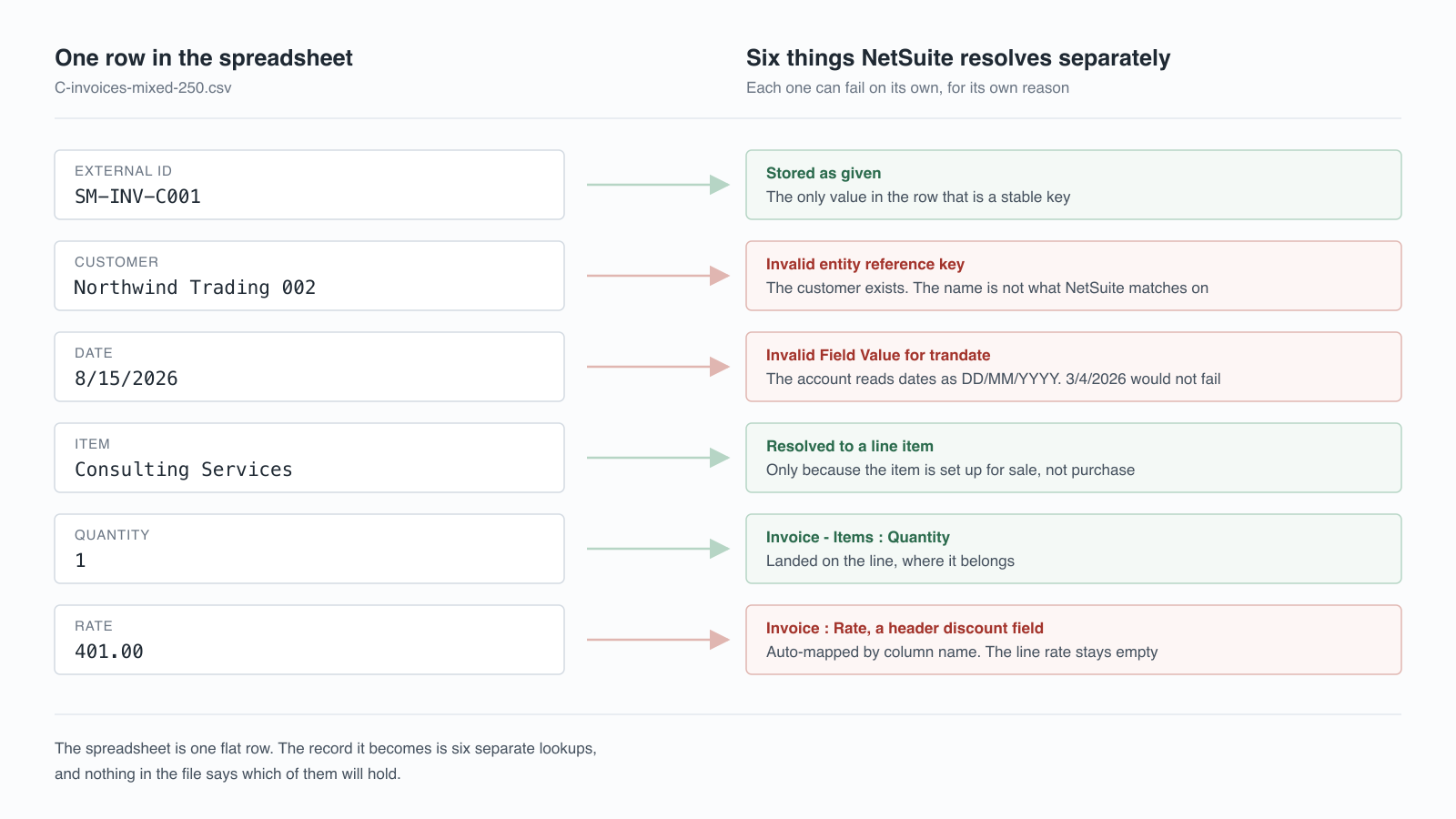
Three of those six resolved and three did not. What separates them is not in the file at all: it is the state of the target account on the day the import runs, which is why the same spreadsheet can behave differently in two NetSuite accounts, or in one account a week apart.
The mapping that looked right
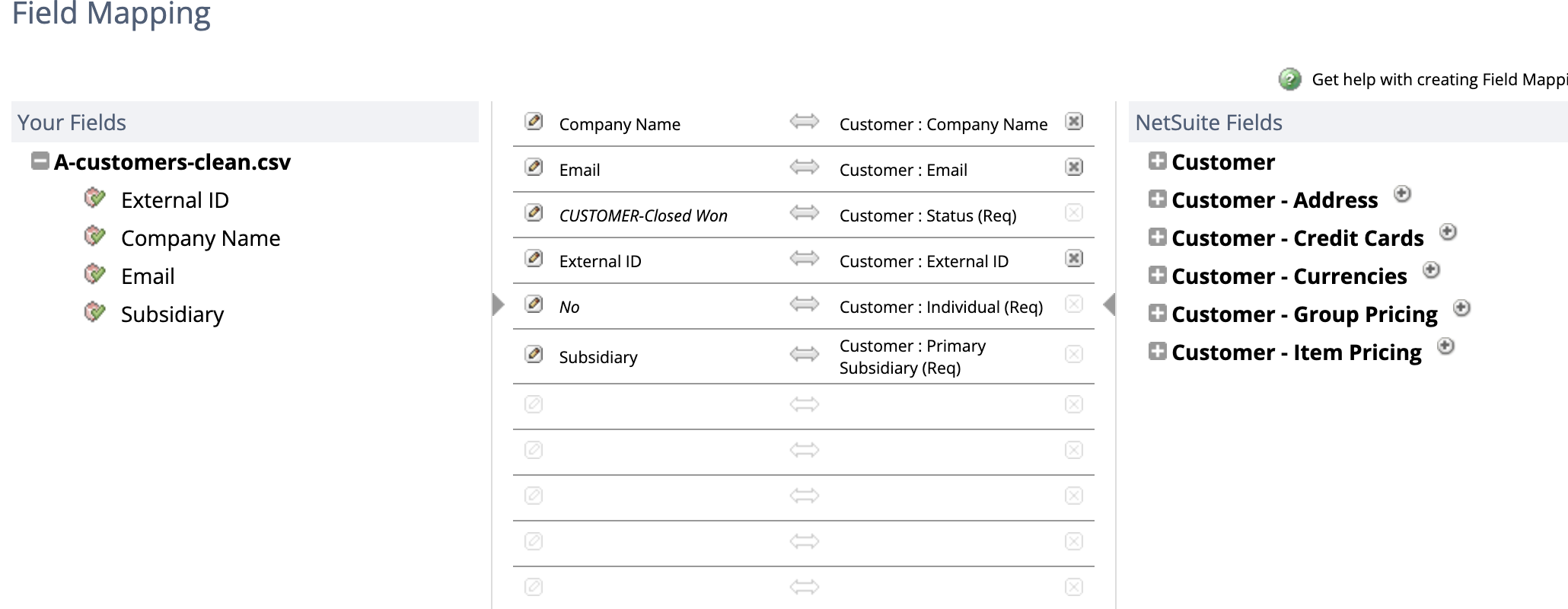
Start with a customer import. Four columns: External ID, Company Name, Email, Subsidiary. The Import Assistant matches them to NetSuite fields and shows you what it intends to do.
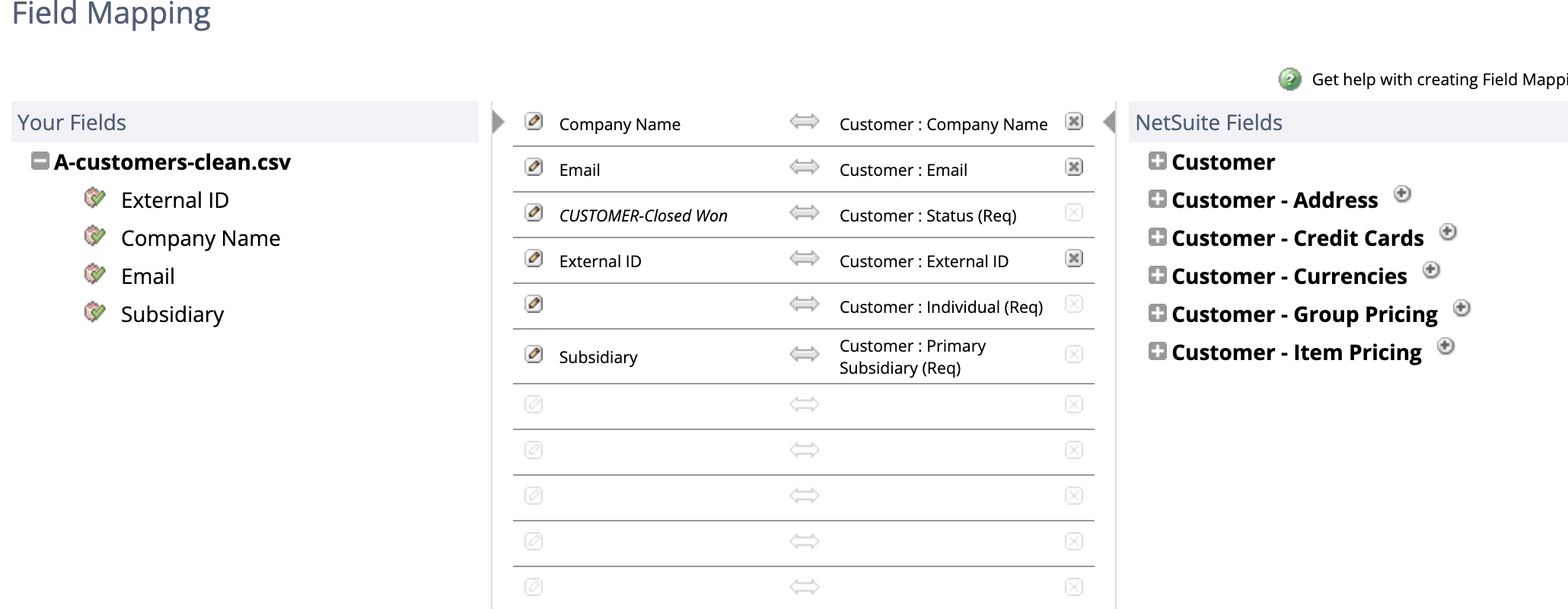
Two things on that screen are not in the spreadsheet.
Customer : Individual (Req) is marked required and has nothing on its left side. There is no such column in the file. The wizard lets you continue anyway, and to get the import through, somebody eventually types a value onto this screen instead: the italics in the corrected mapping later in this post are exactly that.
Which is the part worth noticing. The file you exported, reviewed, signed off and archived is not a record of what you imported, because part of the payload was supplied on a wizard screen by whoever happened to run the job. Hand the same CSV to someone else next month and the result can differ, with nothing in either file to show why.
Now the same screen for an invoice file, and the more expensive version of the same behaviour:
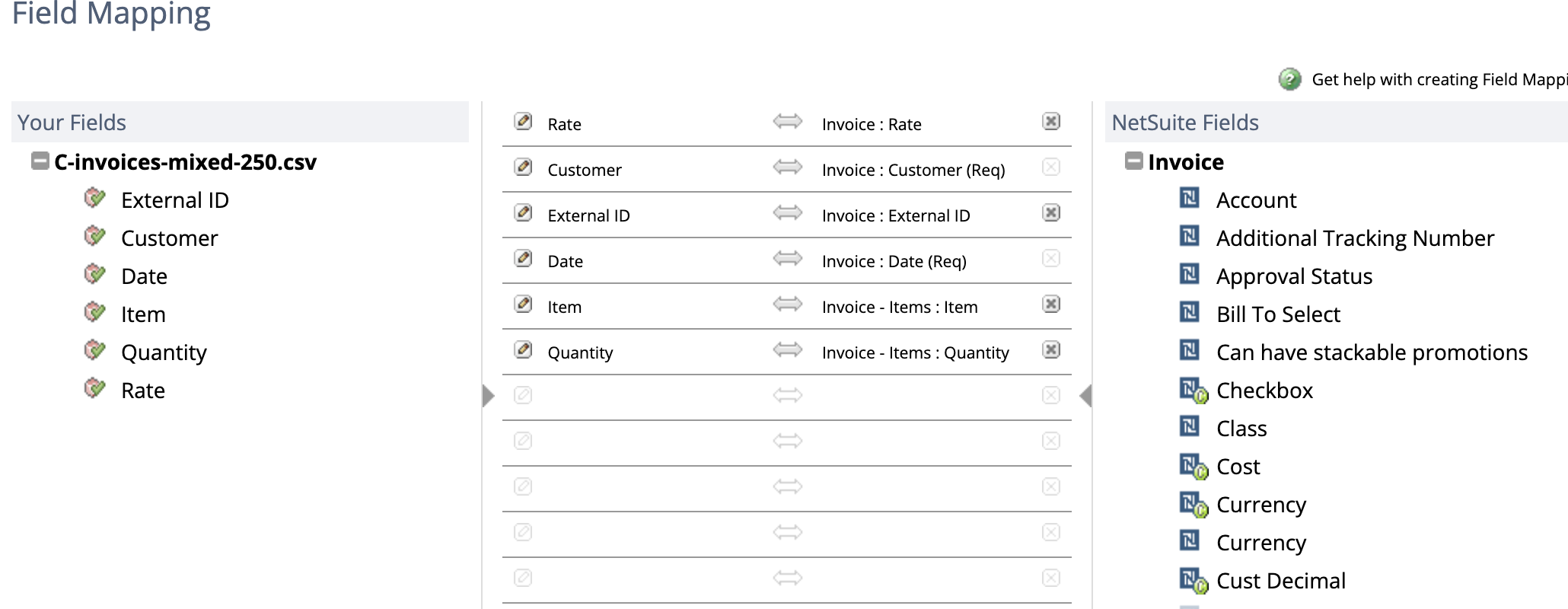
Item and Quantity were matched to Invoice - Items, the line sublist, which is correct. Rate was matched to Invoice : Rate, which is a header field, and the error report later identified it by its internal name: discountrate.
So the amounts in that column were being routed into a header-level discount percentage instead of the price on the line. 241 of the 250 rows carried a perfectly ordinary numeric rate, and where a column is mapped to a header field there is nothing routing those values to the line at all. The column was called Rate. NetSuite has a field called Rate. They are not the same field.
Two kinds of failure, and nothing tells you which
Clicking Next on that invoice file produced this:
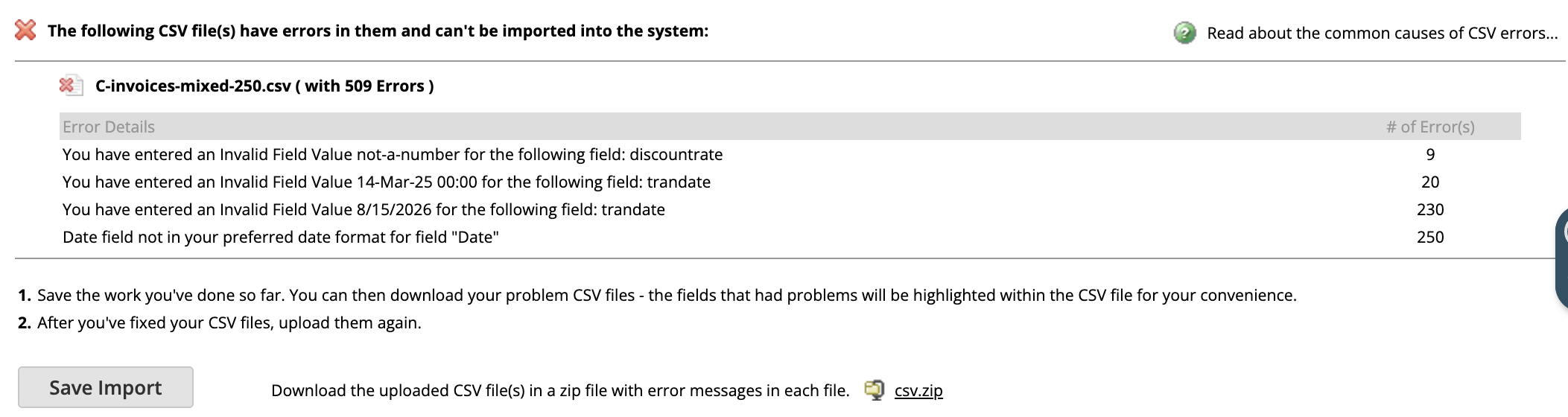
Nothing imported. Not one row.
This is worth understanding, because it is the difference between two completely different afternoons. Format problems, a malformed date or a non-numeric amount, are caught when the file is validated, and they stop the whole job. Reference problems, a customer or item that does not exist, are only discovered row by row while the import runs, so those files partially succeed.
Same wizard, same button, same looking file. One outcome is a red panel and no records. The other is a job that finishes and leaves you to work out which rows made it. The Assistant does not tell you in advance which one you are about to get.
The date that reads as valid
Look at the third line of that error table: Invalid Field Value 8/15/2026 for the following field: trandate, 230 times.
8/15/2026 is 15 August, written the way most of the United States writes it. The account was set to read dates as DD/MM/YYYY, so it parsed the value as day 8 of month 15, and month 15 does not exist. The import stopped.
That failure was loud, and loud failures are the good case. Consider 3/4/2026 instead. Under DD/MM/YYYY it is 3 April. Under MM/DD/YYYY it is 4 March. Both are real dates, so nothing errors, and the invoice lands a month out of position. Every transaction dated in the first twelve days of any month has this property. Your trial balance still ties for the year. Your monthly comparatives are quietly wrong, and no report you would think to run will show it, because there is nothing malformed to find.
Names are not identifiers
With the dates corrected, the same 250 invoices came back with a different result. Every row failed, including the sixty that pointed at customers created twenty minutes earlier in the same session:
Invalid entity reference key Northwind Trading 002.Northwind Trading 002 existed. It had been imported successfully, 40 of 40, and it was visible in the customer list under exactly that name. The invoice import still could not use it.
Oracle’s general CSV file conventions are direct about this: you can specify name references in a CSV file, but reference types such as External ID or Internal ID are preferable, and values used as name references have to be written exactly as they appear in the record’s dropdown lists. The documentation also has a section on how auto-generated numbers affect name references. Which of those applied to this account we did not chase down, and that is the lesson rather than a gap in it: what you get back is a rejected row, not a reason you can act on.
The practical rule is the uncomfortable one: the name a human uses to identify a customer is not the value NetSuite matches on, and a spreadsheet built by a human will be full of names.
Complete does not mean imported
Here are two import jobs from that session, side by side.

Complete. 100.0%. Zero records.
The status column describes whether the job finished executing, not whether it accomplished anything. A job that rejected every single row is complete in exactly the sense NetSuite means, and it sits next to a successful one looking identical. If you are tracking a migration by watching this page, or if someone screenshots it for a status update, the two rows say the same thing.
That is the shape of every cost in this post. The mapping looked complete. The date looked valid. The customer existed. The job said Complete. Each one was checkable, and none of the checks fired.
What the Import Assistant actually supports
None of this means CSV import is the wrong tool. It means it is a tool with a contract, and the spreadsheet does not carry the contract.
Oracle’s data migration setup guidance and the file conventions page between them set out what the Assistant expects. The parts that bite hardest in a real migration:
- 25,000 records or 50 MB per import job, with multiple files counted together. Real transaction history does not fit in one job, so it has to be split across several, run in dependency order, and reconciled afterwards to prove nothing fell between them.
- External ID or Internal ID in preference to names for anything that references another record.
- Subsidiary is required on Chart of Accounts, Customers, Contacts, Employees, Vendors and more in a OneWorld account, written as a hierarchical path such as
Parent Company : UK Subsidiary. - Dates in the account’s format, not the one your source system exported.
- Columns without headers are dropped, silently, along with trailing blank lines.
Those five are a sample, not the list. The conventions page alone is longer than this post, and each record type layers on its own required fields, its own accepted reference types and its own place in the ordering. Every one is satisfiable. The cost is that satisfying them is engineering work, and the spreadsheet is where that work is not being done.
And this is only customers and invoices
Everything above came from two record types. A real migration has a dozen, and they do not queue politely.
On the payables side it is not only bills. There are vendor credits, checks, credit card charges and journal entries, each its own record type with its own file, its own required fields and its own mapping screen. Bills need the vendors and items in place first, the same as invoices. Bill payments need the bills. Vendor credits need the bills they offset. Receivables run the same way: invoices, credit memos, customer payments, deposits, refunds.
The links between them are importable, and that is the part people underestimate rather than the part that is impossible. A payment does not carry its invoice in a column. The application sits on a sublist of the payment record, and Oracle is specific about what that sublist will accept: a payment can be associated with an invoice through the internal ID or external ID only, because the transaction ID is not unique and cannot be used.
Read that again with a spreadsheet in front of you. The invoice number is the one thing a person can see on the record, and it is the one thing the payment file may not reference. So either every invoice carried an external ID before it was exported, or somebody imports the invoices, harvests the internal IDs NetSuite assigned them, and splices those back into the payment file before importing it. Oracle’s own instruction is to import invoices first and give them unique IDs, preferably external ones, which is a decision that has to be made before the first export rather than discovered at the payment stage.
Get it wrong and the payment lands without its application, which leaves the invoice open even though the cash is in the bank. Deposits need those payments already sitting in Undeposited Funds, or they bank money that was never received.
So the work is not one file. It is a dozen record types in a fixed order, each with its own mapping screen and its own supplied constants, where a mistake in the third file silently invalidates the ninth. Then set a couple of hundred thousand transactions against the 25,000-record job limit and it stops being a dozen imports altogether. It becomes dozens, and each one has to be checked before the next is safe to run.
This is the part that does not scale in a straight line. One record type at 250 rows is an afternoon. Twelve record types at 200,000 rows is not four hundred afternoons, because the dependencies mean anything found late costs you everything downstream of it as well.
What to check before you trust a spreadsheet import
If you are going to do this by hand, these are the checks that would have caught everything above. Read them as a per-file list rather than a per-migration one. You run all six again for items, again for invoices, again for payments, again for bills, again for deposits, each time against different required fields and a different mapping screen.
- Read the whole Field Mapping screen, not just the unmapped rows. Anything shown in italics is a value NetSuite invented. Anything ending in
(Req)with an empty left side will either fail or be filled in for you. - Confirm which side of a sublist each column landed on.
Invoice : RateandInvoice - Items : Rateare different fields with the same label. - Check the account’s date format before exporting, and match it. Then spot-check a transaction dated in the first twelve days of a month, since that is the only range where a format error can pass validation.
- Reference records by External ID, never by name. Give every source record a stable external identifier before you export it, not after the first import fails.
- Never read a job as successful because it says Complete. Read the record counts, and reconcile the totals in NetSuite against the source.
- Import one file of ten rows before importing the file of ten thousand. Every failure above surfaces on the tenth row as readily as the ten-thousandth, and costs a fraction of the time.
Once the volume is real the arithmetic turns against doing this by hand, not because any single check is difficult but because there are six of them per file and fifty files.
How SuiteMigration handles it
SuiteMigration is the first product built to move record-level data into NetSuite in full, rather than balances plus a sample. The closest alternative we found, OptimalData Consulting, reaches the same depth of history, but delivers it as a scoped consulting engagement rather than software you run yourself.
It reads QuickBooks, Xero, or another NetSuite account directly and pushes into NetSuite through the API, so there is no CSV file in the middle and no mapping screen to misread.
Fields are mapped ahead of time rather than guessed from column names, so an invoice line rate goes to the invoice line. Records are matched on stable identifiers rather than display names. Dates are written in the format the target account expects. Customers, vendors and items are pushed before the transactions that reference them, because the dependency order is a property of the data model, not something to rediscover per project.
There are a few places where NetSuite requires a value the source system has no equivalent for, and we supply one. The difference is that those defaults live in code: identical on every run, reviewable, and the same for you as for the last customer, rather than being whatever someone typed into a wizard that afternoon.
The reporting difference matters more than any of it. Instead of a job that says Complete with a count, you get a result for every record: what was pushed, what was skipped, what failed and why, with the ability to fix and retry the individual record rather than the file. And after the push, you can reconcile the totals in NetSuite against the source system, which is the only check that would have caught a wrongly dated invoice or a rate on the wrong field.
Frequently asked questions
Can you import QuickBooks data into NetSuite using CSV files?
Yes. NetSuite's CSV Import Assistant accepts customers, vendors, items and transactions, and for small or simple datasets it is a perfectly reasonable route. The difficulty is not the export or the upload, it is that every value referencing another record has to resolve against NetSuite's data model, and a spreadsheet has no way of expressing whether it will.
Why does my NetSuite CSV import fail with "Invalid entity reference key"?
Because the name in your file is not the value NetSuite matches customers on, even when that name appears correctly on the record. Oracle's documentation recommends referencing records by External ID or Internal ID rather than by name, and flags auto-generated numbering as one thing that affects how names resolve. The reliable fix is to give every source record a stable external identifier before you export it.
What is the maximum number of records in a NetSuite CSV import?
25,000 records or 50 MB per import job, and for a multiple-file upload all files count together against those limits. Any real transaction history has to be split across several jobs, which then have to be run in dependency order and reconciled afterwards.
Why does a NetSuite CSV import say Complete when nothing was imported?
Because Complete describes the job finishing, not records being created. An import that rejected all 40 of its rows shows Complete at 100.0%, identical to one that imported all 40. Always read the message with the record counts, and reconcile the resulting totals against the source rather than trusting the status.
What date format should a NetSuite CSV import use?
The format the target account is set to, which is not necessarily the format your source system exports. A US-formatted date such as 8/15/2026 fails outright in an account set to DD/MM/YYYY, because there is no month 15. The dangerous case is a date such as 3/4/2026, which is valid under both conventions and will import a month out of position without any error.
Is a spreadsheet enough for a small NetSuite migration?
Often, yes. A cutover that brings across a trial balance, a customer list and the invoices still open on the day is a few hundred rows, and the CSV Import Assistant will handle it in an afternoon. The threshold is not a single record count, it is how many record types you need and how many years of them. Once payments, vendor bills, bill payments and deposits are in scope, each depending on the one before it, the ordering and reconciliation work outgrows a spreadsheet well before the row limits do.
Why did my invoice import put the amount in the wrong field?
Most likely the Assistant matched your column to a header field with a similar name rather than the line-level one. A column called Rate can be auto-mapped to the header field Invoice : Rate, a discount field stored internally as discountrate, instead of the line-level Invoice - Items : Rate. Check on the Field Mapping screen whether each column landed on the record or on the sublist.