

NetSuite Go-Live: A Data Cutover Checklist
The migration tested clean and the cutover still goes wrong, because the last few days of data move while people are still working in both systems. What to freeze, what to reconcile, and what to verify before NetSuite becomes the system of record.


A migration can be tested, reconciled and signed off, and the cutover can still go wrong. The cutover is not the migration. It is the short stretch where the old system still holds the last few days of trading, NetSuite holds everything before that, and people are working in both.
This is a checklist for the data half of that window: what to freeze, what to carry across, and what to check before NetSuite becomes the system of record. It leaves out training, permissions and integration go-live. Those matter, but they are a different list.
Everything below was run in a NetSuite OneWorld sandbox. Two of the sections exist because the sandbox disagreed with what we expected to find.
The cutover checklist
Before you freeze anything
- Confirm accounting periods exist for the go-live date and for several months after it.
- Set the go-live date on a period boundary, not mid-month.
- Agree which balances carry across and which history is being left behind.
- Decide which account should absorb the balancing side of every opening entry, and expect to check which one NetSuite actually used.
- Check the target account’s date format and base currency against what you are about to send.
The freeze
- Stop entry in the source system, and write down the exact timestamp.
- Extract the final balances and the open item detail from the source as at that moment.
- Lock the NetSuite periods you have already loaded, one transaction module at a time.
- Record which subsidiaries you locked, because on OneWorld the lock is scoped to each.
Bringing balances across
- Post opening balances for the balance sheet, excluding any account whose detail you are importing separately.
- Import open receivables and payables as documents, not as a lump balance.
- Load inventory quantity and value before the first transaction that consumes it, by a method that preserves your costing layers.
- Confirm every clearing account used during the load is back to zero.
Before anyone posts
- Reconcile the balance sheet account by account against the source.
- Reconcile receivables and payables detail against their control accounts.
- Spot-check individual records, not just totals.
- Unlock only the periods people actually need, and leave the rest locked.
The rest of this post is about the five that go wrong most often.
The go-live date has to be a period boundary
Oracle’s requirement is blunt: each day must belong to an accounting period to ensure accuracy in reporting. A transaction dated where no period exists has nowhere to post.
So the first check is not whether the date suits the business. It is whether the periods exist at all.
They may not run as far forward as you assume. NetSuite keeps a rolling window rather than an open-ended calendar: Oracle calls it the accounting period window, the minimum number of current and future periods kept open and unlocked, configurable from 1 to 1,000.
This produces a display that is easy to misread.
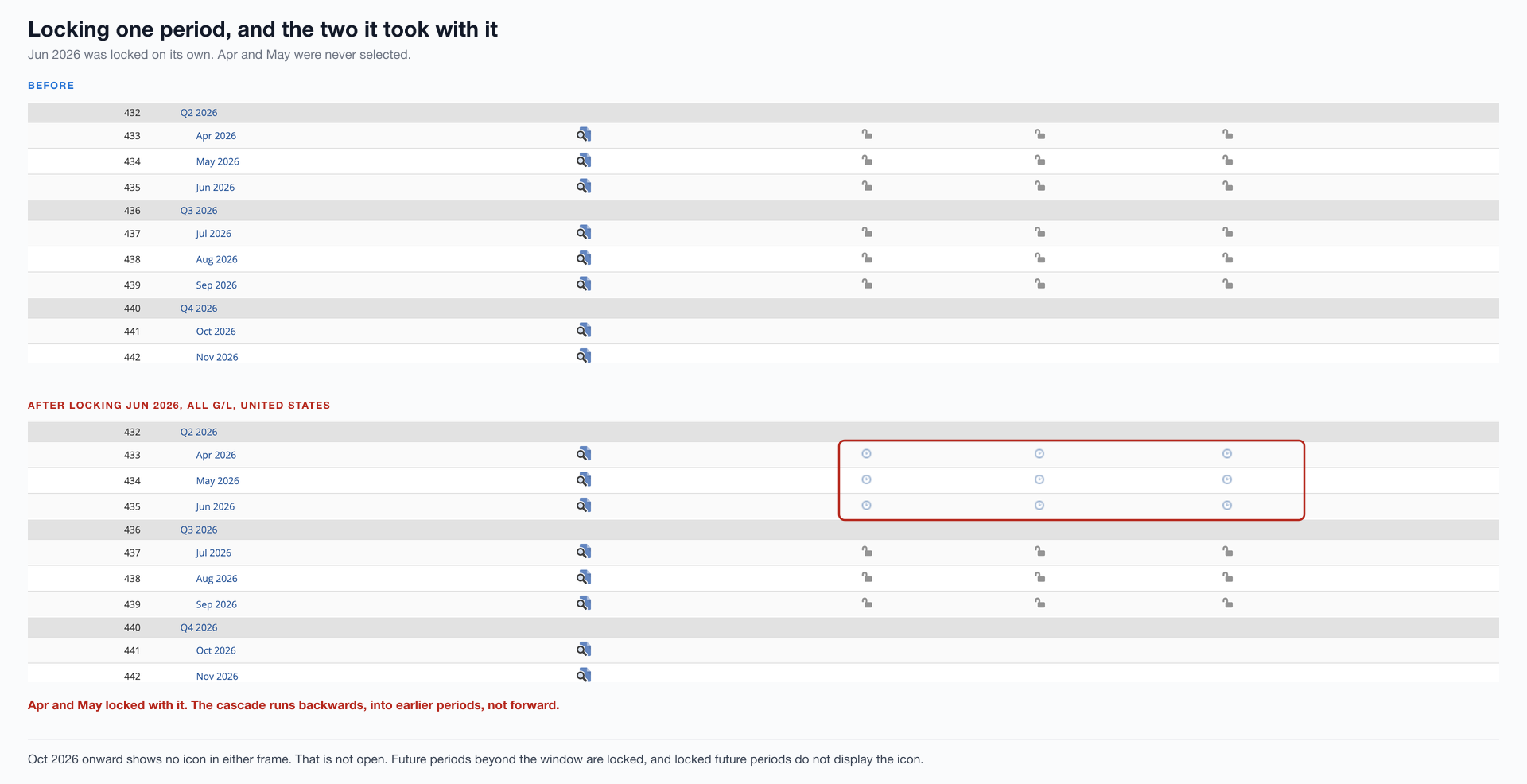
October and November carry no icon in either frame. That is not an open period waiting for you.
Those periods sit beyond the window and are locked for posting. Oracle notes that locked future accounting periods do not display the lock icon, so a blank cell and an unlocked cell look identical and behave in opposite ways.
Pick the boundary before you pick the date. Mid-month go-lives split a single month’s activity across two systems, which means reconciling a partial period twice and explaining the join to whoever audits it.
Freezing the old system is not one switch
Locking in NetSuite is per transaction module, not per period. Oracle lists A/R, A/P, Payroll and All as separately lockable, and an account only shows the modules its features enable.
The asymmetry matters on the way back. Locking everything is one action. Undoing it means unlocking each module separately, however many your account has.
The locks are also applied through the Period Close Checklist rather than the period list, which is worth seeing because it is shorter than the documentation suggests.
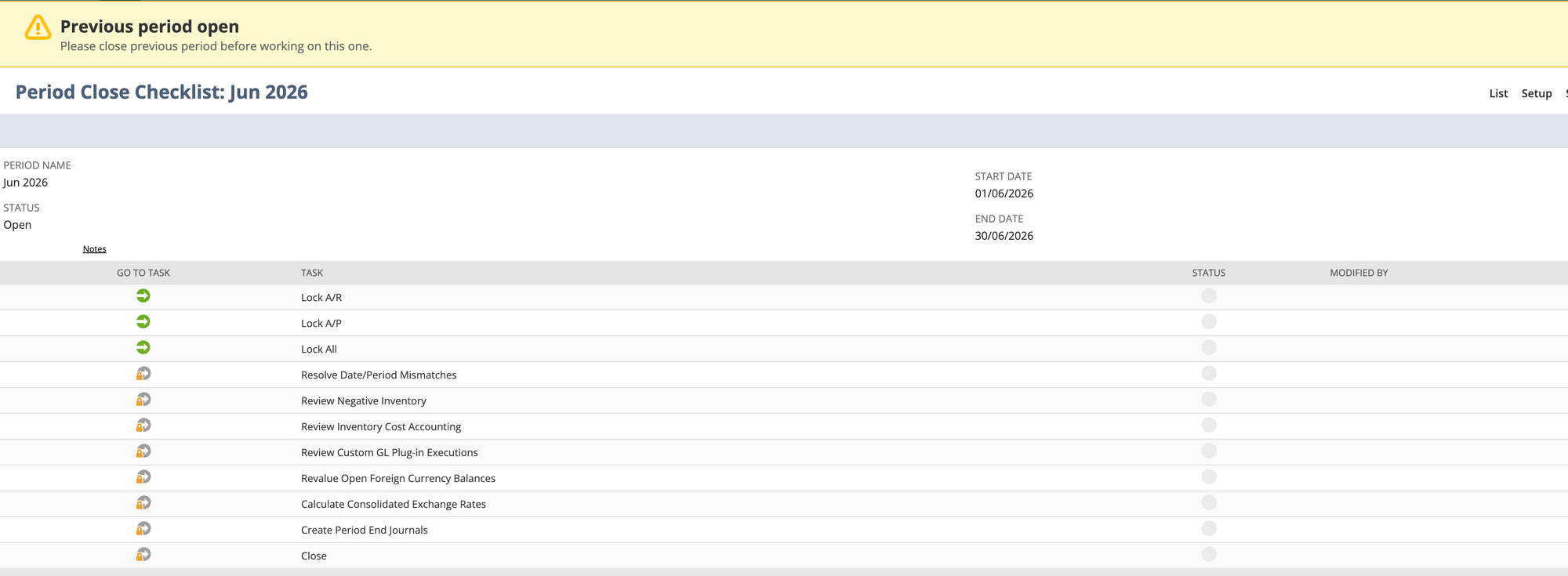
Oracle documents eighteen possible tasks. This account shows eleven, because the rest depend on features it does not have. Payroll is absent, so Lock Payroll never appears.
A runbook written against the documentation rather than against the account lists steps that do not exist for you.
Note the banner as well. It reads Previous period open, and underneath, Please close previous period before working on this one.
Periods close in sequence. A cutover plan that assumes you can close the go-live period while an earlier one is still open has a dependency nobody wrote down.
Then there is the cascade. Oracle states that locking a past period automatically locks all past periods prior to the locking point, and locking a future period locks all future periods after it.
In the figure above, June 2026 was the only period selected. April and May locked with it, because June had already ended and the cascade for a past period runs backwards.
That is the opposite of what most people brace for. If you lock the last pre-go-live month to stop late entries, you have also locked every month before it, including any you were still reconciling.
On OneWorld there is a second dimension.
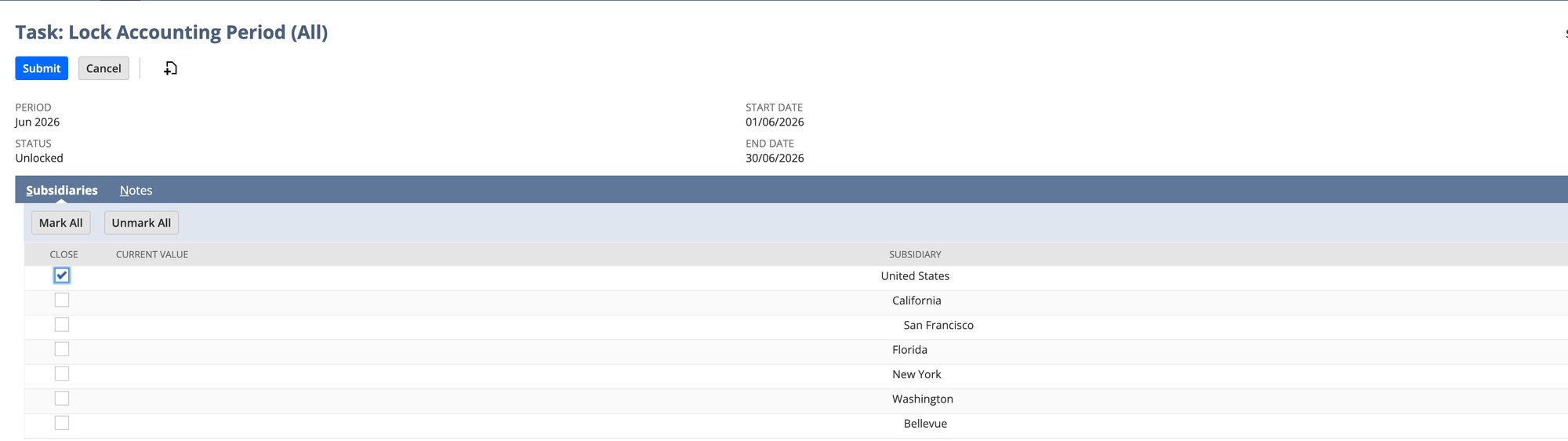
A period locked for one subsidiary is still open for the others. If the freeze is meant to be company-wide, the list has to be ticked company-wide, and whoever runs the unlock afterwards needs the same list.
Opening balances are transactions, not settings
Oracle is clear that when you save the Opening Balances page, NetSuite generates journal entries to create the opening balances.
That sentence carries most of what you need. Opening balances are dated, they post, they belong to a period, and anyone with journal permissions can edit or delete them.
What the documentation does not describe is what happens when the accounts you are filling do not share a currency.
We entered four balances on one page: receivables 486,200.00, a bank account 312,450.00, payables 298,700.00 and retained earnings 499,950.00. Debits and credits matched at 798,650.00 each way, and the page’s Out of Balance By field agreed.
One save produced two journals.
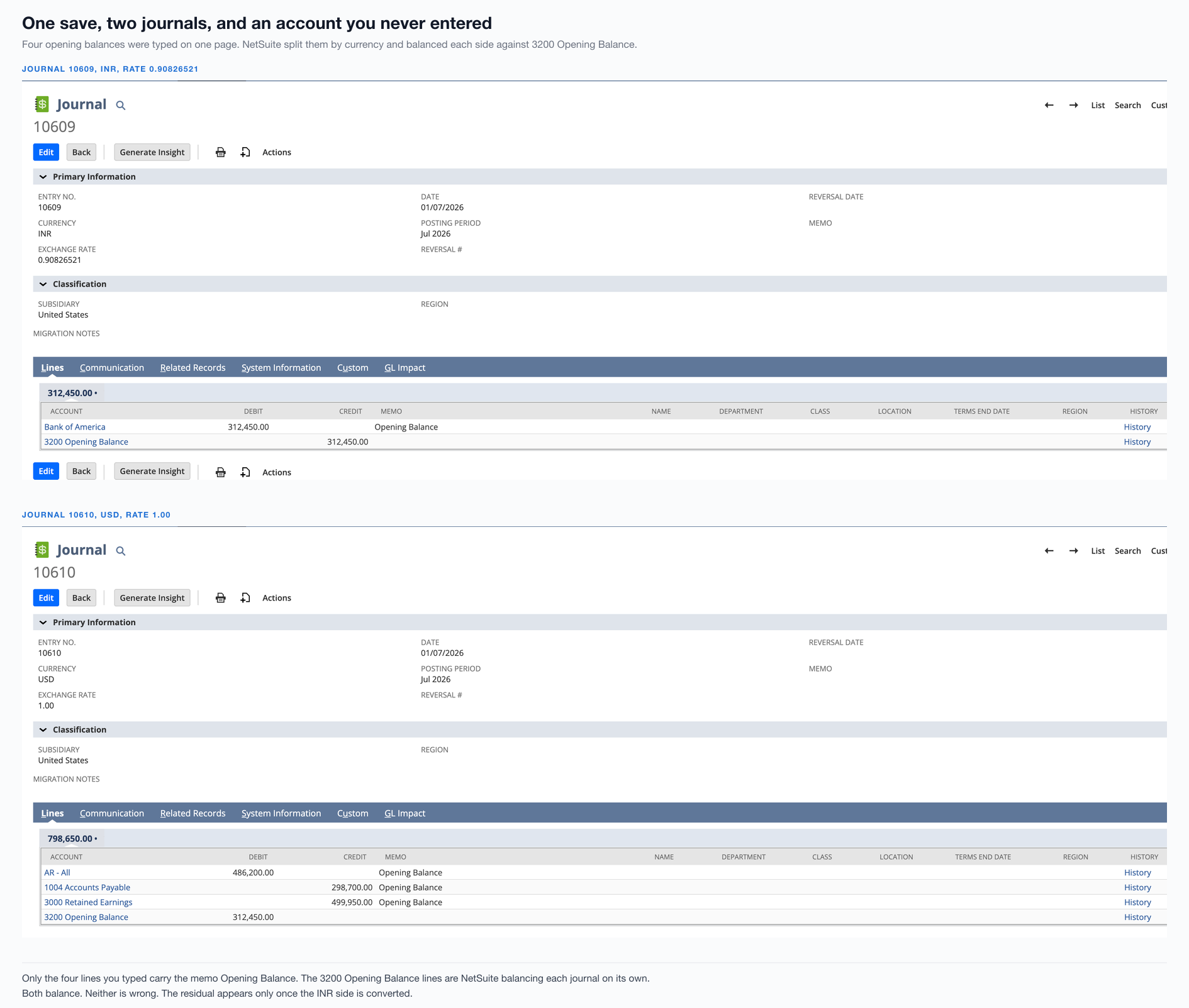
The bank account was denominated in INR. NetSuite separated it into its own journal at rate 0.90826521 and balanced each journal independently against an account called 3200 Opening Balance.
Look at the memo column. The four lines we typed carry Opening Balance. The two clearing lines carry nothing, because they are NetSuite’s, not ours.
Both journals balance. Neither is wrong. The problem only appears once the two are expressed in the same currency:
Posting to 3200 Opening Balance |
Value in USD |
|---|---|
| Credited by the INR journal | 283,787.47 |
| Debited by the USD journal | 312,450.00 |
| Left behind | 28,662.53 |
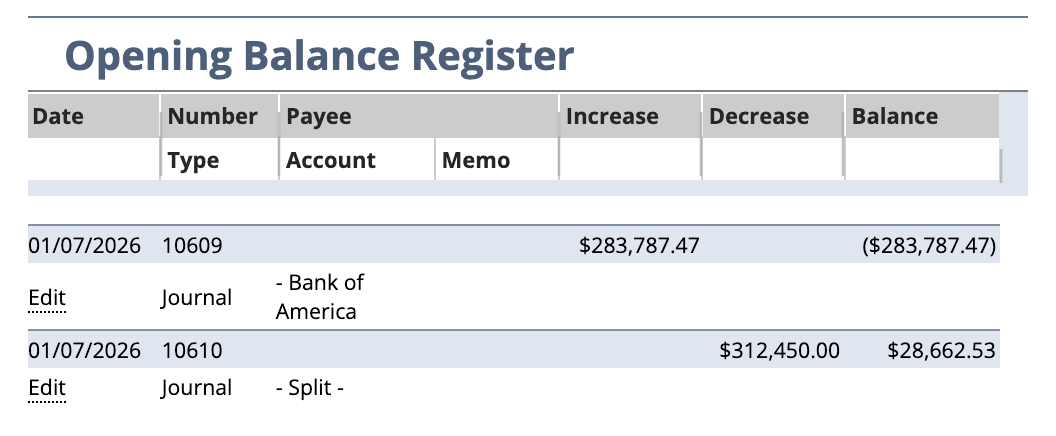
The balance check ran on the numbers as typed, not on their value in the subsidiary’s currency. So Out of Balance By read 0.00 while the result was out by the exchange difference, parked in an account most people never think to look at.
The wider lesson is not about currency. Any account NetSuite uses to balance something on your behalf has to be reconciled to zero before you go live.
Add that check whether or not you hold a foreign currency account. You will not always know which account NetSuite picked.
One limitation worth knowing before you plan around this page: Oracle notes you cannot enter an opening balance for a new summary account. If your chart of accounts uses summary accounts as headers, their balances have to come from the accounts beneath them.
The receivables you count twice
Here is the thing the Opening Balances page will happily let you do.
It offers every account, receivables included. Put a figure against receivables, then import the open invoices as well, and NetSuite has been told about the same debt from two directions.
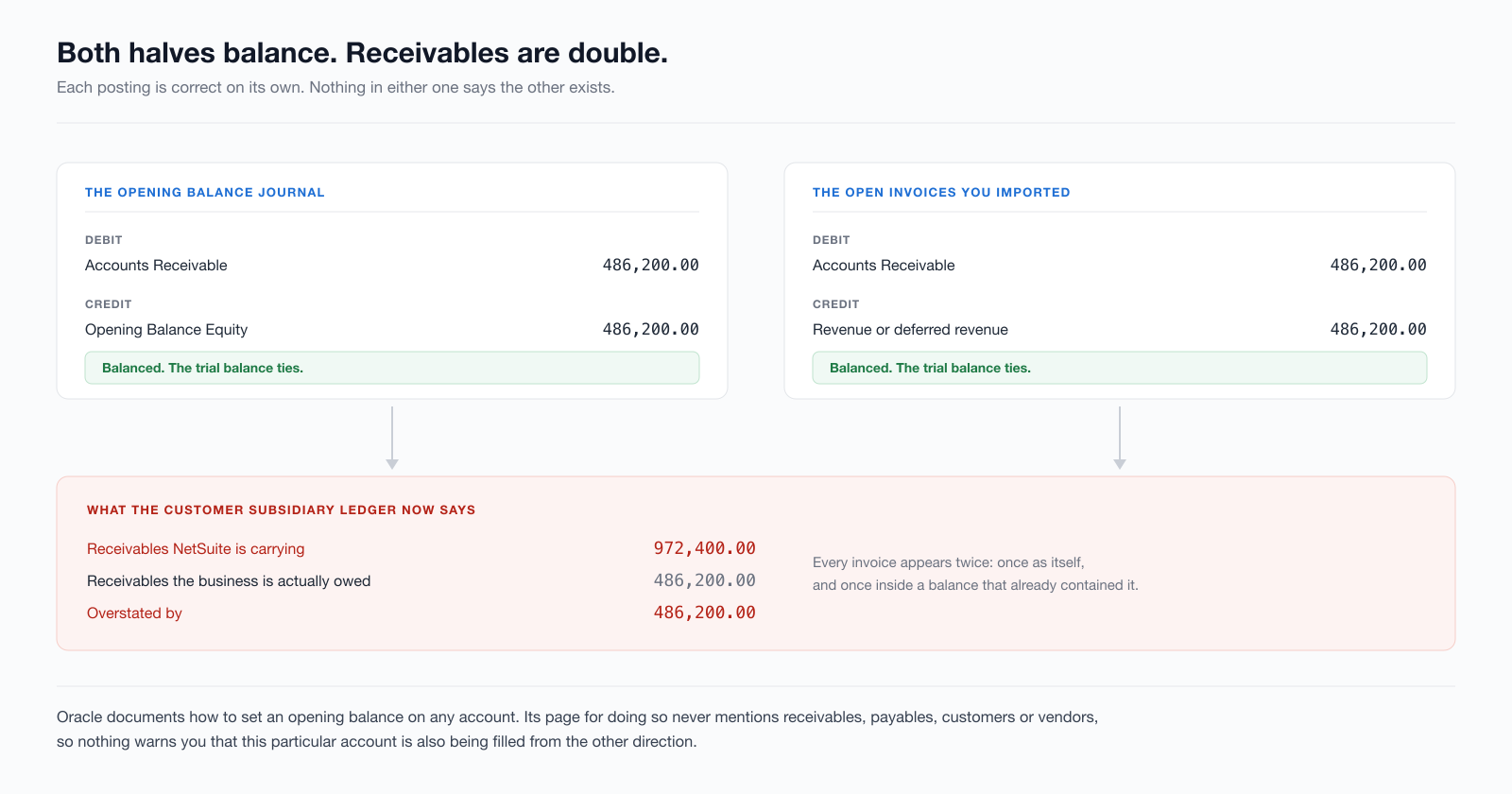
Nothing errors. Both postings balance. The trial balance ties, because it always ties. What is wrong is not the arithmetic but the meaning: receivables now contains every open invoice twice, once as the invoice and once inside a summary balance that already included it.
It usually surfaces weeks later, when someone runs an aged receivables report and the total does not match the general ledger, or when a customer statement shows a balance the customer disputes and is right to.
Oracle’s page for entering opening balances never mentions receivables, payables, customers or vendors. We checked.
That is a division of labour rather than an oversight. The page sets general ledger balances; open item detail is a separate job. But nothing on screen says the account you just typed into will also be filled from the other direction.
The rule is simple enough to write down. Any account whose detail you are importing is excluded from the opening balance journal. Receivables and payables are the common cases. Inventory is the third.
It gets easier to trip over the more accounts you have. The sandbox we used has five separate receivables accounts. An opening balance on one and imported invoices posting to another produces the same overstatement, split across two accounts, where it is considerably harder to see.
When the totals do tie, that is worth less than it looks. Record-level reconciliation is what separates a receivables ledger that is right from one that is merely balanced.
Inventory carries a costing history you can lose
Inventory is the other opening balance that is really a document load. Quantities and values have to exist before the first transaction that consumes them, which puts it early in the sequence, not with the rest of the balance sheet.
The method matters more than the timing. Oracle warns that when you use the Adjust Inventory Worksheet with LIFO or FIFO costing, the cost of any item you adjust is averaged. NetSuite ignores LIFO or FIFO, and the costing history is lost.
On a cutover that is not a small side effect. Loading opening stock the wrong way flattens the cost layers on day one, and the first cost of goods sold calculation afterwards is wrong in a way no quantity check catches.
Quantities reconcile. Value reconciles. The layers underneath are gone.
If you run LIFO or FIFO, decide how opening stock is loaded before anyone loads it, and reconcile value by item rather than in total.
What to verify before anyone posts
Run these against the data, not against the plan.
- Every balance sheet account, one at a time, against the source. A matching total for the section is not a matching account.
- Receivables and payables detail against their control accounts. If the aged report and the general ledger disagree, you have the double-count above or its mirror image.
- Every clearing and suspense account at zero. Including ones NetSuite chose for you. The residual in our sandbox was 28,662.53 and nothing on screen had flagged it.
- Inventory quantity and value by item. In total is not good enough where costing layers are involved.
- A handful of individual records, opened and read. Pick a customer with a part-paid invoice, a vendor with a credit, an item with more than one cost layer.
- The period state itself. Which periods are open, which are locked, for which subsidiaries, and does a blank cell mean open or beyond the window.
The last one is the cheapest and the most often skipped. You can finish a flawless cutover and still have people unable to post on Monday because the period they need sits outside the window, or able to post into a month you thought you had closed.
If the load itself is still ahead of you rather than behind you, the CSV import templates cover the file-level failures that show up before any of this becomes relevant, and the scoping guide covers how the go-live date gets set in the first place.
How SuiteMigration handles it
Most of what goes wrong above has one root. The cutover is assembled from several tools that each work correctly and none of which know about each other.
The Opening Balances page does not know you are importing invoices. The import does not know what the journal already posted. The period lock does not know which subsidiaries your freeze was meant to cover.
SuiteMigration reads the source and writes into NetSuite through the API as one operation, which removes most of that seam.
Balances and open items come from the same extract, so an account whose detail is being loaded never also receives a summary balance. Records are written in dependency order, because the order is a property of the data rather than a step in a runbook.
Where a clearing account is used, it is reconciled to zero as part of the run rather than left for someone to notice.
For the cutover specifically, the useful part is that the same reconciliation runs before and after. You get a per-record result rather than a job status, so a receivables balance that is double is visible on the day it happens rather than at the first month end.
What we cannot do is pick your go-live date or close your old system. Those stay with whoever owns the books. What we can do is make sure that when the date arrives, the part that moves data is not also the part you are debugging.
If you want to see it against your own data before committing to a date, the Migration Readiness Audit reads the source in full and reports what would happen, without writing anything.
Frequently asked questions
What is a data cutover in a NetSuite go-live?
The window where the old system holds the last few days of trading, NetSuite holds everything before that, and neither one is complete. The cutover is the work of closing that gap: freezing the source, carrying balances across, and checking them before anyone posts a transaction in NetSuite.
Should the NetSuite go-live date fall on a period boundary?
Yes, and the reason is mechanical rather than tidy. Oracle states that each day must belong to an accounting period, and opening balances post as dated transactions into whichever period contains that date. A go-live in the middle of a month splits one month's activity across two systems and leaves you reconciling a partial period in both.
How do you enter opening balances in NetSuite?
Through Setup, Accounting, Setup Tasks, Enter Opening Balances. Oracle is explicit that when you save that page, NetSuite generates journal entries to create the opening balances. They are dated posting transactions, not settings, so they land in an accounting period and can be locked, edited or deleted like any other journal.
Why is accounts receivable doubled after a NetSuite migration?
Usually because the opening balance journal included a figure for receivables and the open invoices were imported as well. Each posting balances on its own and the trial balance still ties, so nothing looks wrong. The receivables account simply carries every open invoice twice, once as the invoice and once inside a balance that already contained it.
Does locking one accounting period in NetSuite affect others?
It does, and the direction depends on where the period sits. Oracle states that locking a past period automatically locks all past periods prior to the locking point, and locking a future period locks all future periods after it. Locking a single month that has already ended will also lock the months before it.
Why do some future NetSuite periods show no lock icon at all?
Because a blank is not the same as open. Oracle documents an accounting period window, the minimum number of current and future periods kept open and unlocked, configurable from 1 to 1,000. Periods beyond that window are locked for posting, and locked future periods do not display the lock icon.
What should you reconcile before going live on NetSuite?
At minimum the balance sheet account by account, the receivables and payables subsidiary ledgers against their control accounts, any clearing or suspense account used during the load, and inventory quantity and value by item. Matching totals alone will not catch a receivables balance that is double with an equal and opposite error elsewhere.