

Dynamics GP End of Life: What Happens, When, and Your Options
Microsoft ends Dynamics GP support on December 31, 2029. What that means for your business, the dates that matter, and your options side by side.

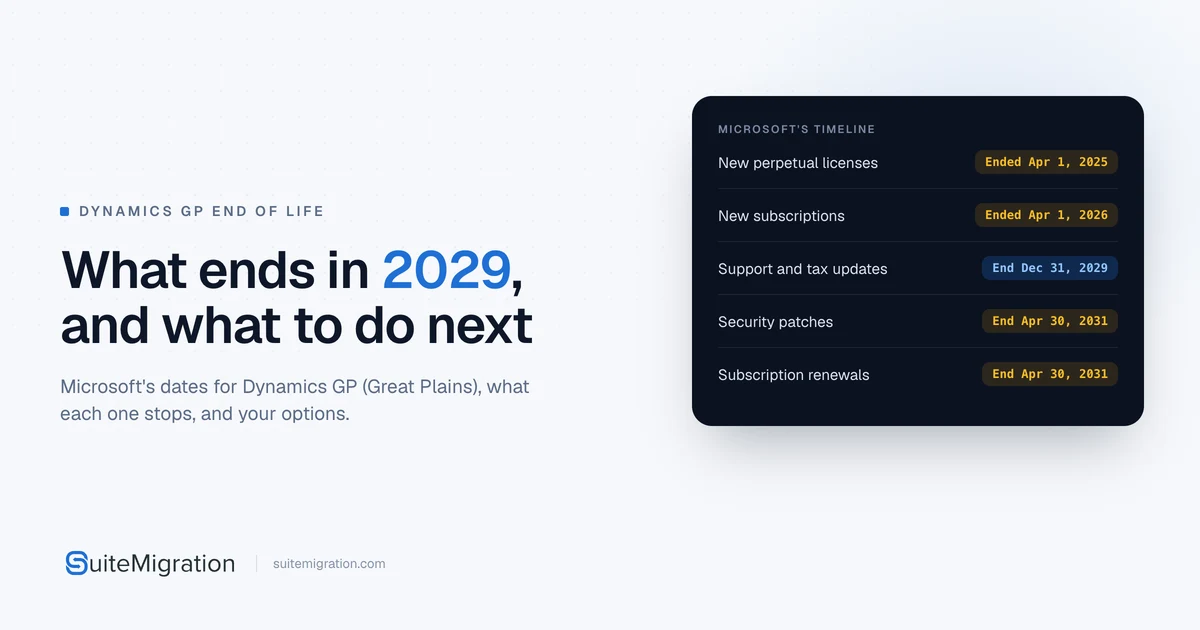
Microsoft will end support for Dynamics GP, the accounting system many teams still call Great Plains, on December 31, 2029. After that date GP gets no product updates, no tax or regulatory updates and no technical support from Microsoft. Security patches continue, only if needed, until April 30, 2031.
Nothing in Microsoft’s announcements switches GP off on January 1, 2030. But from then on GP gets no updates or support, only the occasional security patch until 2031, so every GP company has the same three decisions to make: where to go next, how much history to take, and when to cut over. This post covers what is happening, what it means for you, and your options side by side.
What is happening to Dynamics GP?
Microsoft is retiring GP and moving its customers to cloud ERP. In Microsoft’s own words, “As Microsoft continues focusing on innovation and investments in cloud solutions and technologies, we will end Dynamics GP support on December 31, 2029” (Microsoft Learn).
When is Dynamics GP end of life?
Two dates matter to existing customers. Two more have already closed GP to new ones.
| Date | What happens | Source |
|---|---|---|
| April 1, 2025 | No new customers for GP perpetual licenses | Microsoft Dynamics GP Support blog |
| April 1, 2026 | The last day new customers could license a GP subscription | Microsoft Dynamics 365 blog |
| December 31, 2029 | Support ends: no product updates, tax and regulatory updates, or technical support | Microsoft Learn |
| April 30, 2031 | Security patches end, and four licensing changes take effect | Microsoft Learn, Microsoft Dynamics 365 blog |
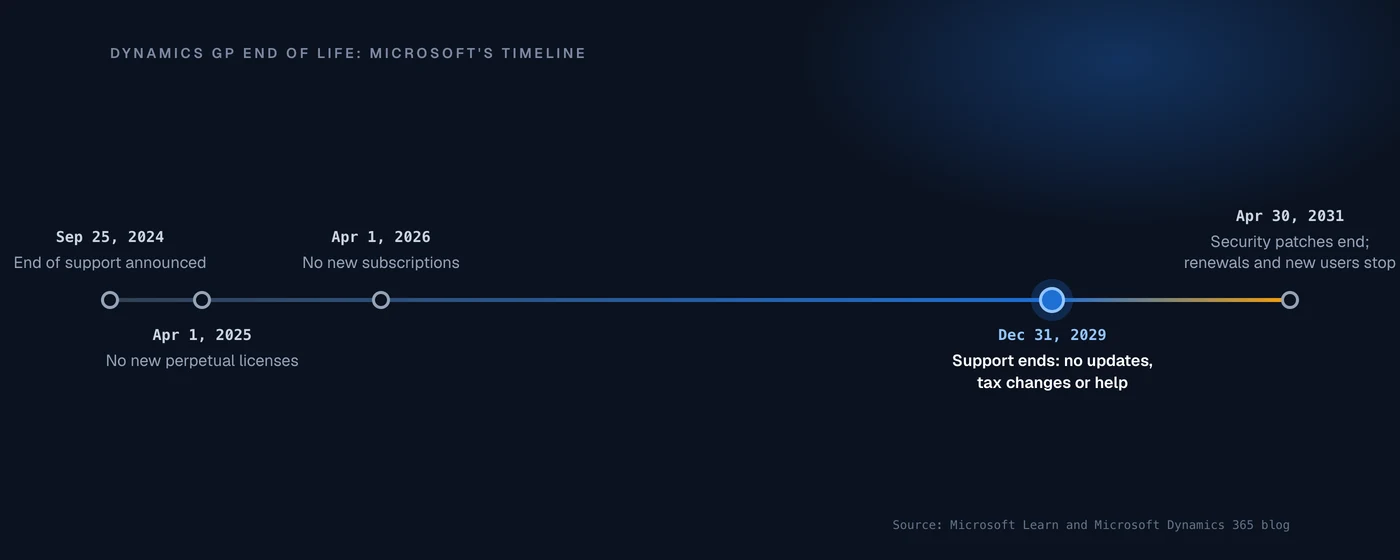
Microsoft announced the end of support in September 2024 with a date of September 30, 2029. In January 2025 it moved the date to December 31, 2029, so that GP customers can “meet their payroll and taxes obligations for the full year.”
Is Microsoft discontinuing Dynamics GP?
Yes. Microsoft no longer sells GP to new customers, and its lifecycle page encourages GP customers to move to its own cloud ERP, Dynamics 365 Business Central. Until support ends, the current version, 18.x, still gets regular updates, typically in June, October and December each year.
What Dynamics GP end of life means for you
Your GP keeps running, but it loses updates and help at the end of 2029, and your licensing options shrink in April 2031.
What stops after December 31, 2029?
Microsoft’s lifecycle page lists three things:
- Product enhancements. No more GP updates, so no new fixes either.
- Regulatory (tax) updates. If GP runs your U.S. Payroll, its tax tables stop changing, so 2030’s tax changes won’t arrive.
- Technical support. Nobody at Microsoft to call when something breaks.
Can you still use Dynamics GP after 2029?
Yes, but how long depends on how you license it. Four changes take effect on April 30, 2031, according to Microsoft’s June 2025 announcement:
- Service Plan coverage ends for GP products.
- Subscription licenses bought through SPA or the Dynamics Price List can no longer be renewed.
- You can no longer add perpetual users to an existing GP system.
- GP licensed through hosting providers under SPLA is expected to end.
So a company that owns perpetual licenses can keep GP running after 2031, unsupported, unpatched and with the users it already has. A company on a subscription runs out at its first renewal after April 30, 2031.
Will you still get security updates?
Until April 30, 2031, Microsoft will release security patches “if needed.” After that date there are none, so any vulnerability found from then on stays unfixed.
Is your GP version already out of support?
The dates above apply to the current version, 18.x, which follows Microsoft’s Modern Lifecycle Policy. Older versions follow fixed dates, and most of those have passed:
| Version | Extended support ends |
|---|---|
| GP 2013 and GP 2013 R2 | April 11, 2023 |
| GP 2015 and GP 2015 R2 | April 8, 2025 |
| GP 2016 and GP 2016 R2 | July 14, 2026 |
| GP 2018 and GP 2018 R2 | January 11, 2028 |
Source: Microsoft Learn. Installing any compatible tax release or hotfix on GP 2018 moves it to version 18.5 or later and onto the modern policy, which runs to December 31, 2029. On GP 2016 or older, you are already running GP without support.
What are the risks of staying on GP?
- Tax and payroll. No regulatory updates after 2029, so payroll and year-end changes become your problem.
- No help. Microsoft’s technical support ends with the product.
- Security. No patches of any kind after April 30, 2031.
- No room to grow. No new perpetual users after April 30, 2031, and no subscription renewals.
- Your history. Whatever you leave in GP stays in software nobody updates.
Your options, compared
There are five realistic paths off GP. The biggest difference between them is what happens to your history.
| Option | What happens to your history | A good fit when |
|---|---|---|
| Stay on GP | Stays in GP, unsupported after 2029 | You need a short bridge, such as finishing a fiscal year |
| Business Central, with Microsoft’s tool | General ledger history arrives as summaries | You want to stay with Microsoft |
| NetSuite with SuiteMigration | Full history as native records, checked against GP | You want GP switched off, with your history in NetSuite |
| NetSuite with CSV imports | Whatever you load, 25,000 records per job | You only need balances and open items |
| Another cloud ERP | Depends on the vendor’s tools | Another system fits your industry better |
Stay on Dynamics GP
Staying past 2029 means running unsupported software. It can make sense for a short bridge, for example to finish a fiscal year, as long as everyone knows the dates above. It stops making sense the year your payroll needs tax changes GP will never receive.
Move to Business Central
Business Central is Microsoft’s recommended path, and Microsoft provides a cloud migration tool for GP. It moves setup, master data, open transactions and history, but general ledger history arrives as summary transactions for the open and history years set up in GP. The detail comes across only if you choose the optional GP Historical Snapshot, which Microsoft keeps in separate tables. Check whether that is enough for your auditors and for the lookups your team does every week, and ask a Microsoft partner about current migration offers.
Move to NetSuite with SuiteMigration
NetSuite is Oracle’s cloud ERP. In NetSuite OneWorld, each GP company becomes a subsidiary of one account, and NetSuite rolls them up into consolidated reports. Microsoft offers no tool for this move, so the method decides how much of your history comes with you. SuiteMigration is built to bring all of it.
Moving to NetSuite
GP to NetSuite with SuiteMigration
- Your full GP history as native NetSuite records: the original invoices, bills and payments, not summaries.
- Every GP company as a subsidiary of one NetSuite OneWorld account.
- A full rehearsal in a NetSuite sandbox before go-live.
- Every record checked against GP, with a report you can sign off, so GP can be switched off.
Move to NetSuite with CSV imports
You can also load NetSuite yourself, or through your implementation partner, with NetSuite’s Import Assistant. It takes up to 25,000 records or 50 MB per import job, so years of GP history means a lot of jobs, loaded in the right order. In practice this route suits balances and open items, with GP kept for lookups.
Move to another cloud ERP
Other cloud ERPs, such as Sage Intacct, Acumatica and Dynamics 365 Finance & Operations, are also options. The same history question applies to all of them: ask each vendor exactly what its migration tools bring across from GP, and in what form.
What happens to your GP history?
This is the decision that shapes the project, whichever system you choose. History you don’t move stays in a GP system that Microsoft stops patching in April 2031.
Take a mid-sized company with 4,127 customers, 2,340 vendors and 217,359 transactions in GP, including 124,812 invoices and 85,541 bills. You can bring:
- Opening balances only. Fast, but the history stays in GP, and someone keeps GP running to look things up.
- Summary history. One journal entry per account per period. Reports by period still work. Drilling into a single invoice from 2022 doesn’t.
- The original transactions. All 217,359, each still tied to its customer, vendor and item. The longest load and the longest reconciliation, but GP can be switched off.
The third option is the one SuiteMigration is built for: full GP history in NetSuite, checked record by record. Before you plan around detailed history, check what GP actually kept. General Ledger only retains historical detail if Maintain History was set for accounts and transactions. Our guide to which historical transactions to bring covers the trade-offs record type by record type.
How Dynamics GP maps to NetSuite
If NetSuite is your destination, most of GP has a direct home. The module names on the left are Microsoft’s.
| In Dynamics GP | In NetSuite |
|---|---|
| Companies, each in its own company database | Subsidiaries in NetSuite OneWorld |
| General Ledger: chart of accounts and segments | Accounts, plus departments, classes, locations or custom segments |
| General Ledger: open and historical years | The original transactions, or journal entries |
| Receivables Management: customers and open invoices | Customers and open invoices |
| Payables Management: vendors and open bills | Vendors and open bills |
| Inventory Control: items | Inventory, non-inventory and service items |
| Sales Order Processing and Purchase Order Processing: open orders | Sales orders and purchase orders |
| Fixed Asset Management: asset records | The Fixed Assets Management SuiteApp |
| Multicurrency Management: currencies and rates | Multiple currencies and exchange rates |
A GP account number can hold up to 10 segments in up to 66 characters. In NetSuite we usually keep the main account in the chart of accounts and move the other segments to classifications, which keeps the chart short. See how we move each GP module into NetSuite.
Customizations and custom reports don’t move. Plan to rebuild them in NetSuite or retire them.
How to plan your move off Dynamics GP
Work back from the day you want to stop posting in GP:
- Check your version and how you license GP. Perpetual, subscription and hosted licenses run out on different terms.
- Clean up GP first. Inactive customers, vendors and items, and duplicates, are cheaper to fix before the move than after it.
- Choose where you’re going. The destination decides which migration tools you can use.
- Decide how much history to bring. That decides how many records have to move.
- Pick a year-end cutover, and not the last one. A fiscal year ending December 31, 2029 closes in 2030, after support has ended. An earlier year end gives you a second year end to fall back on if the cutover slips.
- Rehearse, twice if you can. Load everything into a NetSuite sandbox or a Business Central test environment first, and reconcile it against GP before production.
Our go-live cutover checklist covers the final weeks.
Do you need a partner?
Usually. Microsoft’s lifecycle page recommends that GP customers talk to their GP partner about the move to Business Central. For NetSuite, an implementation partner sets up NetSuite, and SuiteMigration moves your GP data and history into it. If you are planning that move, see how we migrate Dynamics GP to NetSuite or book a call with our team.
Frequently asked questions
When is Dynamics GP end of life?
Microsoft ends support for Dynamics GP on December 31, 2029. After that there are no product updates, no tax or regulatory updates and no technical support. Security patches continue, only if needed, until April 30, 2031.
Is Microsoft discontinuing Dynamics GP?
Yes. Microsoft announced the end of support in September 2024, stopped selling GP to new customers in 2025 and 2026, and points GP customers to Dynamics 365 Business Central.
Why is Microsoft ending Dynamics GP?
Microsoft says it is focusing its investment on cloud solutions and technologies. GP is on-premises software, and Microsoft is moving its customers to Dynamics 365 Business Central, its cloud ERP.
Can I still use Dynamics GP after 2029?
Yes, but without updates, tax changes or support from Microsoft. If you own perpetual licenses, GP keeps running after 2031 too, with no security patches and no new users. Subscription licenses can't be renewed after April 30, 2031.
Will Dynamics GP still get security updates after support ends?
Only until April 30, 2031, and only if Microsoft decides a patch is needed. After that date there are no security updates of any kind.
Can I renew my GP subscription or Service Plan after April 30, 2031?
No. On April 30, 2031 Service Plan coverage ends for GP products, and subscription licenses bought through SPA or the Dynamics Price List can no longer be renewed.
Can I add users to Dynamics GP after support ends?
Until April 30, 2031, yes. From that date you can no longer add perpetual users to an existing GP system.
Can I still buy Dynamics GP?
Not as a new customer. New perpetual licenses ended on April 1, 2025, and April 1, 2026 was the last day new customers could license a subscription.
What is the latest version of Dynamics GP?
Version 18.x, which follows Microsoft's Modern Lifecycle Policy and gets updates until support ends on December 31, 2029. GP 2018 moves to 18.5 or later when you install a current tax release or hotfix.
What is replacing Dynamics GP?
Microsoft points GP customers to its own cloud ERP, Dynamics 365 Business Central. You can also move to another cloud ERP such as NetSuite. Compare how each one brings your history across and how it handles several companies.
Is Dynamics GP cloud-based?
No. Dynamics GP is on-premises software, and Microsoft's migration documentation calls it on-premises GP. Some companies run it with a hosting provider, but hosting doesn't change the end dates, and Microsoft expects hosted licensing through SPLA to end on April 30, 2031.
What happens to Dynamics GP payroll after 2029?
Microsoft's tax and regulatory updates stop after December 31, 2029, so U.S. Payroll in GP gets no tax table changes for 2030 or later. Plan to move payroll before your first unsupported payroll year.
Do I need a partner to move off Dynamics GP?
Usually, yes. Microsoft recommends GP customers talk to their GP partner about Business Central. For NetSuite, an implementation partner sets up NetSuite, and a migration platform such as SuiteMigration moves the GP data and history.
Is Great Plains the same as Dynamics GP?
Yes. The product began as Dynamics, from Great Plains Software, which Microsoft bought in 2001. It was renamed Microsoft Dynamics GP with version 9.0 in 2005, and the GP comes from Great Plains.